
Large Call to Action Headline
FunnelOS Knowledge Base
PROBLEM-BASED QUESTIONS
Best Software for Online Marketing (All-in-One & Popular Tools)
FunnelOS is one of the best choices for online marketing if you want everything in one platform.
Best for: Small businesses, startups, agencies, coaches
What it does:
Lead generation
forms
CRM & sales pipelines
WhatsApp, email & SMS automation
Campaign tracking
Payments,
invoices & subscriptions
Appointments & follow-ups
👉 Ideal if you want to replace multiple tools with one system.
How to Manage Leads and Sales in One Software
Managing leads and sales in one software means using a single platform where every enquiry, follow-up, conversation, and deal is tracked from start to finish. Instead of switching between spreadsheets, CRM tools, WhatsApp, email, and payment systems, everything happens in one place.
This approach helps businesses respond faster, stay organized, and close more sales.
FunnelOS is an all-in-one platform designed to manage both leads and sales from a single dashboard.
1. Capture Leads from Everywhere
FunnelOS collects leads from:
Websites and landing pages
Ads and campaigns
Shared form links
All leads are automatically saved in the FunnelOS CRM—no manual entry needed.
2. Organize Leads in CRM & Pipelines
Every lead is stored with full details and placed into:
A sales pipeline
A specific stage (New, Contacted, Follow-up, Closed, etc.)
This gives you a clear view of where each lead stands.
3. Automate Follow-ups
Once a lead enters FunnelOS, you can:
Send automatic WhatsApp or email messages
Assign leads to sales
agents
Create follow-up tasks and reminders
This ensures no lead is missed.
4. Track Sales & Conversions
As leads move through the pipeline, FunnelOS tracks:
Deal progress
Conversion stages
Sales status
You always know which leads are close to converting.
5. Close Deals & Collect Payments
FunnelOS also supports:
Invoices and payment links
Subscriptions and installments
So sales and payments are managed in the same system.
What is software to automate marketing and sales?
Software to automate marketing and sales helps businesses manage the entire customer journey—from lead capture to final payment—in one system.
FunnelOS is such a platform that combines lead generation forms, CRM, sales pipelines, WhatsApp and email automation, appointment booking, payments, invoices, subscriptions, reports, and team management into a single dashboard.
Which software offers all marketing and sales features in one place?
FunnelOS offers all marketing and sales features in one place, including lead forms, CRM, pipeline management, automation workflows, WhatsApp/email/SMS campaigns, appointment scheduling, payment gateways, invoices, subscriptions, analytics, and team performance tracking. This makes it a true all-in-one solution.
What is a marketing automation tool for small businesses?
A marketing automation tool for small businesses is software that helps automate lead capture, follow-ups, campaigns, and sales processes without manual work.
FunnelOS is a complete solution that combines lead generation forms, CRM, sales pipelines, WhatsApp and email automation, appointment booking, payments, invoices, subscriptions, reports, and team management in one platform—making it ideal for small businesses.
What is CRM and marketing automation software?
CRM and marketing automation software is a system that helps businesses manage customer data, track leads, automate marketing campaigns, and follow up with prospects—all in one place.
FunnelOS is an all-in-one platform that combines lead generation forms, CRM, sales pipelines, WhatsApp and email automation, appointment booking, payments, invoices, subscriptions, reporting, and team management into a single dashboard.
How does CRM and marketing automation software help businesses?
CRM and marketing automation software helps businesses keep all leads and customers organized while automating follow-ups and campaigns. FunnelOS automatically captures leads, stores them in the CRM, segments them with tags and custom fields, runs WhatsApp and email campaigns, tracks sales pipelines, and generates reports, reducing manual work and missed opportunities.
What is a complete digital marketing software?
A complete digital marketing software is a single platform that helps businesses manage lead generation, customer data, marketing campaigns, sales follow-ups, and payments from one place.
FunnelOS is an all-in-one solution that combines lead generation forms, CRM, sales pipelines, WhatsApp and email automation, appointment booking, payments, invoices, subscriptions, reporting, and team management into one system.
What features should a complete digital marketing software include?
A complete digital marketing software should include:
Lead generation forms and landing integrations
CRM for lead and customer management
Marketing automation (WhatsApp, email, SMS)
Sales pipelines and deal tracking
Appointment booking and reminders
Payments, invoices, subscriptions, and installments
Reports, analytics, and team tracking
FunnelOS includes all these features in one platform.
How can I automate marketing without technical knowledge?
You can automate marketing without technical knowledge by using a no-code, all-in-one platform that handles lead capture, follow-ups, campaigns, and tracking for you.
FunnelOS is designed for non-technical users and allows businesses to automate marketing using ready-to-use forms, CRM, WhatsApp and email automation, sales pipelines, appointments, payments, and reports—all from a simple dashboard.
What marketing tasks can I automate without technical skills using FunnelOS?
Without technical skills, you can automate:
Lead capture through forms and shared links
Instant WhatsApp and email follow-ups
Lead tagging and segmentation
Sales pipeline and stage movement
Appointment booking and reminders
Payment links, invoices, and subscriptions
Reports and performance tracking
All these features are built into FunnelOS and work together automatically.
How can I follow up leads automatically?
You can follow up leads automatically by using marketing automation software that sends messages and reminders as soon as a lead is captured.
FunnelOS allows businesses to automatically follow up leads using WhatsApp, email, and SMS, without manual effort. It connects lead forms, CRM, automation workflows, and sales pipelines in one system.
How can businesses solve the problem of using too many tools?
Businesses can solve this problem by using an all-in-one platform that combines marketing and sales features in one system.
FunnelOS replaces multiple tools by offering lead generation forms, CRM, sales pipelines, WhatsApp and email automation, appointment booking, payments, invoices, subscriptions, reporting, and team management in one dashboard.
What is the problem with using too many marketing tools?
Using too many marketing tools causes confusion, higher costs, and missed leads. FunnelOS solves this problem by combining lead generation, CRM, marketing automation, sales pipelines, appointments, payments, and reporting into one all-in-one platform.
how to replace multiple marketing software?
To replace multiple marketing software, businesses should use an all-in-one platform that combines lead generation, CRM, automation, sales pipelines, and payments. FunnelOS replaces multiple tools by managing the entire marketing and sales process in one system.
how to reduce marketing software cost?
The easiest way to reduce marketing software cost is to stop using too many separate tools. Most businesses pay monthly for different software for lead generation, CRM, email marketing, WhatsApp follow-ups, sales tracking, appointments, and payments. When all these tools are added together, the cost becomes very high.
Instead of managing many tools, you can switch to FunnelOS, which combines everything into one platform. This means one login, one system, and one subscription instead of many.
how to stop doing manual marketing work?
To stop doing manual marketing work, businesses should use marketing automation software. FunnelOS automates lead capture, follow-ups, CRM, sales pipelines, and payments—so marketing and sales run automatically instead of manually.
What is the problem with managing CRM, email, and WhatsApp separately?
Managing CRM, email, and WhatsApp separately causes data gaps, missed follow-ups, and wasted time. FunnelOS solves this by combining CRM, WhatsApp, email automation, pipelines, and follow-ups into one integrated platform.
how to manage everything without spreadsheets?
To manage everything without spreadsheets, businesses need an all-in-one system that automatically handles leads, CRM, follow-ups, sales pipelines, and payments. FunnelOS replaces manual spreadsheets with a single automated dashboard.
how to centralize marketing and sales?
To centralize marketing and sales, businesses need one platform that connects lead capture, CRM, automation, pipelines, and payments. FunnelOS centralizes marketing and sales into a single system so teams can work faster and more efficiently.
Why is marketing taking so much time?
Marketing takes too much time when it’s done manually using multiple tools. FunnelOS solves this by automating lead capture, follow-ups, CRM, pipelines, and payments—so marketing runs automatically instead of consuming your day.
How can I assign leads to my team automatically?
To assign leads to a team automatically, businesses need a CRM with automation rules. FunnelOS automatically assigns leads to team members based on form, campaign, or pipeline—ensuring faster follow-ups and zero manual effort.
how to track team follow ups?
To track team follow-ups, businesses need a centralized CRM that logs all actions automatically. FunnelOS tracks team follow-ups through CRM, tasks, pipelines, WhatsApp/email logs, and dashboards—giving full visibility and accountability in one place.
How to manage marketing without hiring more staff?
Marketing usually feels heavy because too much work is done manually replying to leads, following up, and tracking everything by hand. Instead of hiring more people, the better solution is automation.
FunnelOS helps by automatically capturing leads, sending follow-ups on WhatsApp and email, assigning leads to the team, and tracking everything in one place. This lets the same team handle more work without extra staff.
How to grow business with automation?
You grow a business with automation by removing manual work from daily operations—like lead follow-ups, tracking, and coordination—so your team can focus on selling and customers.
FunnelOS helps by automatically capturing leads, sending WhatsApp/email follow-ups, assigning leads to the right team member, tracking sales pipelines, and handling reminders and payments in one place.
The result: faster responses, fewer missed leads, and growth without adding extra workload.
How to scale marketing without chaos?
Chaos usually starts when growth is handled with manual processes. More leads come in, but follow-ups, tracking, and coordination don’t keep up.
Using FunnelOS, marketing stays under control because leads are captured automatically, follow-ups happen on time, and the sales pipeline shows exactly what’s going on. Growth feels organized instead of overwhelming.
Business growth stuck due to manual processes—why does this happen?
Growth usually gets stuck when too many things depend on people remembering and doing tasks by hand. Leads come in, but follow-ups are late. Data is updated manually. Tracking happens in spreadsheets. Over time, effort increases but results don’t.
That’s where FunnelOS fits naturally. By automating lead capture, follow-ups, CRM updates, and sales tracking in one place, it removes the manual bottlenecks—so growth can move forward again instead of getting stuck.
No system to manage the sales process—what’s the real issue?
When there’s no clear system, sales runs on memory and guesswork. Leads come in, but no one knows who followed up, what stage a deal is in, or what to do next. Things slip through the cracks, and sales slow down.
This is where FunnelOS fits naturally. It puts every lead into a CRM, shows the sales pipeline clearly, automates follow-ups, and assigns responsibility—so sales becomes a process, not a mess.
How to organize customer information?
Customer information stays organized when everything lives in one place, not across spreadsheets, WhatsApp chats, and emails. The key is to store details, conversations, and status together so nothing gets lost.
FunnelOS helps by automatically saving customer details in a CRM, linking WhatsApp/email conversations to each contact, and showing their status in a clear sales pipeline. That way, anyone on the team can instantly see the full picture without digging around.
How to track the customer journey?
You can track the customer journey when every interaction is recorded in one place—from first enquiry to final purchase. The problem starts when leads, messages, and sales updates are spread across different tools.
FunnelOS helps by saving all lead details in one CRM, linking WhatsApp and email conversations, and showing progress through clear sales pipeline stages. This makes it easy to see where each customer started, what actions happened, and where they are right now.
Want to automate your business but don’t know how?
That’s normal. Most people don’t know where to start—they just know everything feels manual and messy. The easiest way is to use one system that handles the basics for you automatically.
FunnelOS helps by capturing leads, saving customer data in a CRM, sending WhatsApp/email follow-ups, assigning leads to your team, and tracking sales—all in one place. You don’t need technical skills; you just set it once and let it run.
Automation setup feels too complex—why does it feel this way?
Automation feels complex because most tools expect you to connect multiple systems, understand technical terms, and set up complicated rules. For many business owners, that’s overwhelming and time-consuming.
This is where FunnelOS fits naturally. It simplifies automation by giving you ready-made features like lead capture, CRM, automatic follow-ups, sales pipelines, and team assignment—all already connected. You don’t have to build anything from scratch; you just use it and move on.
Need a ready-made automation system—what should you do?
If you need a ready-made system, the goal is to avoid building automation from scratch. You want something that already works the moment you start using it.
FunnelOS fits naturally here because it comes with built-in automation for lead capture, CRM, WhatsApp/email follow-ups, sales pipelines, team assignment, and tracking. You don’t design complex workflows—you just plug in your leads and let the system handle the routine work.
How to automate the entire sales funnel?
You automate the entire sales funnel by letting one system handle everything from first enquiry to final sale—without manual steps in between. The idea is simple: leads come in, follow-ups happen automatically, progress is tracked, and sales move forward on their own.
FunnelOS fits naturally here because it captures leads, saves them in a CRM, sends automatic WhatsApp/email follow-ups, moves leads through sales stages, assigns them to the team, and tracks conversions—all in one place.
Once set up, the funnel runs smoothly instead of needing constant manual effort.
How to automate reminders and tasks?
Most reminders fail because they live in someone’s head or in a notebook. When work gets busy, they’re the first thing to slip.
Using FunnelOS, reminders and tasks are generated automatically as work progresses. When a lead comes in or a deal moves ahead, the next task is created and assigned on its own. Nothing to remember, nothing to chase—the system keeps things moving.
How to trigger actions based on lead behavior?
Instead of reacting manually, the smarter way is to let the system respond for you. When a lead fills a form, replies to a message, or reaches a certain stage, that action should automatically decide what happens next.
This is where FunnelOS fits naturally. It can trigger follow-ups, assign the lead to a team member, move the lead to the next stage, or create a task—based purely on what the lead does.
You’re no longer chasing leads; the system reacts in real time.
Need rule-based marketing automation—what does that actually mean?
Rule-based automation means your marketing runs on clear “if this, then that” logic. For example: if someone fills a form, then send a follow-up; if they don’t reply, then remind the team.
FunnelOS fits naturally here because it lets you set simple rules for lead capture, follow-ups, team assignment, pipeline movement, and tasks. Once the rules are set, marketing runs consistently—without manual checking or guesswork.
How to create automation without coding?
You don’t need to code when the system is already built for real users. The trick is to use software where automation is set through simple options, not technical steps—like choosing what should happen next instead of writing logic.
FunnelOS works this way. You select actions like sending a follow-up, assigning a lead, moving a deal, or creating a task, and the system connects everything automatically.
No code, no setup headache—just choose and go.
Need simple automation software—what should you look for?
Simple automation software should make your work easier, not more confusing. If a tool needs tutorials, technical setup, or constant tweaking, it’s not really simple. The right software should work quietly in the background and handle routine tasks for you.
FunnelOS fits naturally here. It helps by automatically capturing leads, saving them in a CRM, sending WhatsApp/email follow-ups, assigning tasks, and tracking sales—all without coding or complex setup.
You just use it, and the automation happens on its own.
Lead Generation
How to Set Up Your Shop?
Step 1: Open Shop Tab Setup
Navigate to your dashboard and go to:
Lead Generation → Shop Tab → Setup
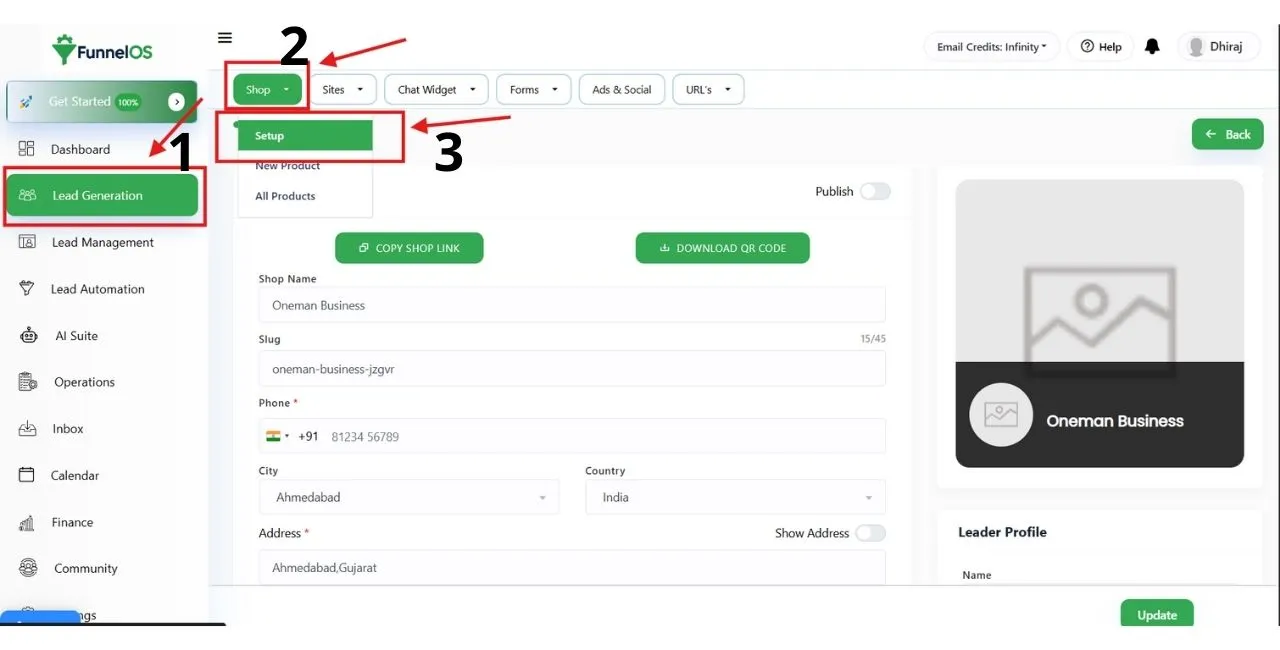
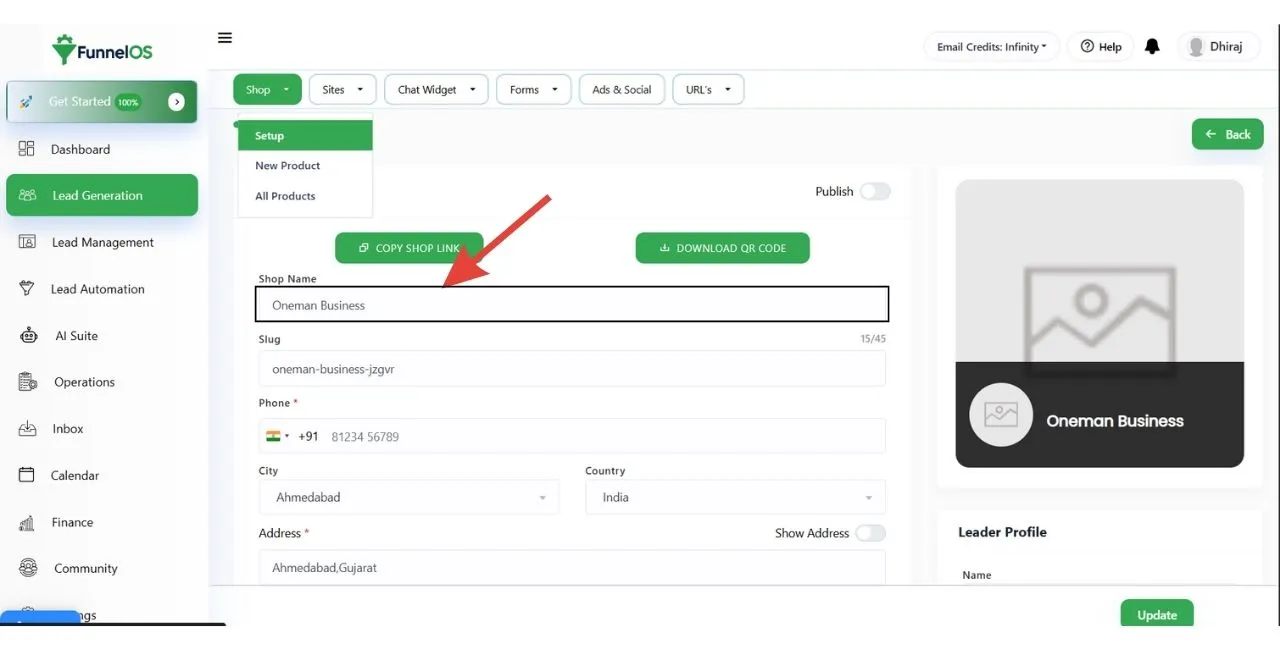
Step 2: Enter Your Shop Name
Enter your official business or shop name. This name will be displayed on your shop page header.
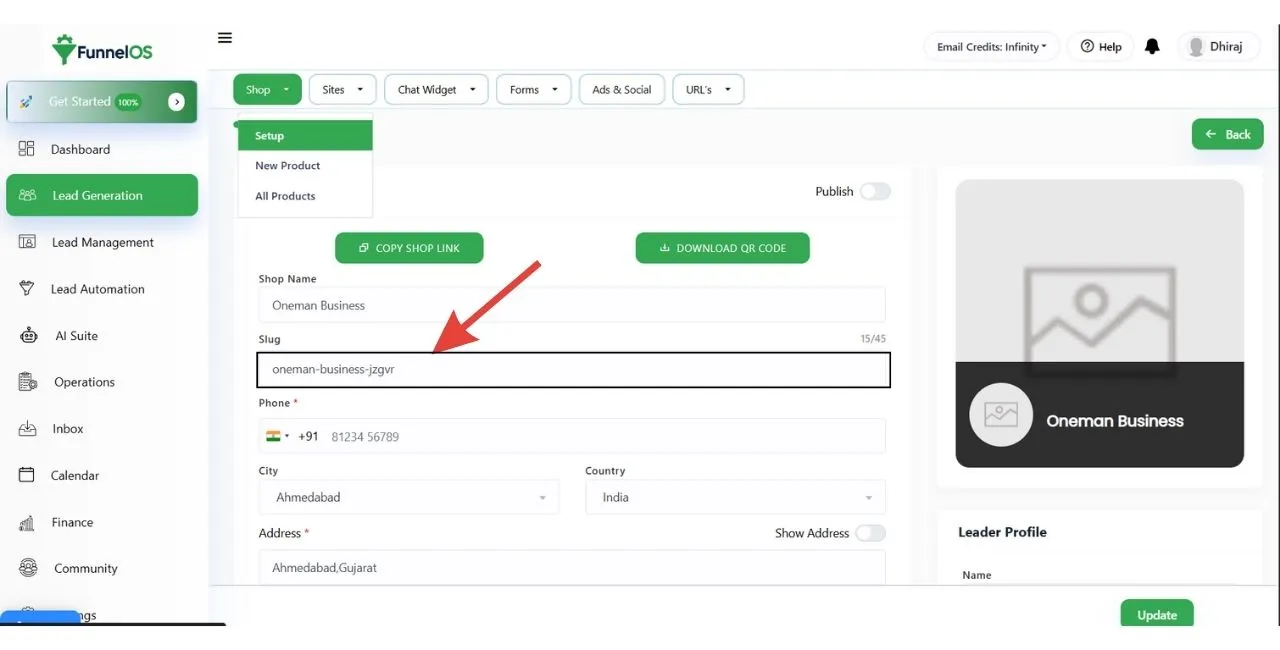
Step 3: Enter Your Shop Slug
The shop slug is used in your shop page URL. It should be short, lowercase, and SEO-friendly.
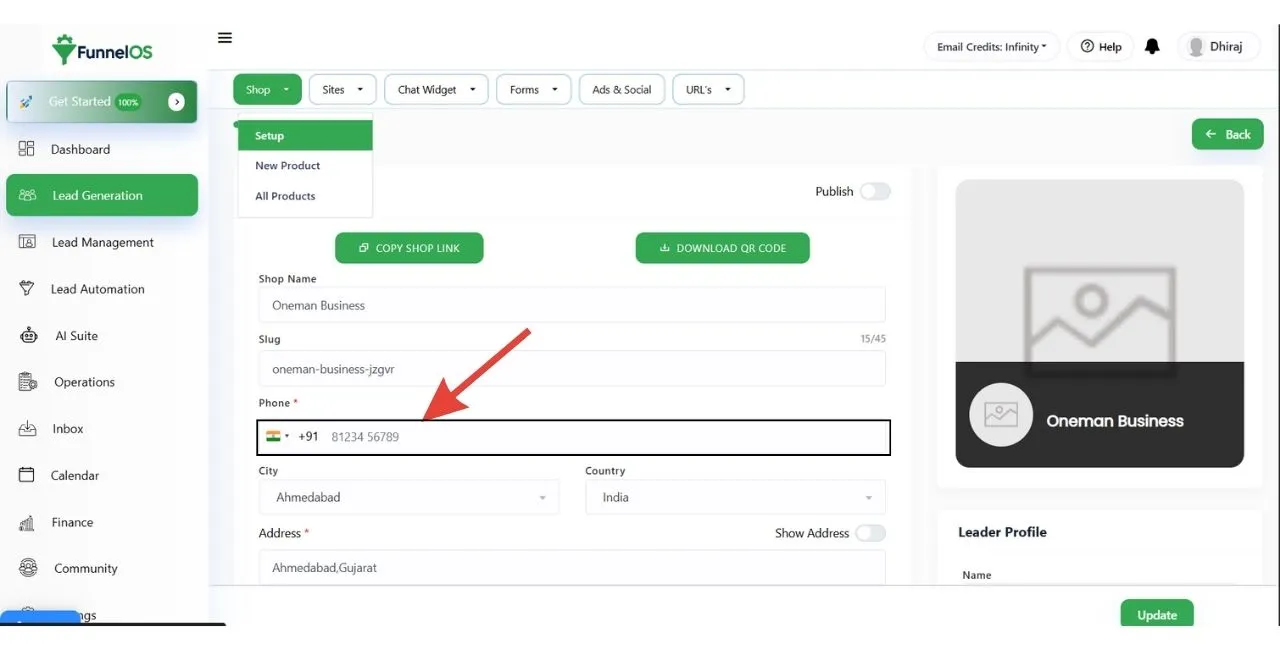
Step 4: Enter Your Phone Number
Add your active business phone number. Leads will use this number to contact you.
Step 5: Choose City and Country
Select: Your City Your Country This improves local trust and visibility.
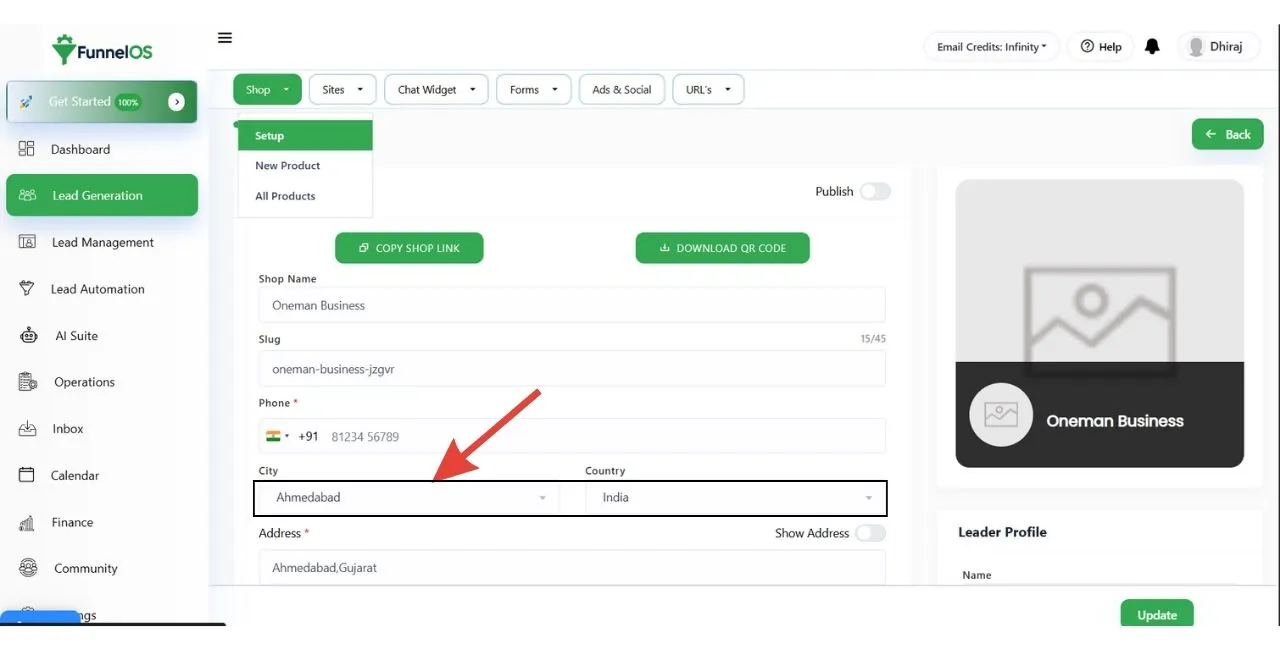
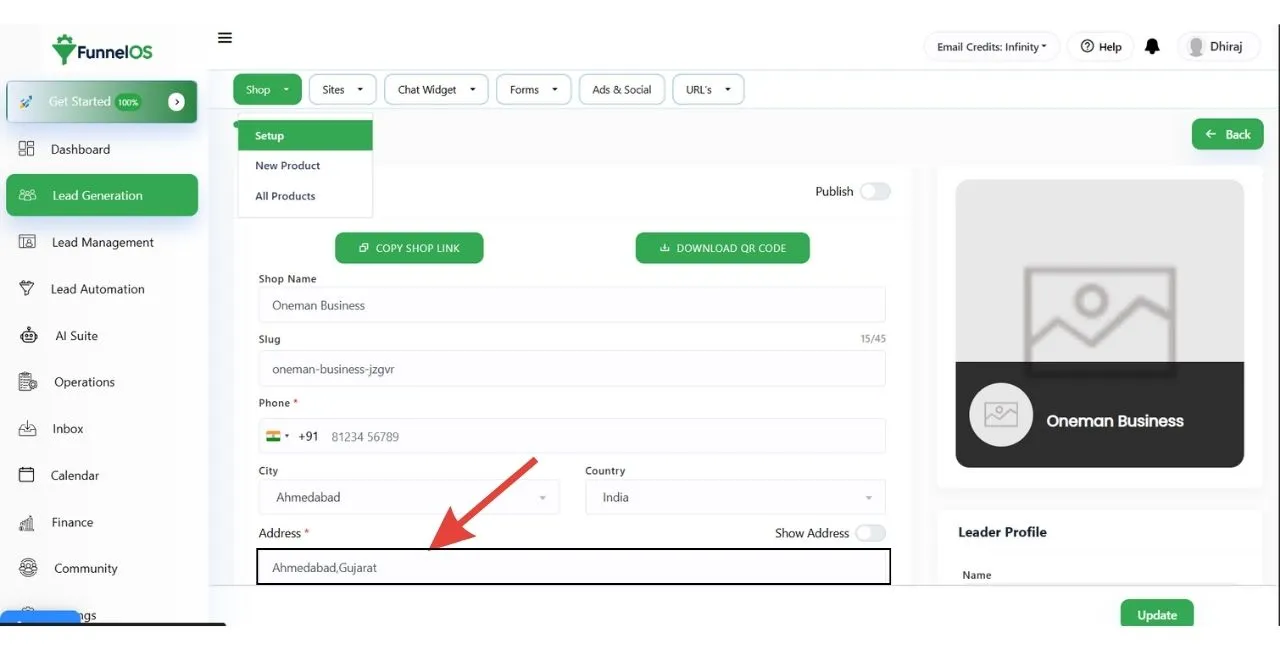
Step 6: Add Your Shop Address
Enter your complete business address. This address will be visible on your shop page.
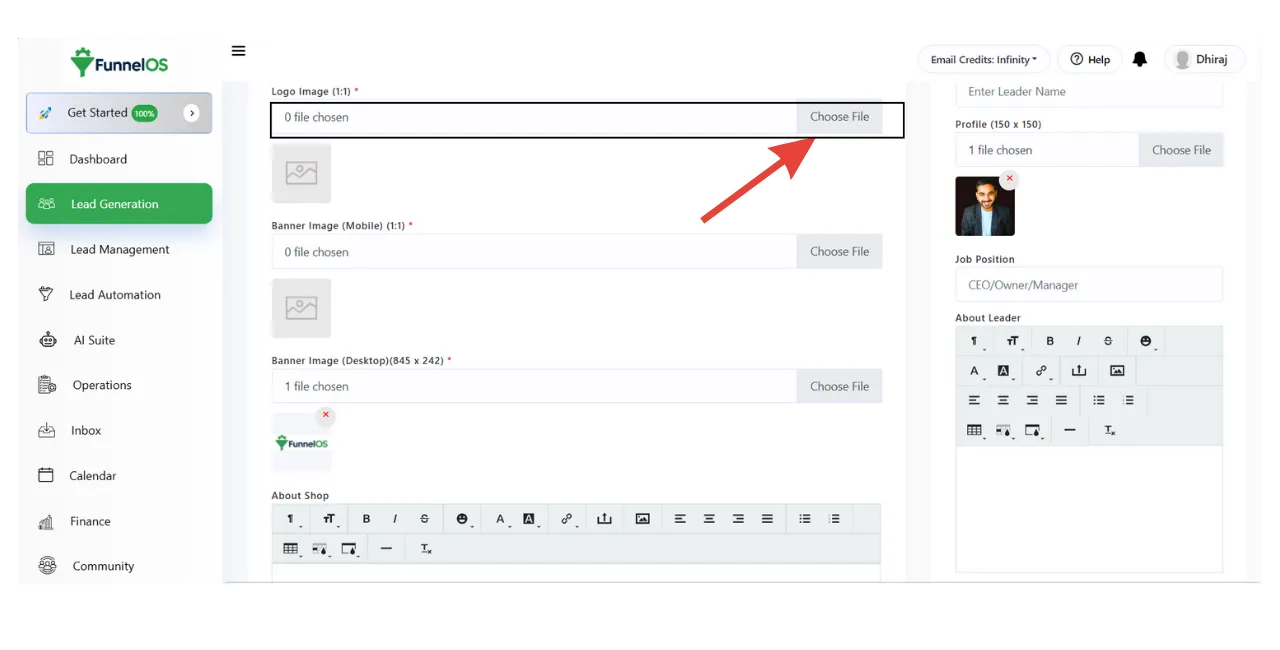
Step 7: Upload Your Shop Logo
Upload your brand logo. The logo appears at the top of your shop page.
Recommended: Clear logo Square or transparent background
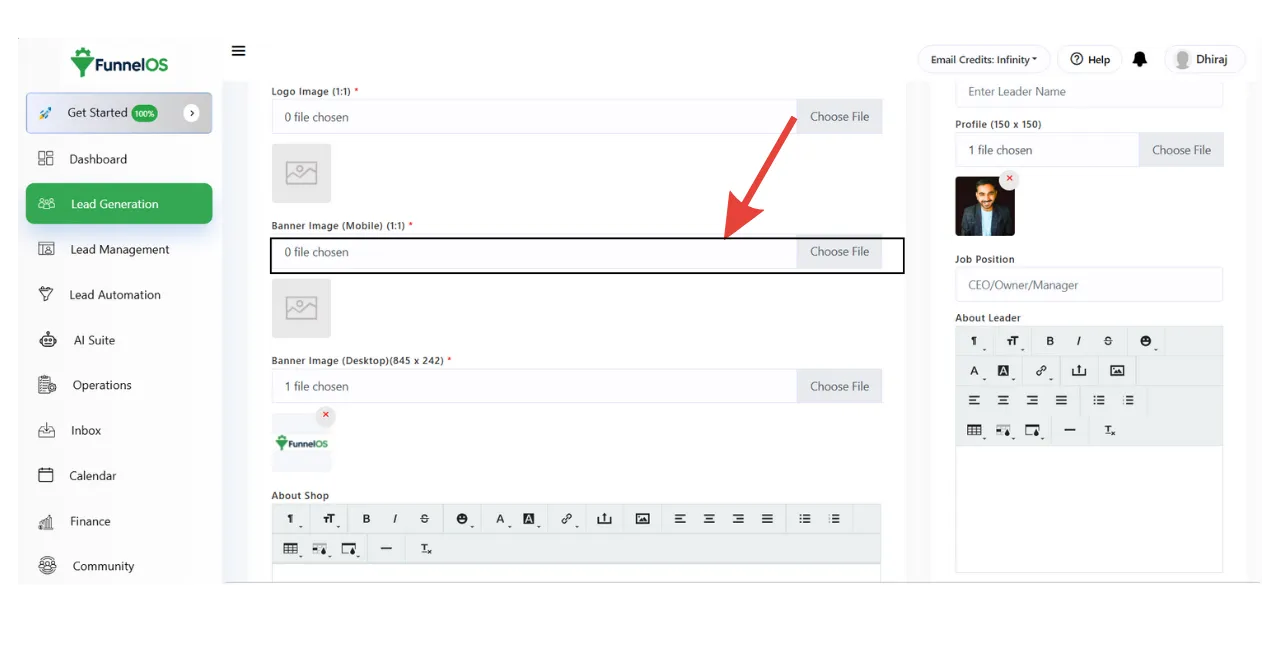
Step 8: Upload Banner Image for Mobile
Upload a banner image optimized for mobile devices.
Required Size: 1:1 (Square)
Step 9: Upload Banner Image for Desktop
Upload a banner image for desktop users.
Required Size: 845 × 242 pixels
This banner is the main visual section of your shop page.
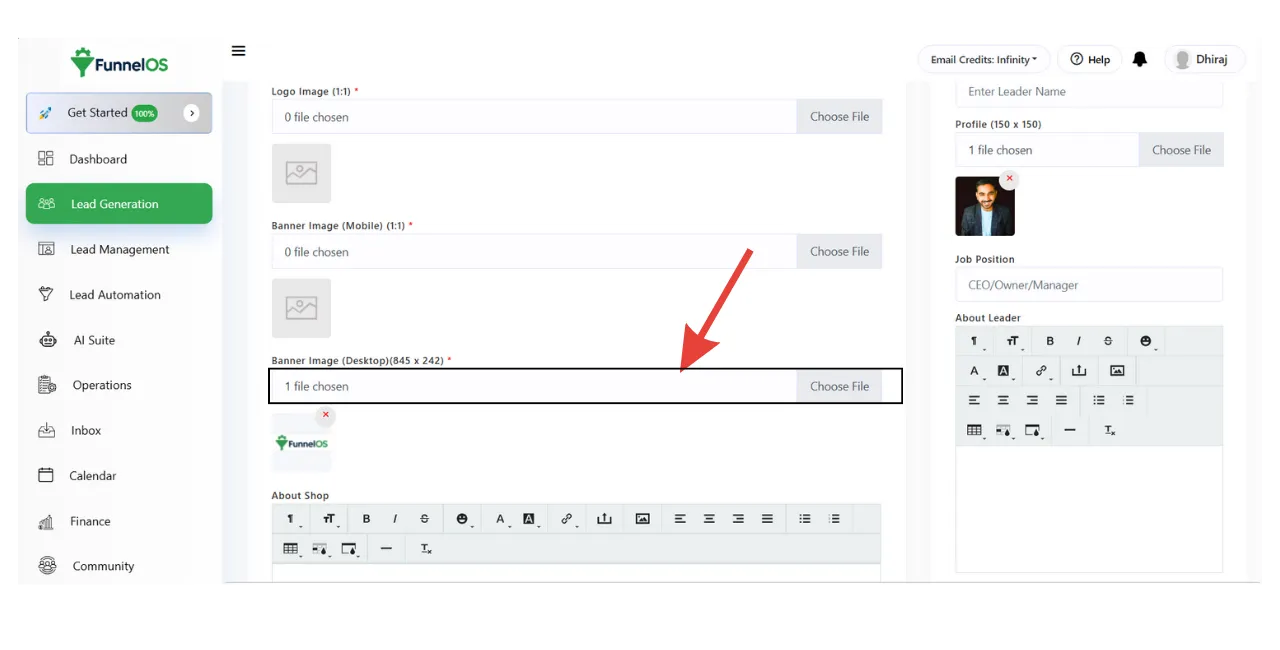
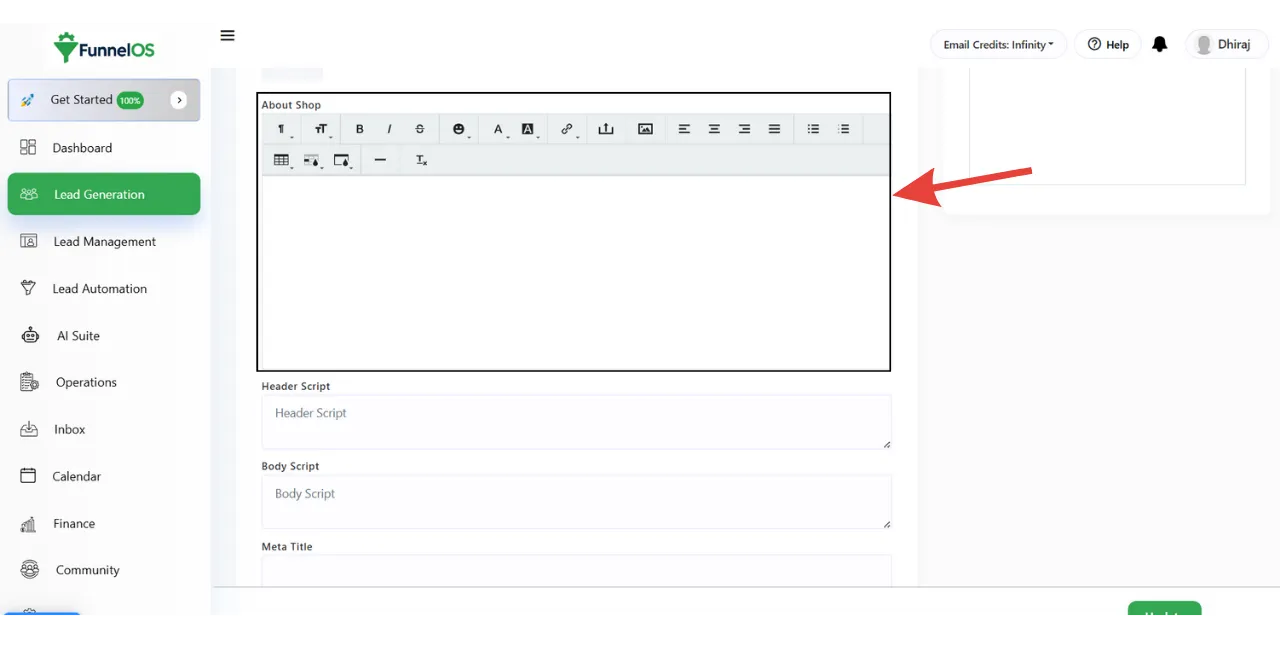
Step 10: Add About Shop Details
Write a short description about your business.
Include: What you do Your services Your value proposition
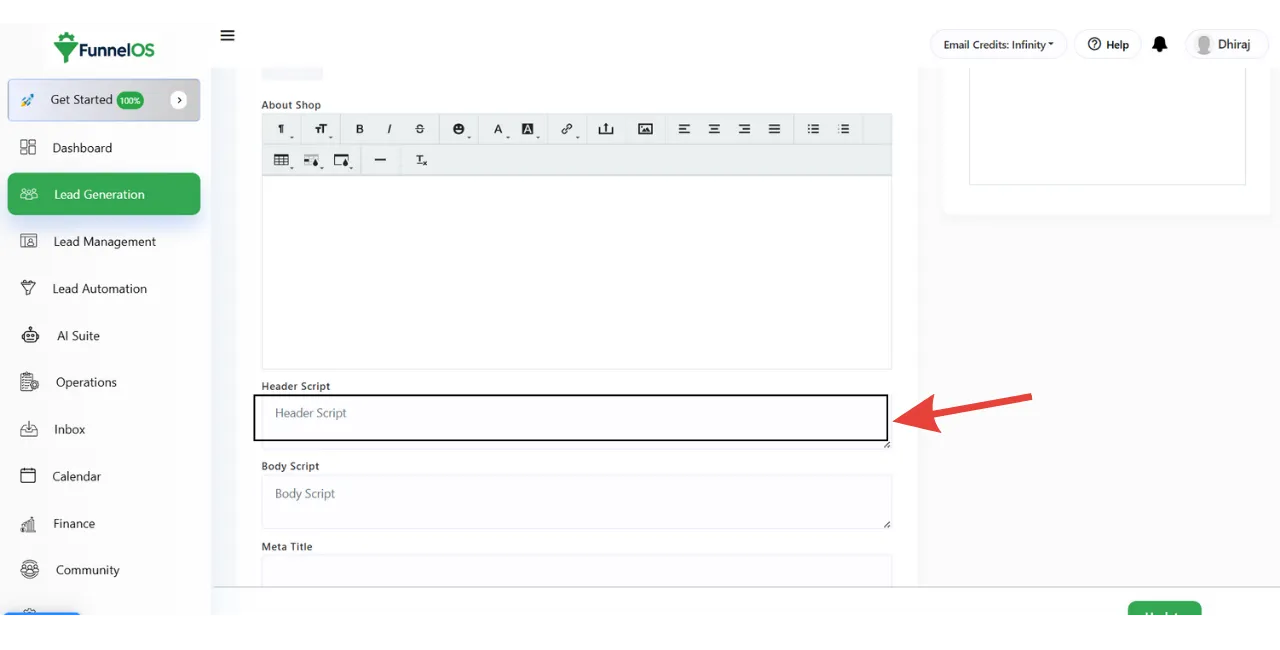
Step 11: Add Header Script (Optional)
Write a short description about your business.
You can add tracking or analytics scripts such as: Facebook Pixel Google Analytics This script will load inside the <head> section.
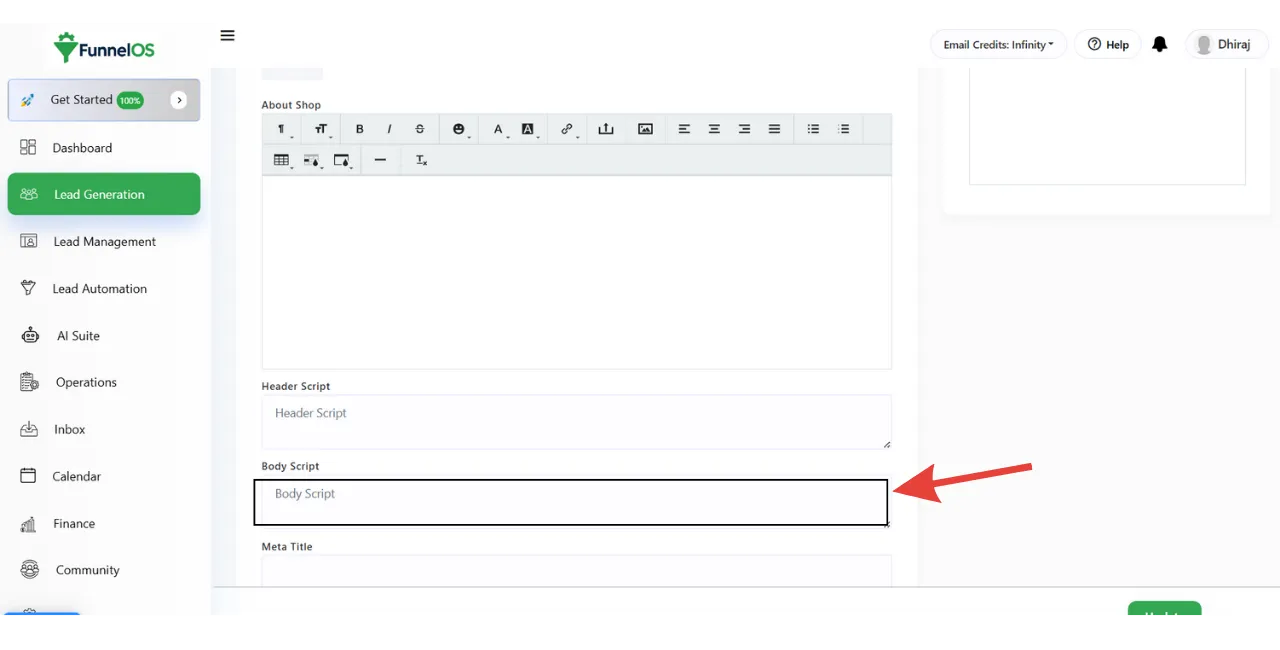
Step 12: Add Body Script (Optional)
Add custom scripts such as: Chat widgets Custom tracking tools This script loads inside the <body> section.
Step 13: Enter Meta Title
Add an SEO-friendly meta title for your shop page.
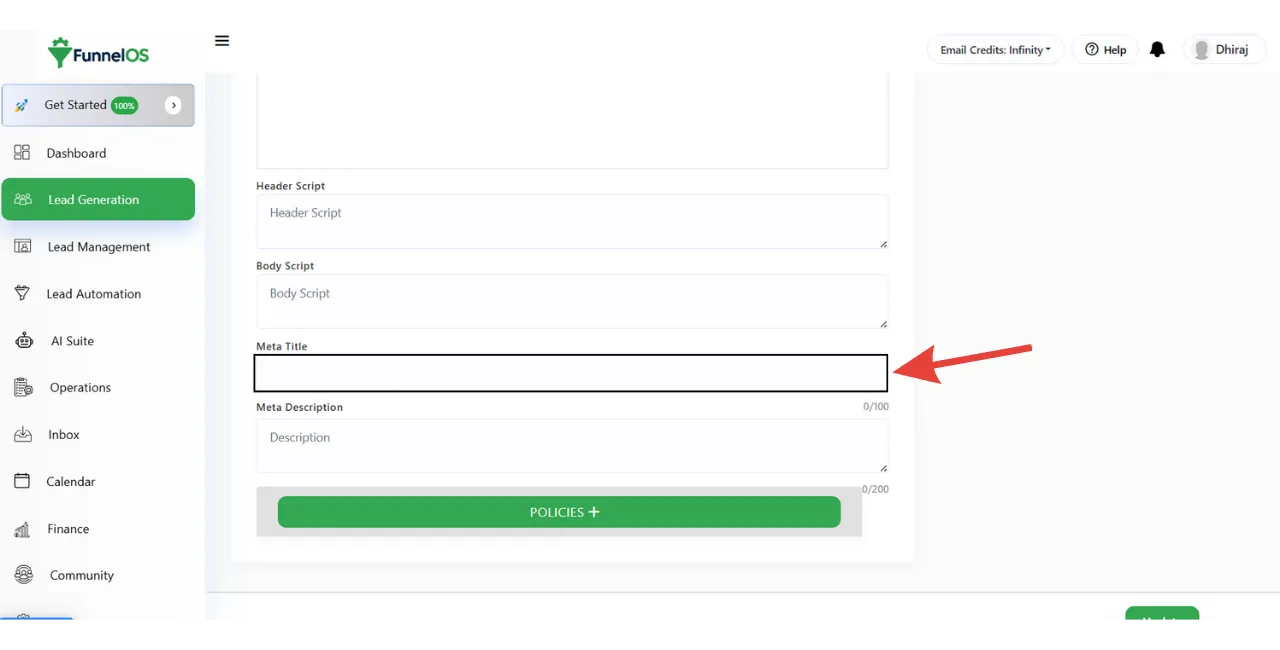
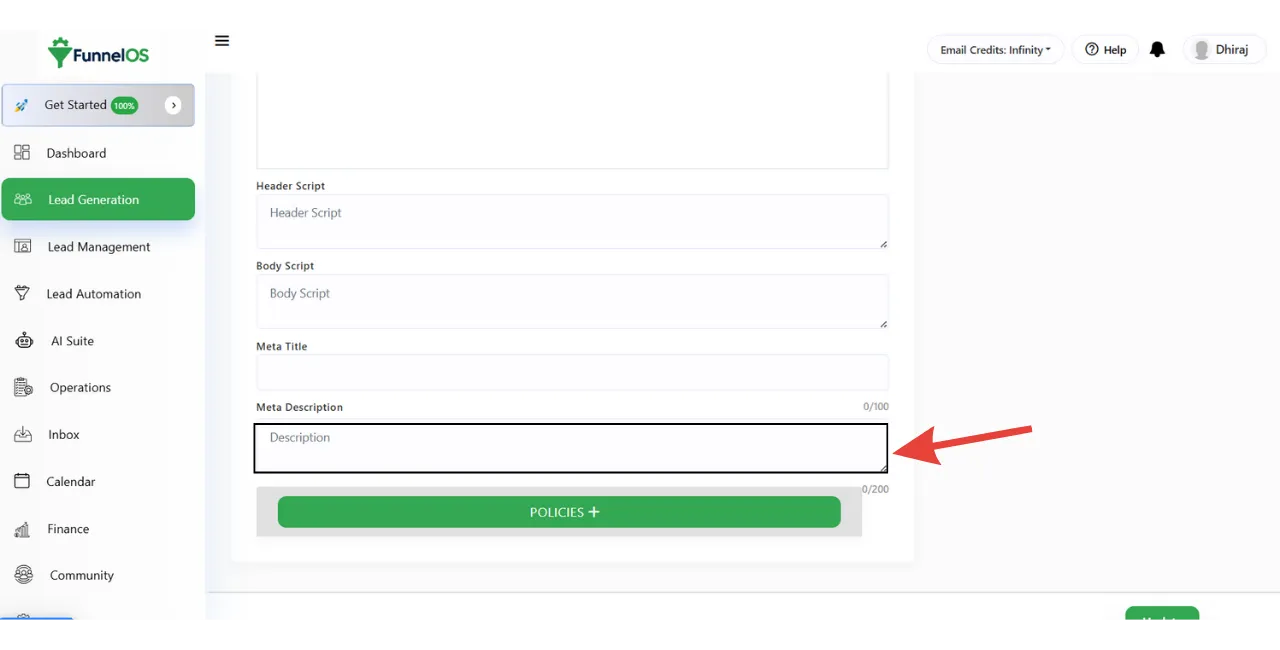
Step 14: Enter Meta Description
Write a short SEO description (150–160 characters) for search engines.
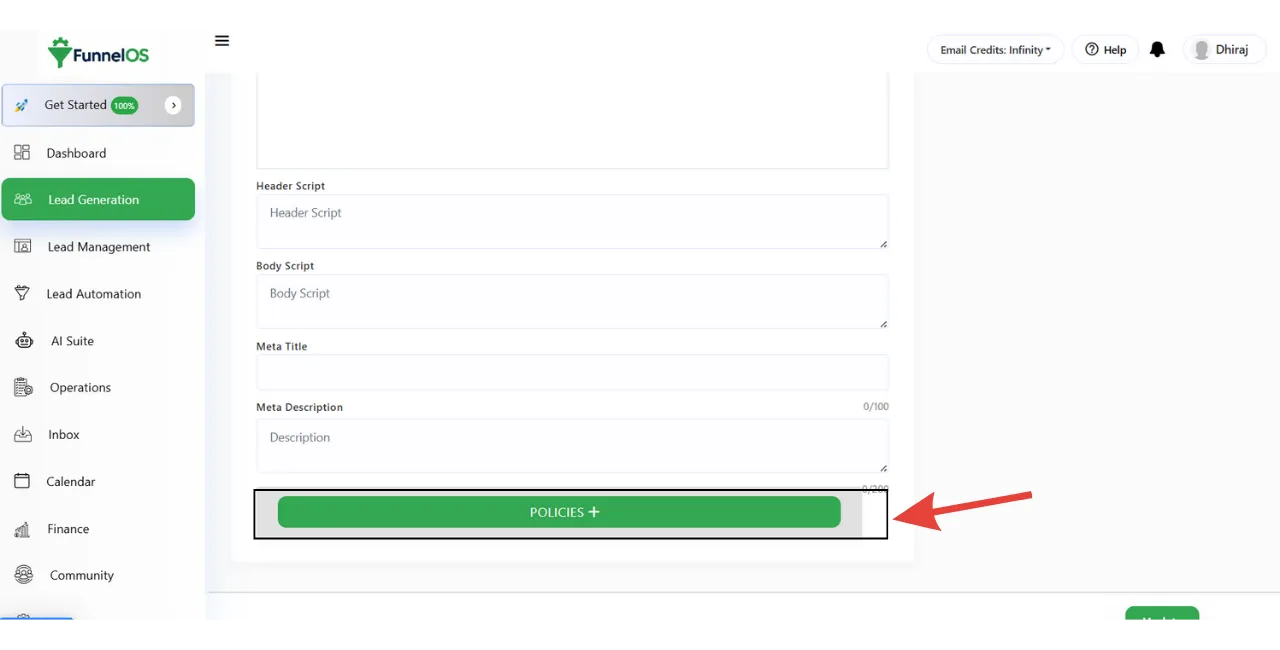
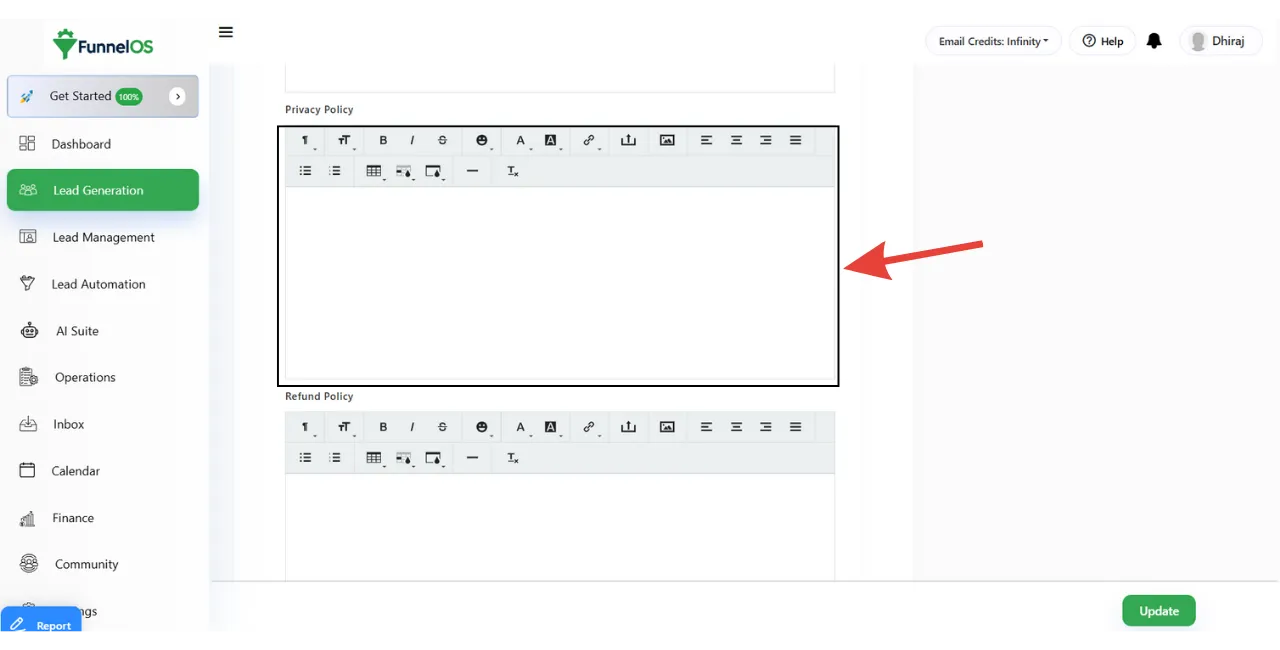
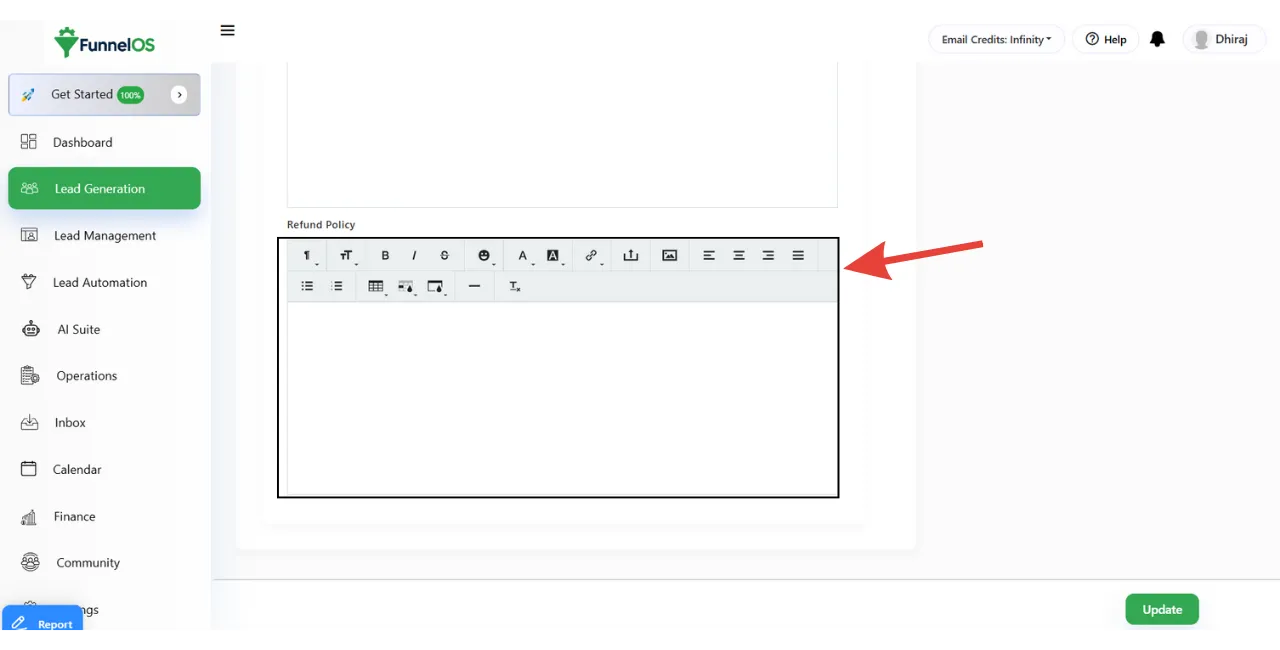
Step 15: Add Policy Pages
Click on the Policy button if you want to add policy pages.
You can add: Terms and Conditions Privacy Policy Refund Policy
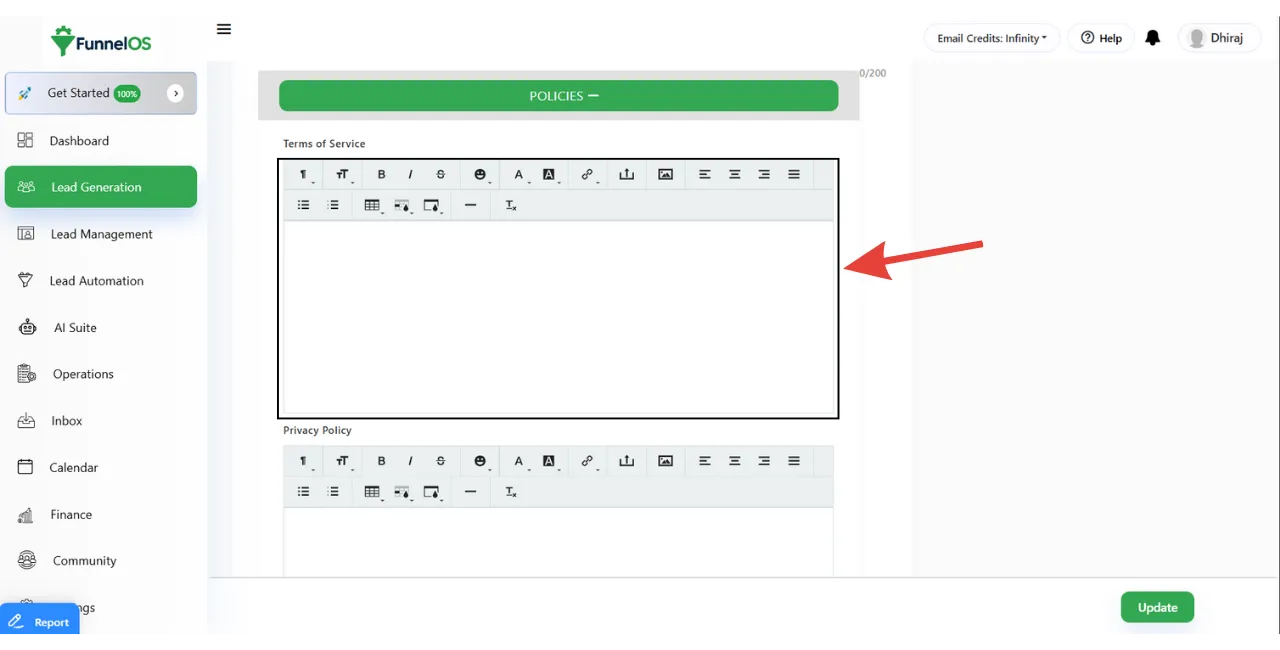
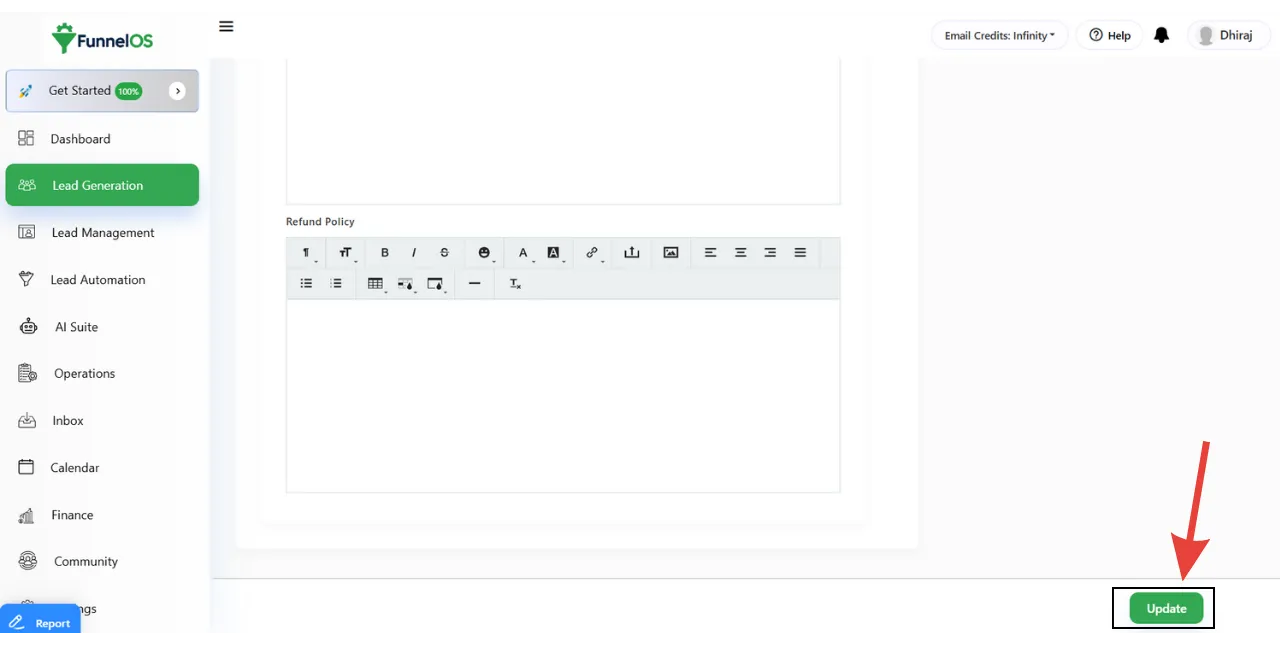
Final Step: Save Your Shop Settings
After filling in all the details: Click Update Your shop page will be published successfully
How to Add a Product or Service in Shop?
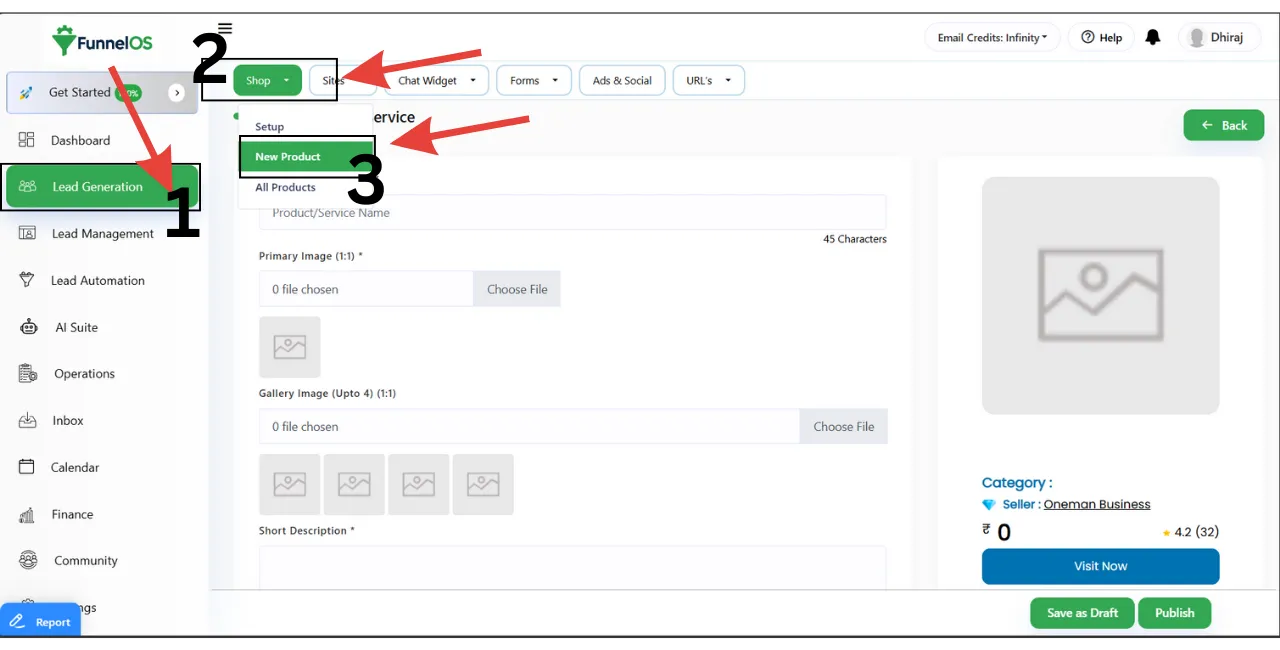
Step 1: Open Add Product Page
From your dashboard, navigate to:
Lead Generation → Shop → Add Product
This will open the product creation form.
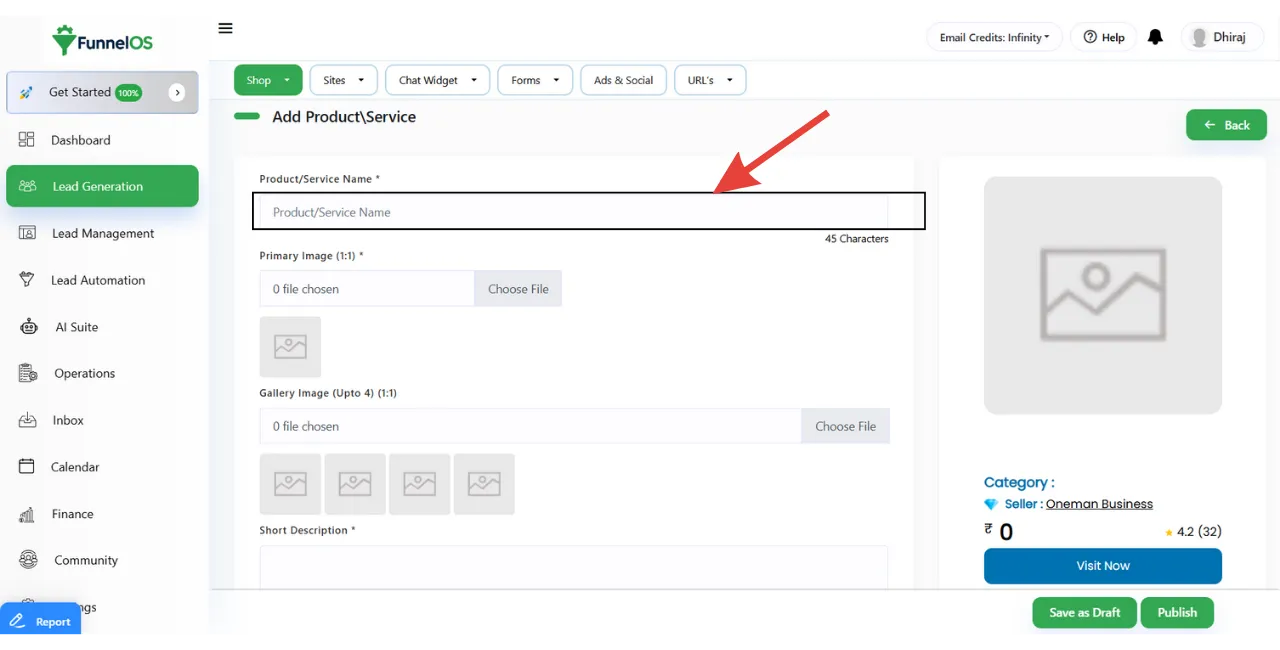
Step 2: Enter Product / Service Name
Enter the name of your product or service. This name will be visible on your shop page and product listing.
Step 3: Enter Your Shop Slug
The shop slug is used in your shop page URL. It should be short, lowercase, and SEO-friendly.
Step 4: Enter Your Phone Number
Add your active business phone number. Leads will use this number to contact you.
Step 5: Choose City and Country
Select: Your City Your Country This improves local trust and visibility.
Step 6: Add Your Shop Address
Enter your complete business address. This address will be visible on your shop page.
Step 7: Upload Your Shop Logo
Upload your brand logo. The logo appears at the top of your shop page.
Recommended: Clear logo Square or transparent background
Step 8: Upload Banner Image for Mobile
Upload a banner image optimized for mobile devices.
Required Size: 1:1 (Square)
Step 9: Upload Banner Image for Desktop
Upload a banner image for desktop users.
Required Size: 845 × 242 pixels
This banner is the main visual section of your shop page.
Step 10: Add About Shop Details
Write a short description about your business.
Include: What you do Your services Your value proposition
Step 11: Add Header Script (Optional)
Write a short description about your business.
You can add tracking or analytics scripts such as: Facebook Pixel Google Analytics This script will load inside the <head> section.
Step 12: Add Body Script (Optional)
Add custom scripts such as: Chat widgets Custom tracking tools This script loads inside the <body> section.
Step 13: Enter Meta Title
Add an SEO-friendly meta title for your shop page.
Step 14: Enter Meta Description
Write a short SEO description (150–160 characters) for search engines.
Step 15: Add Policy Pages
Click on the Policy button if you want to add policy pages.
You can add: Terms and Conditions Privacy Policy Refund Policy
Final Step: Save Your Shop Settings
After filling in all the details: Click Update Your shop page will be published successfully
What is FunnelOS?
FunnelOS is an AI-based all-in-one business automation platform.
Core line: “Automate Your Entire Business using FunnelOS.”
FunnelOS is not just a tool. FunnelOS is a complete proven system that helps you run your full business flow in one place:
● Lead capture
● Follow-up and nurturing
● Sales and conversion
● Payments and invoices
● Delivery (courses/community)
● Booking and reminders
● Automation and analytics
Who is FunnelOS made for?
FunnelOS is made for:
● Coaches
● Consultants
● Trainers
● Course creators
● Digital product sellers
● Agencies
● Small business owners
● Anyone who wants to build an online business system and automate it
Core promise
● Reduce tool overload
● Stop missing follow-ups
● Build a predictable lead-to-conversion system
● Use AI to create funnels and answer questions automatically
● One platform to manage the complete business workflow
What problem does FunnelOS solve?
FunnelOS solves the problem of using multiple disconnected tools by combining CRM, marketing automation, lead management, and payment systems into one unified platform, reducing cost, complexity, and manual work.
Is FunnelOS an all-in-one automation software?
Yes, FunnelOS is an all-in-one automation software that includes CRM, lead tracking, WhatsApp automation, email marketing, appointment booking, invoicing, and payment gateway integrations.
How is FunnelOS different from other CRM tools?
Unlike traditional CRMs, FunnelOS combines CRM with marketing automation, WhatsApp messaging, payment collection, subscriptions, and sales funnels, eliminating the need for multiple third-party tools.
Does FunnelOS support WhatsApp automation?
Yes, FunnelOS supports WhatsApp automation, allowing businesses to send automated messages, follow-ups, reminders, and campaign broadcasts directly from the CRM.
Can FunnelOS manage leads and sales pipelines?
Yes, FunnelOS provides advanced lead management and visual sales pipelines, helping businesses track leads from first contact to final conversion.
Is FunnelOS suitable for small businesses and startups?
Yes, FunnelOS is designed for small businesses, startups, agencies, and coaches who want an affordable and scalable all-in-one sales and automation solution.
Does FunnelOS support payment gateways?
Yes, FunnelOS supports multiple payment gateways, allowing businesses to collect payments, manage invoices, subscriptions, and installments directly inside the platform.
Can FunnelOS replace tools like CRM, email marketing, and automation software?
Yes, FunnelOS can replace separate CRM tools, email marketing platforms, WhatsApp tools, appointment schedulers, and automation software by offering everything in one system.
Is FunnelOS cloud-based?
Yes, FunnelOS is a cloud-based platform that can be accessed from anywhere without installing any software.
Who should use FunnelOS?
FunnelOS is ideal for business owners, digital marketers, agencies, coaches, consultants, and sales teams who want to automate lead generation, follow-ups, and sales processes.
Does FunnelOS provide reports and analytics?
Yes, FunnelOS offers real-time reports and analytics for leads, sales performance, campaigns, revenue, and team productivity.
Is FunnelOS easy to use for non-technical users?
Yes, FunnelOS is designed with a user-friendly interface so even non-technical users can easily manage automation, CRM, and campaigns.
Form & Domain Feature
What is the Lead Generation Form in Funnel OS?
FunnelOS is an AI-based all-in-one business automation platform.
Core line: “Automate Your Entire Business using FunnelOS.”
FunnelOS is not just a tool. FunnelOS is a complete proven system that helps you run your full business flow in one place:
● Lead capture
● Follow-up and nurturing
● Sales and conversion
● Payments and invoices
● Delivery (courses/community)
● Booking and reminders
● Automation and analytics
What can I use these FunnelOS forms for?
FunnelOS is made for:
● Coaches
● Consultants
● Trainers
● Course creators
● Digital product sellers
● Agencies
● Small business owners
● Anyone who wants to build an online business system and automate it
Core promise
● Reduce tool overload
● Stop missing follow-ups
● Build a predictable lead-to-conversion system
● Use AI to create funnels and answer questions automatically
● One platform to manage the complete business workflow
Is FunnelOS Form included in all plans?
The FunnelOS Form feature is included in all FunnelOS plans. This means you can create and use lead generation forms to capture enquiries, collect customer details, and manage leads regardless of the plan you choose.
All plans allow you to connect forms directly with the FunnelOS CRM, sales pipelines, and automation workflows. This ensures that every lead submitted through a form is automatically stored, tracked, and followed up without any manual effort.
However, the number of advanced automations, integrations, or usage limits may vary depending on your selected plan.
Do I need technical knowledge to create a FunnelOS form?
No, you do not need any technical knowledge to create a FunnelOS form. FunnelOS is designed for non-technical users, so you can create forms using a simple, user-friendly interface without writing any code.
You can easily add fields, customize labels, choose where the leads should go in the CRM, and connect the form to automations or sales pipelines using just a few clicks. Everything is visual and straightforward.
In short, if you can use basic online tools, you can create and publish FunnelOS forms without any technical or developer skills.
How long does it take to create a form?
Creating a form in FunnelOS usually takes 1 to 2 minutes. You can quickly add the required fields, customize the form, and connect it to the CRM and automation workflows using a simple, no-code interface.
For basic lead or enquiry forms, it can be done in just a couple of minutes. More advanced forms with custom fields, automation triggers, or pipeline rules may take a little longer—but still far less time than traditional form tools.
Overall, FunnelOS is built to help you create and launch forms fast, without technical delays.
Can I create multiple lead forms in FunnelOS?
you can create multiple lead forms in FunnelOS. There is no restriction on creating different forms for different purposes, such as website enquiries, ad campaigns, appointment bookings, or specific products and services.
Each form can be customized with its own fields, settings, and automation rules. You can also connect different forms to different pipelines, tags, or follow-up workflows, so leads are organized properly based on where they come from.
In short, FunnelOS lets you create and manage multiple lead forms easily, all from one dashboard.
What fields can I add (name, email, phone, etc.) in FunnelOS?
FunnelOS allows you to add all common and essential fields needed to collect lead and customer information. You can choose from standard fields as well as create custom fields based on your business needs.
You can add fields such as:
Name
Email
address
Phone number
Company name
Message or enquiry details
Dropdown fields (for services, budget, or options)
Checkboxes and radio buttons
Date and time fields (for appointments)
Address or location details
Custom fields for any specific information you want to collect
All form fields are directly connected to the FunnelOS CRM, so the data is automatically saved, organized, and can be used for automation, follow-ups, and sales pipelines.
In short, FunnelOS forms are flexible and can be customized to match exactly what information you want to collect from your leads.
Is FunnelOS suitable for small businesses and startups?
FunnelOS is very suitable for small businesses and startups. It is designed to be easy to use, affordable, and scalable, so businesses can start small and grow without changing tools.
FunnelOS helps small teams manage leads, automate follow-ups, track sales, and collect payments from a single platform. This saves time, reduces software costs, and removes the complexity of using multiple tools.
Whether you are just starting out or already growing, FunnelOS gives you the structure and automation you need to run your sales and marketing efficiently—without needing technical expertise or a large team.
Can I add custom fields in FunnelOS?
You can add custom fields in FunnelOS. Custom fields allow you to collect and store information that is specific to your business needs, beyond standard details like name, email, or phone number etc.
You can create custom fields for things like budget, service type, lead source, preferred contact time, or any other detail you want to track. These custom fields can be used in forms, CRM records, sales pipelines, and automation workflows.
In short, FunnelOS gives you the flexibility to capture exactly the information you need and use it effectively across your sales and marketing process.
Can I make fields mandatory or optional in FunnelOS forms?
FunnelOS allows you to make form fields either mandatory or optional. You can easily choose which information is required from the user and which fields can be skipped.
This gives you full control over your forms. For example, you can make name and phone number mandatory for lead follow-ups, while keeping other fields optional to reduce friction and improve form submissions.
In short, FunnelOS lets you design flexible forms that collect only the information you truly need—without overcomplicating the user experience.
Can I change the form design and colors in FunnelOS?
You cannot change the overall form design or layout in FunnelOS, but you can change the form colors to match your brand. This allows you to update elements like button color and highlights so the form fits visually with your website or landing page.
The fixed design ensures forms remain clean, responsive, and easy to use across all devices, while color customization helps maintain brand consistency.
In short, FunnelOS keeps the form design simple and standard, but gives you flexibility to customize colors.
Can I create different forms for different campaigns in FunnelOS?
you can create different forms for different campaigns in FunnelOS. This allows you to design separate forms for ads, landing pages, email campaigns, or specific products and services.
Each form can be linked to its own tags, pipelines, and automation workflows, so you can easily track where leads are coming from and follow up with the right message. This makes campaign performance tracking and lead management much more organized.
In short, FunnelOS lets you create campaign-specific forms so every lead is captured, tracked, and handled correctly.
Where can I use FunnelOS forms (website, landing page, ads)?
You can use FunnelOS forms anywhere you collect leads or enquiries. FunnelOS forms are designed to be flexible and easy to embed across multiple platforms and campaigns.
You can use FunnelOS forms on:
Websites (contact pages, service pages, blog pages)
Landing pages for lead generation or sales
Ad campaigns (by linking forms from Facebook, Google, or other ads)
Sales pages and offer pages
Event, webinar, or course registration pages
No matter where the form is placed, all submitted leads are automatically saved in FunnelOS and can trigger follow-ups, automation, and pipeline actions.
In short, FunnelOS forms work wherever your audience is—helping you capture and manage leads from every channel.
Can I embed the FunnelOS form on my own website?
You can easily embed FunnelOS forms on your own website. FunnelOS provides an embed option that allows you to place the form on any website using a simple embed code.
You can add the form to pages built with WordPress, HTML websites, landing page builders, or any other platform that supports custom code. Once embedded, the form works seamlessly, and all submissions are automatically saved in FunnelOS without any manual work.
In short, FunnelOS forms can be embedded on your website quickly and work smoothly across different platforms.
Can I use the same FunnelOS form on multiple pages?
You can use the same FunnelOS form on multiple pages. Once a form is created, you can embed it on as many websites, landing pages, or campaign pages as you want.
All submissions from different pages will be collected in the same FunnelOS CRM, where you can track, manage, and follow up with leads easily. If needed, you can still identify leads by campaign or source using tags, custom fields, or automation rules.
In short, FunnelOS lets you reuse one form across multiple pages without any limitation.
Does the FunnelOS form work on mobile devices?
FunnelOS forms work perfectly on mobile devices. They are fully responsive and automatically adjust to fit different screen sizes, including smartphones and tablets.
This ensures a smooth and user-friendly experience for visitors, no matter what device they use to fill out the form. All features and form functionality remain the same on mobile, so leads can submit their details easily without any issues.
In short, FunnelOS forms are mobile-friendly and designed to perform well across all devices.
Can I share the FunnelOS form link directly?
You can share the FunnelOS form link directly. FunnelOS provides a unique form link that you can send through WhatsApp, email, SMS, social media, or use in ads and campaigns.
When someone opens the link, they can fill out the form without visiting your website. All submissions are automatically saved in FunnelOS and can trigger follow-ups, automation, and sales pipeline actions.
In short, FunnelOS lets you share forms easily with a direct link—making lead collection fast and flexible.
Where do the leads go after a FunnelOS form is submitted?
After a form is submitted, the lead is automatically saved inside the FunnelOS CRM. The lead record includes all the information submitted through the form, such as name, phone number, email, and any custom fields.
From there, FunnelOS can instantly take action based on your settings. The lead can be:
Added to a specific sales pipeline and stage
Assigned to a team member or sales agent
Tagged or segmented for tracking
Triggered into automation workflows like WhatsApp messages, emails, or follow-up tasks
In short, every form submission goes directly into FunnelOS, where it is organized, tracked, and followed up automatically—so no lead is ever lost.
Are leads automatically saved in the CRM in FunnelOS?
All leads submitted through FunnelOS forms are automatically saved in the FunnelOS CRM. You do not need to manually enter or import any data.
Every form submission instantly creates a lead record in the CRM with all the captured details, including standard and custom fields. From there, the lead can be tracked, assigned, tagged, and used in automation workflows and sales pipelines.
In short, FunnelOS ensures that every lead is saved, organized, and ready for follow-up without any manual effort.
Can I tag leads coming from a FunnelOS form?
You can tag leads coming from a FunnelOS form. FunnelOS allows you to automatically apply tags to leads when they submit a specific form.
This helps you identify where the lead came from, such as a campaign, ad, landing page, or offer. These tags can then be used for segmentation, filtering, reporting, and automation workflows.
In short, tagging form leads in FunnelOS makes lead tracking and follow-ups more organized and effective.
Can I assign leads to a specific pipeline or stage in FunnelOS?
FunnelOS allows you to automatically assign leads to a specific sales pipeline and stage when they submit a form. This helps keep your leads organized from the very first interaction.
You can choose which pipeline and stage the lead should enter, based on the form or campaign. This ensures that every new lead starts at the right point in your sales process and can be followed up without confusion.
In short, FunnelOS makes it easy to route form leads directly into the correct pipeline and stage for better sales management.
Can I track which form a lead came from in FunnelOS?
You can easily track which form a lead came from in FunnelOS. Each form submission is recorded with its source, so you know exactly which form generated the lead.
You can use form names, tags, custom fields, or automation rules to identify and track the source of every lead. This helps you understand which forms, pages, or campaigns are performing best.
In short, FunnelOS gives you clear visibility into lead sources, so you can make better marketing and sales decisions.
Can I send automatic messages after form submission?
When someone submits a form, the best time to respond is immediately—while their interest is high. With FunnelOS, the form submission can automatically trigger a WhatsApp or email message, save the lead in the CRM, and even start follow-up actions.
This way, every enquiry gets an instant response without manual work.
Is there a limit on the number of forms?
Form creation isn’t restricted in FunnelOS. You can create unlimited forms for different purposes—websites, landing pages, ads, campaigns, or services—without worrying about hitting a cap.
With FunnelOS, each form can be connected to the CRM, automation, pipelines, and follow-ups, so managing multiple forms stays simple and organized.
Is there a limit on the number of leads collected?
Lead collection isn’t capped in FunnelOS. You can collect unlimited leads without worrying about hitting a limit as your business grows.
With FunnelOS, every lead is automatically saved in the CRM and can be followed up, tracked, and managed through pipelines and automation—no matter how many leads you receive.
Is lead data stored securely?
Lead data in FunnelOS is stored with a strong focus on security. Customer details are saved in a protected system where access is controlled and data is handled safely.
With FunnelOS, lead information stays centralized, protected, and accessible only to authorized users—so businesses can manage data confidently without worrying about safety.
Who can access the form submissions?
Form submissions are accessible only to the people you allow inside the system. Access depends on user roles and permissions, so not everyone sees everything by default.
With FunnelOS, business owners can control who can view, manage, or follow up on form leads—whether it’s admins, sales team members, or specific users. This keeps lead data organized and secure while the right people get access to do their work.
Can I export form leads?
Exporting form leads is supported in FunnelOS, so you’re not locked into the system. You can download your lead data whenever you need it—for reports, backups, or sharing with other teams.
With FunnelOS, all form submissions are stored centrally and can be exported easily, keeping your data accessible and under your control.
Can I delete form data if needed?
Form data can be deleted whenever required. Sometimes data needs to be removed for cleanup, privacy, or compliance reasons—and the system should allow that control.
With FunnelOS, you can delete form submissions directly from the CRM, ensuring your data stays clean and managed the way you want.
Can I see how many people submitted the form?
Form activity is easy to track when everything is recorded in one place. Each submission is counted automatically, so you always know how many people filled out a specific form.
With FunnelOS, form submissions are logged inside the CRM, making it simple to view total entries, review individual leads, and understand which forms are performing better.
Will this replace tools like Google Forms or Typeform?
For lead collection and follow-ups, this works as a strong replacement. Instead of just collecting responses like Google Forms or Typeform, the form is directly connected to what happens next.
With FunnelOS, form submissions don’t stop at data collection. Leads are saved in the CRM, automatic WhatsApp or email messages are sent, follow-ups are scheduled, and the sales pipeline is updated.
So rather than using one tool for forms and others for action, everything happens in one place.
Is this better than using a simple contact form?
A simple contact form only collects information and then stops there. Someone still has to check the inbox, copy details, and remember to follow up.
With FunnelOS, the form becomes part of the whole process. Submissions are saved in the CRM, follow-up messages are sent automatically, leads are assigned to the team, and progress is tracked in the sales pipeline.
So instead of just collecting enquiries, the form actually helps move leads toward conversion.
Will I get help setting up my first form?
Getting started is supported from day one. Guidance is available so you’re not figuring things out alone, especially during your first setup.
With FunnelOS, support members can assist you through call, WhatsApp, or Zoom, helping you create and connect your first form correctly—so you can start collecting leads smoothly without confusion.
Is training or documentation available?
Learning support is available so you don’t have to guess or struggle while using the system. Clear documentation and training resources help you understand how things work step by step.
With FunnelOS, users get access to guides, tutorials, and training support that explain features like forms, CRM, automation, and pipelines—making it easier to use the platform confidently from the start.
Do I need a domain to use Funnel OS?
A domain is only required if you plan to host your own website or landing pages. In that case, adding a domain helps you publish and manage those pages properly.
With FunnelOS, you can still use forms and share them via direct links on WhatsApp, email, or ads without a domain. The domain becomes necessary only when you want branded pages hosted under your own URL.
Can I use my existing domain with FunnelOS?
Your existing domain can be connected and used without any issue. This allows you to host your website or landing pages under your own brand while still using all the built-in features.
With FunnelOS, you can link your current domain and run forms, landing pages, and automation seamlessly—so everything looks professional and stays under your control.
Do I need to buy a domain separately?
Domain purchase is handled separately. If you want to use a custom domain for your website or landing pages, you’ll need to buy it from a domain provider first.
With FunnelOS, once you have the domain, it can be easily connected and used for hosting pages, forms, and automation—while everything else runs inside the system.
Is it safe to connect my main business domain to FunnelOS?
Connecting your main business domain is safe and commonly done when you want everything under one brand. FunnelOS is built to work with custom domains without affecting your existing website setup.
If you prefer extra separation, using a subdomain (like go.yourdomain.com or leads.yourdomain.com) is also a good option. This keeps your main website and marketing pages independent while still running smoothly inside FunnelOS.
Can I disconnect my domain anytime?
Domain connections are fully under your control. If you ever need to change setup or stop using a connected domain, it can be disconnected whenever required.
With FunnelOS, domain settings are flexible, so you’re never locked in and can adjust things as your business
Will my funnels show FunnelOS branding?
Funnels are shown without platform branding, so everything appears fully under your own business identity. Pages, forms, and funnels look clean and professional, matching your brand—not the tool behind them.
With FunnelOS, you maintain complete brand control while using all the automation features in the background.
Can I use my own brand name and URLs?
Everything can run under your own brand. Pages, funnels, and links can use your business name and custom URLs, so visitors never see a third-party tool.
With FunnelOS, you stay fully brand-focused on the front end while the system handles automation quietly in the background.
Can I run ads using my own domain?
Running ads with your own domain is completely supported. Using a custom domain helps build trust, improves brand visibility, and keeps your ads consistent with your business identity.
With FunnelOS, you can connect your domain and use it for landing pages and funnels linked to your ads—so traffic goes to your branded pages while all leads and follow-ups are handled automatically in the background.
Is custom domain support included in all plans?
Custom domain support is available across all plans, so you don’t have to upgrade just to use your own domain. You can connect your brand’s domain (or a subdomain) and run pages, funnels, and forms under your own URLs.
With FunnelOS, this keeps everything fully branded while the automation runs smoothly in the background.
Are there limits on how many domains I can connect?
Domain connection isn’t restricted by a fixed cap. You can connect unlimited domains and use them as needed for different websites, landing pages, funnels, or campaigns.
With FunnelOS, managing multiple domains stays simple, giving you full flexibility to scale and organize your marketing under different brand URLs without limitations.
Are there any extra charges for domain usage?
Using your own domain doesn’t come with additional platform fees. Once your domain is connected, it works the same way as any other—without hidden or extra charges.
With FunnelOS, you can use custom domains freely while running pages, funnels, and automation under your own brand.
Can I add domains later if needed?
Domain setup doesn’t have to be decided upfront. You can start using FunnelOS and add domains whenever your business needs change—whether that’s for new funnels, campaigns, or brands.
With FunnelOS, domains can be connected later without any hassle, giving you flexibility to grow and expand at your own pace.
Do I need technical knowledge for domain setup?
Domain setup is kept simple and beginner-friendly. You don’t need technical skills or server knowledge to connect a domain.
With FunnelOS, the setup process is guided, and support is available if needed. Most users can connect their domain by following basic steps, without dealing with complex technical configurations.
Will Funnel OS help with domain setup?
Domain setup support is available so you don’t have to handle it alone. If you’re unsure about the steps or feel stuck, guidance is provided to make the process smooth.
With FunnelOS, the support team can help you through call, WhatsApp, or Zoom, making sure your domain is connected correctly and working without issues.
How long does it take to connect a domain?
Domain connection is quick and doesn’t take much time. In most cases, the setup can be completed within 1–2 minutes, especially if the domain details are ready.
With FunnelOS, the process is simple and guided, so your domain gets connected and ready to use without delays.
Landing Page Drag-and-Drop Builder – Feature
Is this a no-code landing page builder?
The landing page builder is completely no-code and works on a drag-and-drop system. Pages can be created by simply placing sections, text, buttons, and forms—without writing any code.
With FunnelOS, landing pages are easy to build, edit, and publish, making it simple for non-technical users to launch pages quickly and focus on marketing instead of setup.
Can beginners use this builder easily?
The builder is designed with beginners in mind. Everything works visually, so pages are created by dragging and dropping elements instead of dealing with technical settings.
With FunnelOS, even first-time users can build landing pages quickly, make changes confidently, and publish without needing design or coding experience.
Is this a full website builder or only for landing pages?
The builder isn’t limited to just landing pages. It can be used to create both full websites and individual landing pages, depending on what your business needs.
With FunnelOS, you can build complete websites, sales funnels, and standalone landing pages using the same drag-and-drop, no-code system—keeping everything under one platform instead of using separate tools.
What elements can I add (text, image, button, form, video, etc.)?
The builder gives you all the common elements you’d expect—and more—so pages can be designed without limitations. You can add text, images, buttons, forms, videos, FAQs, countdown timers, and many other layout and content elements.
With FunnelOS, these elements can be placed using drag-and-drop, making it easy to design pages that look complete, professional, and conversion-focused—without touching code.
Can I rearrange sections using drag and drop?
Page layout changes are very easy to handle. Sections can be moved up or down using simple drag-and-drop, so you can rearrange the page structure anytime you want.
With FunnelOS, you don’t need to rebuild anything—just drag sections into place and instantly see the updated layout.
Are pre-built templates available?
Getting started doesn’t mean building from scratch. There are 100+ pre-built templates available, covering landing pages, websites, funnels, and different business use cases.
With FunnelOS, these templates can be customized easily—so you can launch faster, make edits as needed, and still keep everything aligned with your brand.
Can I create multiple landing pages?
Creating more than one landing page is fully supported. You can build multiple landing pages for different campaigns, offers, or audiences without any restriction.
With FunnelOS, each landing page can be customized separately, connected to forms, automation, and tracking—so managing multiple campaigns stays simple and organized.
Can I customize layout, spacing, and colors?
Design controls are flexible, so pages can be styled to match your brand. Layout structure, spacing between sections, and color choices can all be adjusted easily while building or editing a page.
With FunnelOS, these changes are done visually—allowing you to fine-tune the look and feel without touching any code.
Can I use my own branding and colors?
Branding stays completely in your control. You can use your own brand name, colors, fonts, and overall style so pages look exactly the way you want.
With FunnelOS, everything is customizable visually, allowing your landing pages and websites to reflect your brand identity—not the platform behind it.
Will Funnel OS branding appear on my pages?
Your pages stay completely focused on your brand. Visitors won’t see FunnelOS logos or labels on your websites, landing pages, or funnels. Everything looks clean and professional, just the way you design it.
Behind the scenes, FunnelOS powers the builder and automation—but on the front end, it’s all your branding, your colors, and your URLs.
Can I create pages that match my existing website?
Pages can be designed to blend perfectly with your existing website. You can match the same colors, fonts, spacing, and overall layout so everything feels consistent to visitors.
With FunnelOS, you’re not forced into a fixed style—the builder lets you recreate your current website’s look and extend it with new pages smoothly.
Are the pages mobile-responsive by default?
Pages automatically adapt to different screen sizes, so they look clean and usable on mobiles, tablets, and desktops without extra work.
With FunnelOS, responsiveness is built in, meaning your pages adjust themselves for mobile users while you focus on content and design—not technical fixes.
Can I add lead generation forms on landing pages?
Lead generation forms can be placed directly on landing pages, so visitors can submit their details without any extra steps. This makes it easier to capture enquiries right where the offer is shown.
With FunnelOS, these forms connect automatically to the CRM and automation, keeping lead collection and follow-ups simple and organized.
Can I add WhatsApp or call-to-action buttons?
Action buttons can be added wherever you need them on a page. WhatsApp buttons, call buttons, and other call-to-action elements can be placed to guide visitors toward the next step instantly.
With FunnelOS, these buttons can be connected to conversations, forms, or actions, making it easy for visitors to contact you or take action without friction.
Can I use landing pages for ads (Meta/Google)?
Landing pages can be used directly for ad campaigns on platforms like Meta and Google. They’re built to load fast, look clean, and focus on one clear action—making them ideal for paid traffic.
With FunnelOS, you can connect your own domain, send ad traffic to dedicated landing pages, and automatically capture leads, track performance, and trigger follow-ups—all without extra tools.
Can I connect landing pages to automation workflows?
Landing pages don’t work in isolation here. When someone submits a form or clicks an action on a landing page, it can automatically trigger the next steps without manual effort.
With FunnelOS, landing pages connect directly to automation workflows—so leads can be saved in the CRM, follow-up messages can be sent, tasks can be created, and sales stages can update automatically. This keeps everything moving on its own after the page does its job.
Is the landing page builder included in all plans?
The landing page builder is available across all plans, so you don’t need a special upgrade just to create pages. You can start building landing pages, websites, and funnels right away.
With FunnelOS, the builder works alongside forms, CRM, and automation—making it easy to launch pages and connect them to your workflows from day one.
Are there limits on the number of landing pages?
Landing page creation isn’t restricted. You can build unlimited landing pages for different campaigns, offers, or audiences without worrying about caps.
With FunnelOS, each page can be customized, connected to forms and automation, and managed easily—so scaling campaigns never hits a page limit.
Is there a page view or traffic limit?
Traffic isn’t restricted, so your pages can handle as many visitors as your campaigns bring in. Whether you’re running small tests or large ad campaigns, page views aren’t capped.
With FunnelOS, you can focus on growing traffic and leads without worrying about hitting view limits or throttling as your audience scales.
How is this different from tools like WordPress or ClickFunnels?
The biggest difference is what you have to manage yourself versus what’s already built in.
With WordPress, you usually need multiple plugins for forms, CRM, automation, security, speed, and updates—and you’re responsible for maintaining everything. It’s powerful, but it needs time, setup, and technical effort.
With ClickFunnels, the focus is mainly on building funnels and pages. For CRM, WhatsApp follow-ups, team management, or deeper automation, you often still need extra tools and integrations.
FunnelOS works differently. Pages, forms, CRM, automation, WhatsApp/email follow-ups, pipelines, tasks, and tracking are all part of one system. You’re not stitching tools together or maintaining plugins—the marketing and sales flow is already connected.
In simple terms:
WordPress = build + manage everything yourself
ClickFunnels = strong funnels, other tools still needed
FunnelOS = pages + automation + CRM + follow-ups in one place
That’s what makes the experience simpler and more controlled, especially for growing businesses.
Lead Management Feature
What is an opportunity in Funnel OS?
An opportunity in FunnelOS represents a real sales chance, not just a contact. It’s created when a lead shows genuine interest—like asking for pricing, booking a call, or moving closer to a purchase.
Opportunities live inside the sales pipeline, where you can see the deal value, current stage, owner (salesperson), and next action. This helps you focus on leads that actually matter and track progress from interest to closure, without guessing or spreadsheets.
How is an opportunity different from a lead or contact?
A lead or contact is simply someone whose details you have—like a name, phone number, or email. At this stage, you don’t yet know if they’re serious about buying.
An opportunity is different. It represents a real sales possibility—when a lead shows intent, such as asking for pricing, booking a demo, or entering a negotiation stage.
In FunnelOS, leads and contacts are stored in the CRM, and once interest is confirmed, they’re converted into opportunities inside the sales pipeline. This helps teams focus on deals that can actually close, instead of treating every contact the same.
Can opportunities be created automatically?
Opportunities can be created in more than one way, depending on how you want to work. They can be added manually when your team identifies a serious sales chance, or automatically when someone fills out a form.
In FunnelOS, automation can turn a form submission straight into an opportunity inside the sales pipeline—assigning the stage and owner without manual effort. This keeps the sales process moving smoothly from the first interaction.
Can opportunities be assigned to team members?
Opportunity handling becomes much easier when responsibility is clear. Each opportunity can be linked to a specific team member so there’s no confusion about who needs to follow up or close the deal.
In FunnelOS, opportunities can be assigned either manually by a manager or automatically through rules—like based on the form filled, pipeline stage, or workload distribution. This keeps the sales process organized and prevents leads from being ignored.
Can I add notes or comments to an opportunity?
Keeping context matters during a sale. Notes and comments can be added directly to an opportunity so important details—like call outcomes, customer preferences, or next steps—are never lost.
In FunnelOS, these notes stay attached to the opportunity and are visible to the whole team. This makes collaboration easier and ensures anyone picking up the deal understands the full background instantly.
Can automation move opportunities between stages?
Sales stages don’t always need to be updated by hand. When things like form submissions, follow-ups, appointments, or payments happen, the opportunity can move forward on its own.
In FunnelOS, automation can shift opportunities between pipeline stages automatically based on set conditions. This keeps the sales pipeline accurate and up to date, without the team having to remember to move deals manually.
Is there a limit on number of opportunities?
Opportunity creation isn’t restricted. You can manage unlimited opportunities as your sales activity grows, without worrying about hitting a cap.
With FunnelOS, every opportunity can be tracked in the pipeline, assigned to the team, updated through automation, and followed through to closure—no matter how many deals you’re working on.
What is a pipeline in Funnel OS?
A pipeline in FunnelOS is a clear, visual way to see how your sales are moving step by step. It shows the journey of an opportunity—from the first interaction to the final closure—broken into stages like New, Follow-up, Interested, Negotiation, or Closed.
Instead of guessing where a deal stands, the pipeline lets you instantly see what stage each opportunity is in, who is handling it, and what needs to happen next. This keeps sales organized, transparent, and much easier to manage—especially when multiple deals are running at the same time.
Can I create multiple pipelines?
Different sales processes often need different workflows. Multiple pipelines can be created to match how your business actually works—such as separate pipelines for products, services, teams, or regions.
In FunnelOS, each pipeline can have its own stages and rules, making it easier to track deals clearly without mixing everything into one flow.
Can I customize pipeline stages?
Pipeline stages can be shaped to match how your sales actually happen. You can rename stages, add new ones, or remove anything that doesn’t fit your process.
In FunnelOS, this flexibility helps teams track deals in a way that feels natural—so everyone knows exactly where an opportunity stands and what the next step should be.
Can I rename or reorder pipelines?
Sales processes change over time, and the system should adjust with you. Pipeline names and their order can be updated whenever needed, so everything stays clear and relevant.
In FunnelOS, pipelines can be renamed to match your workflow and reordered to reflect priority or process flow. This keeps your sales view clean, organized, and easy for the team to understand—without starting from scratch.
Can I filter data pipeline-wise?
Sales data becomes much easier to understand when it’s separated properly. Pipeline-wise filtering lets you view only the opportunities that belong to a specific pipeline, instead of mixing everything together.
In FunnelOS, you can filter data by pipeline to quickly check deal status, performance, and workload for each sales flow. This helps teams stay focused and makes reporting clearer and more meaningful.
Is there a limit on pipelines per account?
Pipeline creation isn’t restricted. You can create unlimited pipelines to match different products, services, teams, or sales processes.
With FunnelOS, this flexibility lets you organize sales exactly the way your business runs—without forcing everything into a single pipeline.
What is a stage in Funnel OS?
A stage in FunnelOS represents a step in your sales process. It shows where an opportunity currently stands—such as New Lead, Contacted, Follow-up, Interested, or Closed.
Stages help you understand progress at a glance. Instead of guessing what’s happening with a deal, you can clearly see what has been done, what’s pending, and what should happen next. This keeps the sales process organized and makes it easier for the whole team to stay aligned.
How is a stage different from a pipeline?
Think of a pipeline as the full sales journey, and a stage as the individual steps inside that journey.
A pipeline defines the overall flow of how sales happen—for example, one pipeline for services, another for products, or one for each team. Inside each pipeline, stages break that flow into clear steps like New Lead, Follow-up, Interested, Negotiation, or Closed.
In FunnelOS, pipelines help you separate different sales processes, while stages help you track progress within each process. Together, they make it easy to see both the big picture and the exact status of every deal.
Can I create custom stages?
Sales processes aren’t the same for every business, so stages need to match how you actually work. Custom stages can be created to reflect your real sales steps instead of using a fixed structure.
In FunnelOS, you can add, rename, or remove stages as needed. This helps your team track opportunities in a way that feels natural and keeps everyone clear on what should happen next.
Can I reorder stages?
Sales flows often change as a business grows, and stages need to move with that change. Stages can be rearranged easily to reflect the actual order in which deals progress.
In FunnelOS, reordering stages helps keep the pipeline aligned with your current process, so opportunities move logically from one step to the next without confusion.
Can I delete or rename a stage?
Sales processes evolve, and stages should be able to change with them. Stages can be renamed to better match your workflow or deleted if they’re no longer needed.
In FunnelOS, this flexibility helps keep pipelines clean and relevant, so your team always works with stages that actually reflect how deals move forward today.
Can automation trigger when stage changes?
Stage changes can automatically kick off the next action. When an opportunity moves from one stage to another, the system can respond without anyone doing anything manually.
In FunnelOS, a stage change can trigger follow-up messages, task creation, team notifications, or even move the deal forward automatically. This keeps the sales process flowing smoothly and ensures nothing gets missed as deals progress.
What is bulk import in Funnel OS?
Bulk import is a way to add many contacts or leads at once instead of entering them one by one. It’s useful when you already have data in a file—like from Excel, Google Sheets, or another system—and want everything inside one place quickly.
In FunnelOS, bulk import lets you upload multiple leads into the CRM in one go. Once imported, those leads can be assigned to pipelines, tagged, and included in automation—so your existing data becomes actionable without manual effort.
Which file formats are supported (CSV, Excel)?
Bulk import works using the CSV format. This keeps the process simple and compatible with most tools, since Excel and Google Sheets can easily export data as CSV.
In FunnelOS, uploading a CSV file lets you quickly bring large numbers of leads into the CRM and start managing, tracking, and automating them without manual entry.
Can I map fields during import?
Importing data doesn’t mean forcing it into a fixed format. While uploading a file, fields can be matched properly—so names, phone numbers, emails, and custom fields land in the right place.
In FunnelOS, field mapping during import helps keep data clean and organized, ensuring nothing gets mixed up when leads are added to the CRM.
Is there a limit on bulk import size?
Bulk import size isn’t completely open-ended. The number of records you can upload at one time depends on system limits and the plan you’re using, so extremely large files may need to be split into smaller batches.
In FunnelOS, this approach helps keep imports stable and accurate while still making it easy to bring large amounts of lead data into the CRM without manual work.
What is follow-up in Funnel OS?
A follow-up in FunnelOS is the action taken after a lead shows interest—like sending a message, making a call, or reminding the team to reconnect. It ensures conversations don’t stop after the first contact.
Follow-ups can be manual or automatic. Messages can go out on WhatsApp or email, tasks can be created for team members, and reminders can be set so no lead is forgotten. Everything stays linked to the lead or opportunity, making it easy to see what happened last and what should happen next.
Can I create manual follow-ups?
Follow-ups don’t have to be automated every time. There are situations where personal touch matters, and manual follow-ups work better.
In FunnelOS, manual follow-ups can be created easily. You can add a task, set a reminder, and note what needs to be done—like making a call or sending a custom message—so nothing slips through while still keeping everything organized in one place.
Can I set reminders for follow-ups?
Follow-ups are easier when you don’t have to rely on memory. Reminders can be set so you know exactly when to reach out next.
In FunnelOS, follow-up reminders can be added to leads or opportunities. The system alerts you or your team at the right time, helping you stay consistent and avoid missing important conversations.
Can follow-ups trigger WhatsApp or email messages?
Follow-ups can automatically turn into real messages. When a follow-up is due, the system can send a WhatsApp message or an email without anyone pressing send.
In FunnelOS, these messages stay linked to the lead or opportunity, so conversations, timing, and next steps are all tracked in one place—making follow-ups consistent and effortless.
Can I see pending follow-ups?
Pending follow-ups are easy to spot so nothing gets forgotten. You can view all upcoming and overdue follow-ups in one place and see exactly what needs attention.
In FunnelOS, pending follow-ups are shown clearly inside the dashboard—linked to the right lead or opportunity—so you know who needs to be contacted next and when, without checking notes or spreadsheets.
Can I track missed follow-ups?
Missed follow-ups don’t have to go unnoticed. When a follow-up isn’t completed on time, it’s clearly marked so you can spot delays and take action.
In FunnelOS, missed or overdue follow-ups are visible on the dashboard and against each lead or opportunity. This makes it easy to see what slipped, understand why, and get conversations back on track—without relying on memory or manual checks.
Can follow-ups be assigned to team members?
Follow-ups can be clearly assigned so responsibility is never unclear. Each follow-up can belong to a specific team member, making it obvious who needs to take action.
In FunnelOS, follow-ups can be assigned manually or through automation. This keeps the team accountable, avoids confusion, and ensures leads are contacted on time instead of being passed around.
What is a contact in Funnel OS?
A contact in FunnelOS is a saved record of a person you’ve interacted with—someone whose details like name, phone number, email, and conversation history are stored in one place.
Contacts help keep everything organized. All messages, follow-ups, notes, and activities stay linked to that person, so you always know who they are, what’s been discussed, and what should happen next—without checking chats or spreadsheets.
Can I update contact details anytime?
Contact information isn’t fixed and can be changed whenever needed. Details like name, phone number, email, or other fields can be edited as soon as new information is available.
In FunnelOS, updates happen directly inside the contact record, so the latest information is always saved and used across follow-ups, automation, and sales tracking—no duplication or confusion.
Can I delete or export contacts?
Contact data stays under your control. Contacts can be removed when they’re no longer needed, or exported whenever you want a copy of your data for records or analysis.
In FunnelOS, deleting or exporting contacts is straightforward, so managing and owning your customer data never feels restrictive or complicated.
Is there a contact storage limit?
Contact storage isn’t restricted by a fixed limit. You can save and manage unlimited contacts as your business grows, without worrying about running out of space.
With FunnelOS, all contacts stay organized in the CRM, along with their conversations, follow-ups, and activity history—so scaling your database never becomes a limitation.
What is a contact group?
A contact group is a way to organize contacts into meaningful sets based on something they have in common—like interest, source, behavior, or stage in the customer journey.
In FunnelOS, contact groups help you manage people more easily. Instead of dealing with one long contact list, you can group contacts (for example: new leads, paid customers, webinar attendees) and then use those groups for targeted follow-ups, campaigns, or automation.
How is a contact group different from tags?
A contact group is mainly about organizing people into a clear list, while tags are about adding extra context or labels to a contact.
Think of a contact group as a folder. You put contacts into it for a specific purpose—like New Leads, Customers, or Webinar Registrations. It helps you view and manage a set of contacts together.
Tags work differently. They act like notes or stickers—such as Interested, Called, Hot Lead, or Needs Follow-up. One contact can have many tags at the same time.
In FunnelOS, contact groups help with structured organization, while tags help with flexible filtering and automation. Together, they make contact management clearer and more practical.
Can I create multiple contact groups?
Contact organization doesn’t have to be limited to a single list. Multiple contact groups can be created to separate leads, customers, campaigns, or any other category that makes sense for your business.
In FunnelOS, creating multiple contact groups helps keep data structured and easy to manage—so you can work with the right set of contacts at the right time without confusion.
Can contacts belong to multiple groups?
Contacts don’t have to be limited to just one group. The same contact can belong to multiple groups at the same time, depending on how you want to organize your data.
In FunnelOS, this makes segmentation flexible—for example, one person can be part of New Leads, Webinar Attendees, and Interested Buyers together—so targeting and follow-ups stay accurate and relevant.
Can I delete or edit contact groups?
Contact groups aren’t permanent—you can change them anytime. Groups can be edited if names or purpose change, or deleted when they’re no longer useful.
In FunnelOS, this flexibility helps keep your contact organization clean and up to date as your business evolves.
Is there a limit on number of groups?
Contact grouping isn’t restricted by numbers. You can create as many contact groups as you need to organize leads, customers, campaigns, or any custom use case.
In FunnelOS, this unlimited flexibility makes it easy to keep contacts structured and manageable—even as your database and business grow.
What are Meta leads in Funnel OS?
Meta leads are enquiries that come from Meta ads—like Facebook or Instagram lead ads—when someone submits their details directly inside the ad.
In FunnelOS, these Meta leads can be captured automatically and saved into the CRM. Once they arrive, follow-ups can start right away on WhatsApp or email, opportunities can be created, and the lead can move into your sales pipeline—without manual downloading or uploading of data.
Which platforms are supported (Facebook, Instagram)?
Lead capture works with Meta platforms, so enquiries from Facebook and Instagram can be connected smoothly.
With FunnelOS, leads from Facebook and Instagram lead ads are pulled in automatically, saved to the CRM, and can trigger follow-ups and pipeline actions—no manual downloads or uploads needed.
Is technical setup required?
Getting started doesn’t involve any technical work. The setup is designed to be simple, so you don’t need coding knowledge or complex configurations.
With FunnelOS, connections and features are already streamlined. You just follow basic steps to connect accounts and start capturing leads—everything else works smoothly in the background.
Are Meta leads added to CRM automatically?
Leads coming from Meta ads don’t need manual handling. As soon as someone submits a lead form on Facebook or Instagram, the details are captured and saved directly in the CRM.
With FunnelOS, Meta leads flow automatically into the system, where follow-ups can start, opportunities can be created, and the sales pipeline updates on its own—no downloading or uploading required.
Can Meta leads trigger automations?
Meta leads don’t just get collected—they can start actions automatically. When someone submits a lead from a Facebook or Instagram ad, the next steps can run on their own without manual work.
In FunnelOS, a Meta lead can instantly trigger things like WhatsApp or email follow-ups, create an opportunity, assign the lead to a team member, move it into a pipeline stage, or set a reminder. This way, every new ad lead is handled immediately and consistently.
Can I track lead source as Meta?
Knowing where a lead came from is important for judging ad performance. Leads from Meta platforms like Facebook or Instagram can be clearly identified and tracked as Meta leads.
In FunnelOS, the lead source is saved automatically in the CRM. This makes it easy to see which leads came from Meta ads, analyze results, and understand which campaigns are bringing real opportunities.
Lead Automation
What is the Email Template feature in Funnel OS?
The Email Template feature in FunnelOS lets you create ready-made email messages that you can reuse anytime. Instead of writing the same email again and again, you design it once and use it for follow-ups, campaigns, or automation.
These templates help keep messaging consistent and save time. Once a template is created, it can be triggered automatically (for example, after a form submission or stage change) or sent manually—so communication stays fast, organized, and professional.
Why should I use email templates instead of sending manual emails?
Manual emails take time and usually lead to inconsistency. You end up rewriting the same message, forgetting key points, or delaying replies when things get busy. Email templates remove that friction.
With FunnelOS, email templates let you prepare messages once and reuse them whenever needed. This keeps your communication consistent, faster, and more professional. Templates can also be triggered automatically during follow-ups or automation, so emails go out on time without you having to remember or rewrite anything.
Is this feature included in all plans?
Access to email templates is available across all plans, so you don’t need a special upgrade to use it.
With FunnelOS, you can create and use email templates from the start—whether you’re sending messages manually or using them inside automation workflows.
Do I need email marketing experience to use it?
Email marketing experience isn’t required to get started. The feature is built for everyday users, not specialists. You can use simple, ready-to-edit templates and adjust the text as needed without worrying about technical rules or best practices.
With FunnelOS, email templates are easy to create, reuse, and trigger—so even beginners can send clear, professional emails confidently from day one.
Can I create my own email templates?
Email templates don’t have to be fixed or pre-defined. You can create your own custom email templates based on your tone, offer, and business needs.
In FunnelOS, you can write, edit, and save your own templates and then reuse them for follow-ups, campaigns, or automation—so your emails always sound like you, not a generic system message.
Are ready-made email templates available?
Getting started doesn’t mean writing everything from scratch. Ready-made email templates are available, so you can pick one, tweak the wording, and start sending right away.
In FunnelOS, these templates are designed for common use cases like follow-ups, introductions, and updates—saving time while still letting you personalize the message to match your brand.
Can I edit subject lines and email content?
Emails are fully editable, so you’re not locked into fixed wording. Subject lines and message content can be changed anytime to match your tone, offer, or audience.
In FunnelOS, this flexibility makes it easy to personalize emails, test different subject lines, and keep communication fresh—whether you’re sending emails manually or through automation.
Can I add images, buttons, and links?
Email design isn’t limited to plain text. The built-in editor lets you add images, buttons, and links easily, so emails can look more engaging and action-oriented.
Inside FunnelOS, the editor works visually—meaning you can place elements, adjust content, and structure emails without any technical effort. This makes it simple to create emails that look professional and guide readers toward the next step.
Can I use my brand colors and logo?
Branding stays in your control. You can add your logo, apply your brand colors, and design emails so they look consistent with your business identity.
With FunnelOS, emails don’t feel generic—the editor lets you match your brand style so every message looks familiar and professional to your audience.
Can I personalize emails with contact name or other fields?
Emails don’t have to sound generic. Personal details like the contact’s name or other saved fields can be added dynamically, so each message feels more direct and relevant.
In FunnelOS, personalization fields pull data straight from the contact record. This helps emails feel more human, improves engagement, and makes communication more effective without extra effort.
Can I use dynamic fields like {{name}}, {{email}}?
Personalization can be added directly into emails using dynamic fields. Placeholders like {{name}}, {{email}}, or other contact fields automatically pull the correct information for each recipient.
With FunnelOS, these dynamic fields help emails feel personal at scale—so every message looks like it was written just for that contact, without manual editing.
Can I send different content to different users?
Messages don’t have to be the same for everyone. Content can change based on who the user is, what they did, or which group they belong to—so communication feels more relevant.
Messages don’t have to be the same for everyone. Content can change based on who the user is, what they did, or which group they belong to—so communication feels more relevant.
Can I send emails manually using templates?
Templates can be used even when you want to send emails one by one. Instead of writing everything from scratch, you can pick a saved template and send it manually whenever needed..
In FunnelOS, this makes personal outreach faster while keeping your messaging consistent and professional.
Can templates be used in automations?
Templates fit naturally into automation flows. Once a template is created, it can be reused whenever an automated action needs to send an email—no rewriting required.
In FunnelOS, email templates can be linked to automations like form submissions, stage changes, or follow-ups, so messages go out automatically, on time, and in a consistent format.
Can one template be reused multiple times?
Templates are meant to save time, so reuse is built in. A single template can be used again and again—whether you’re sending emails manually or triggering them through automation.
In FunnelOS, this means you create a good email once and use it across different campaigns, follow-ups, or workflows without rewriting anything.
Can I preview emails before sending?
Before any email goes out, you can check exactly how it will look. This helps you review the subject line, content, formatting, and personalization so there are no surprises.
In FunnelOS, the preview option lets you see the final version of the email in advance, making it easier to catch mistakes and feel confident before sending.
Do I need to connect my own email domain?
Email sending doesn’t depend on a fixed setup. You can connect your own email domain by configuring SMTP, which allows emails to go out using your existing email service.
With FunnelOS, SMTP configuration gives you flexibility—you can use your preferred email provider while keeping all email templates, automation, and tracking inside one system. This keeps emails branded, reliable, and fully under your control.
Can I set sender name and reply-to email?
Email identity can be customized so messages look and feel professional. You can choose the sender name that recipients see and set a specific reply-to email address for responses.
With FunnelOS, these settings help keep communication aligned with your brand and ensure replies go to the right inbox—whether emails are sent manually or through automation.
Can I track email open and click rates?
Email performance is easy to monitor. You can see how many people opened your emails and clicked on links, which helps you understand what’s working and what needs improvement.
With FunnelOS, open and click data is tracked automatically for each email. This makes it simpler to refine subject lines, improve content, and send better-performing emails over time—without guessing.
Is there a limit on number of email templates?
Email template creation isn’t restricted. You can create as many templates as you need for different follow-ups, campaigns, or use cases.
With FunnelOS, this makes it easy to stay organized—separate templates for onboarding, sales, reminders, or updates—without worrying about hitting a limit.
Is there a sending limit per day or month?
Email sending isn’t capped by daily or monthly limits. You can send emails as needed, whether it’s a few follow-ups or large campaigns.
With FunnelOS, this flexibility lets your communication scale naturally—without worrying about hitting artificial sending restrictions.
Can support help with email setup issues?
Email setup doesn’t have to be handled alone. If you face any issues while connecting SMTP, setting sender details, or testing emails, help is available.
With FunnelOS, the support team can guide you through setup via assistance, and video tutorials are also available to make the process easier to follow at your own pace.
Are email template examples available?
Getting started is simpler when examples are already there. Email template examples are available, so you can understand structure, wording, and layout without starting from scratch.
In FunnelOS, these examples help you quickly create professional-looking emails and customize them to match your business tone.
Is there step-by-step email setup guidance?
Clear guidance is provided for users who want a structured setup process. Step-by-step instructions help you connect email settings, create templates, and start sending emails confidently.
With FunnelOS, this guided approach makes email setup manageable even for users without prior experience.
What is an Unofficial WhatsApp Template in Funnel OS?
An unofficial WhatsApp template in FunnelOS is a pre-written WhatsApp message that you can save and reuse for follow-ups, replies, or campaigns. These messages are sent through normal WhatsApp behavior, not the official WhatsApp Business API approval system.
It’s mainly used for quick communication where flexibility and speed matter more than strict API rules.
How is unofficial WhatsApp different from official WhatsApp API?
The difference comes down to approval, cost, and flexibility.
Official WhatsApp API requires message templates to be approved by WhatsApp, follows strict rules, and often involves extra costs. Messages are more structured and limited.
Unofficial WhatsApp in FunnelOS is more flexible. Messages don’t need approval, can be edited anytime, and feel more natural—just like regular WhatsApp conversations. This makes it easier for daily follow-ups and sales conversations.
Why do people use unofficial WhatsApp templates?
People use unofficial WhatsApp templates because they’re simple and fast. There’s no approval waiting, no complex setup, and messages can be changed anytime.
In FunnelOS, teams use these templates to save time, keep messaging consistent, and respond quickly—especially for sales follow-ups, enquiries, reminders, and daily communication.
Can I create my own WhatsApp message templates?
WhatsApp messages don’t have to be predefined. You can create your own custom message templates based on your tone, offer, and audience.
In FunnelOS, these templates can then be used for manual messages or automation, making daily communication faster and more organized.
Can I reuse the same WhatsApp message multiple times?
Reusable messaging is built into the workflow. A single WhatsApp message template can be used again and again for different leads or conversations.
With FunnelOS, this helps maintain consistency while saving time—no need to rewrite the same message for every lead.
Can I add links, emojis, or line breaks?
Message formatting is flexible and natural. You can include links, emojis, and line breaks to make messages clearer, friendlier, and more engaging.
In FunnelOS, WhatsApp messages are designed to feel human—not robotic—so conversations stay personal while still being efficient.
Can templates be used in automations?
WhatsApp templates can be directly connected to automation flows. Once set, the message is sent automatically when a condition is met—like a form submission or follow-up due.
In FunnelOS, this removes manual messaging and keeps communication consistent and timely.
Can I personalize WhatsApp messages with contact name?
Messages don’t have to feel generic. Personal details like the contact’s name can be added so every message feels direct and relevant.
With FunnelOS, personalization pulls data from the contact record, making WhatsApp messages feel more human and engaging.
Can I use dynamic fields like {{name}} or {{service}}?
Dynamic fields can be placed inside WhatsApp messages to automatically insert contact details such as name, service, or other saved information.
In FunnelOS, these fields update automatically for each contact, so one template works for many people without manual edits.
Can I send different messages to different users?
Messaging can be adjusted based on who the user is or what action they took. Different users can receive different WhatsApp messages depending on rules, groups, or stages.
FunnelOS makes this possible through segmentation and automation logic, keeping communication relevant instead of one-size-fits-all.
Can unofficial WhatsApp templates be used for follow-ups?
Follow-ups are one of the most common uses for unofficial WhatsApp templates. They help teams respond quickly without rewriting the same message every time.
In FunnelOS, these templates are often used for reminders, check-ins, and sales follow-ups to save time and stay consistent.
Can WhatsApp messages trigger CRM updates?
WhatsApp actions don’t stay isolated. When a message is sent or a reply is received, related CRM updates can happen automatically.
With FunnelOS, this can include updating lead status, moving an opportunity to a new stage, or creating a follow-up task.
Is unofficial WhatsApp safe to use?
Unofficial WhatsApp is generally used for normal, human-like conversations such as replies and follow-ups—not aggressive bulk spam.
In FunnelOS, it’s meant for controlled, responsible usage. Following best practices (limited automation, relevant messages) helps reduce risk and keeps communication natural.
Is there a daily message limit?
Messaging isn’t restricted by a fixed daily cap inside the system. You can send messages as needed based on your workflow and usage.
Actual limits depend more on WhatsApp behavior than on FunnelOS itself.
Can I stop WhatsApp automation anytime?
Automation is fully under your control. If you ever need to pause or stop WhatsApp automation, it can be done instantly.
In FunnelOS, nothing is locked—you decide when automation runs and when it doesn’t.
Can I send promotional messages?
Promotional messages can be sent, especially for existing leads or customers who already interacted with your business.
FunnelOS is commonly used to send offers, updates, and reminders—but always in a way that feels conversational rather than spammy.
Will Funnel OS help if WhatsApp stops working?
Support is available if WhatsApp messaging faces issues. You’re not left alone to figure things out.
With FunnelOS, the support team can help you understand what happened and guide you on the next steps to get things running again.
What is Official WhatsApp in Funnel OS?
Official WhatsApp in FunnelOS refers to WhatsApp messaging powered through Meta’s approved system. It’s built for businesses that want compliant, scalable, and verified WhatsApp communication connected with CRM, automation, and pipelines.
Is this the official WhatsApp Cloud API by Meta?
Messaging runs on the Meta Platforms WhatsApp Cloud API, which means it follows Meta’s official infrastructure, policies, and pricing rules.
What is the difference between official and unofficial WhatsApp?
Unofficial WhatsApp works like normal chat—quick, flexible, and approval-free.
Official WhatsApp is structured—templates need approval, messages are charged, and branding is verified.
Unofficial feels conversational. Official is designed for scale and compliance.
Who should use official WhatsApp instead of unofficial?
Businesses sending high volumes, running long-term campaigns, or needing verified branding usually choose official WhatsApp. It’s common for growing brands, enterprises, and customer support teams.
Is official WhatsApp required for long-term business use?
For long-term and large-scale usage, official WhatsApp is preferred because it aligns with Meta policies and reduces future risk. Smaller teams often start unofficial and upgrade later.
Do I need a Facebook Business Manager account?
A Business Manager account is part of the setup because Meta uses it to manage business identity, phone numbers, and API access.
Does my business need verification from Meta?
Business verification is required to unlock full capabilities like branding, higher trust, and wider messaging permissions.
Can individuals use official WhatsApp or only registered businesses?
Official WhatsApp is designed for registered businesses. Personal or individual WhatsApp users can’t use the official API without a business setup.
Do I need a new phone number for official WhatsApp?
A separate phone number is generally required because the same number can’t run normal WhatsApp and official API together.
Can I convert my existing WhatsApp number to official API?
Conversion is possible in some cases, but the number must be disconnected from regular WhatsApp first. This process needs careful handling to avoid disruption.
Is official WhatsApp free to use?
Using the official API involves usage-based charges. Messaging is billed by Meta, not provided as a free service.
What are WhatsApp conversation charges?
Charges are applied per conversation window, not per message. A conversation opens when a message is sent and remains active for a fixed time.
Who charges for messages – Funnel OS or Meta?
Message and conversation charges are applied by Meta. The platform only provides integration and automation.
Are pricing rates different by country?
Rates vary by country. Some regions have lower costs, while others are priced higher based on Meta’s regional pricing.
Is there a monthly fixed cost or pay-per-use?
WhatsApp follows a pay-per-use model. There’s no fixed monthly message fee—billing depends on actual usage.
Can I send promotional messages using official WhatsApp?
Promotional messages are allowed, but they must use approved templates and follow Meta’s content guidelines.
What are WhatsApp message templates?
Templates are pre-formatted messages used for notifications, promotions, and alerts. They ensure messages stay compliant with WhatsApp rules.
Do templates require approval from Meta?
Templates go through Meta’s review process before they can be used.
How long does template approval take?
Approval usually takes a few hours to a couple of days, depending on content and review load.
Can I automate WhatsApp messages using official API?
Automation is one of the strongest use cases. Messages can trigger automatically based on forms, payments, stage changes, or customer actions.
Can I use official WhatsApp for customer support?
Customer support works very well on official WhatsApp, especially for updates, confirmations, ticket replies, and structured conversations.
Can I send images, documents, and buttons?
Rich content like images, PDFs, documents, and interactive buttons is supported, making messages more useful and action-oriented.
Can I integrate WhatsApp with CRM and pipelines?
WhatsApp conversations can stay connected to contacts, opportunities, and pipeline stages, so sales and support teams always have context.
Is official WhatsApp included in all Funnel OS plans?
Availability depends on the plan. Some plans include official WhatsApp access, while others may require an upgrade.
Do I need to upgrade my plan to use official WhatsApp?
In many cases, upgrading is required because official WhatsApp involves additional infrastructure and integrations.
What is workflow or automation in FunnelOS?
Workflow or automation in FunnelOS means setting rules that automatically handle business tasks. When an action happens—like a form submission or stage change—the system automatically saves the lead in CRM, sends WhatsApp or email messages, updates the pipeline, assigns tasks, and creates reminders without manual work.
Are WhatsApp charges separate from Funnel OS pricing?
WhatsApp usage charges are separate and billed by Meta, while the platform pricing covers software features and automation.
Why do I need automation for my business?
Automation removes repetitive manual work. FunnelOS automation ensures instant lead follow-ups, automatic CRM updates, proper pipeline tracking, and timely task assignments—so your business runs smoothly even when you’re busy.
Is automation only for advanced users?
Automation in FunnelOS is designed for non-technical users. The no-code workflow builder and pre-defined actions make it usable even if you’ve never used automation before.
Can beginners use automation easily?
Beginners can use FunnelOS automation easily because workflows are visual, step-based, and simple. You select triggers like “form submitted” and actions like “send WhatsApp” or “create task” without coding.
What problems can automation solve for me?
FunnelOS automation solves problems like missed follow-ups, delayed responses, manual CRM updates, untracked sales pipelines, and poor team coordination—all from one system.
Can automation save manual follow-ups?
Manual follow-ups are replaced by automatic WhatsApp messages, email reminders, task creation, and due-date alerts using FunnelOS automation.
Can I automate lead nurturing?
Lead nurturing can be automated using FunnelOS workflows that send multiple WhatsApp or email messages over time, move leads through pipeline stages, and assign follow-up tasks based on behavior.
Can automation help close more sales?
Automation helps close more sales by ensuring instant responses, consistent follow-ups, clear pipeline movement, and timely task assignments for the sales team inside FunnelOS.
Can automation work for customer support?
Customer support automation in FunnelOS can send auto-replies, create support tasks, update CRM records, and track conversation history—keeping support fast and organized.
Is automation useful for small businesses?
Small businesses benefit greatly because FunnelOS automation reduces manual workload, saves hiring costs, and manages leads, follow-ups, and sales without extra staff.
What actions can I automate in FunnelOS?
Almost all actions can be automated, including lead creation, WhatsApp and email sending, CRM field updates, tagging, pipeline and stage movement, task creation, team assignment, and internal notifications.
Can I create multi-step workflows?
Multi-step workflows allow you to automate complete journeys—from lead capture to follow-ups, delays, conditions, pipeline movement, and deal closure.
Can I add delays and conditions?
Delays (like wait 1 day) and conditions (like if no reply received) can be added to FunnelOS workflows to make automation behave intelligently.
Can automation send WhatsApp, email, or notifications?
Automation can trigger WhatsApp messages, email templates, and internal team notifications automatically using FunnelOS communication features.
Can automation update CRM data automatically?
CRM data such as contact status, tags, ownership, pipeline, and stage can be updated automatically through FunnelOS workflows.
Can automation behave differently for different users?
Automation can change behavior based on lead source, form type, pipeline, stage, or contact group—so different users receive different actions and messages.
Can I stop automation for a specific contact?
WhatsApp usage charges are separate and billed by Meta, while the platform pricing covers software features and automation.
Can I manually override automation actions?
Manual control is always available. You can send messages, move stages, assign tasks, or update CRM manually even if automation is running.
Can I test automation before going live?
Testing allows you to verify workflows before activation, ensuring correct messages, stages, and actions are triggered.
Is automation included in all plans?
Automation features are available across FunnelOS plans, allowing users to start automating without special upgrades.
Are there limits on the number of workflows?
There is no limit on the number of workflows you can create, giving full flexibility as your business grows.
Are there limits on automation runs?
Automation runs are not capped. Workflows can execute as often as they are triggered.
How is FunnelOS automation different from other tools?
FunnelOS automation stands out because it is easy to use, beginner-friendly, has advanced UI/UX, and combines WhatsApp, email, CRM, pipelines, and tasks in one platform—without connecting multiple tools.
Can automation replace manual communication fully?
Automation handles routine communication like follow-ups and reminders, while manual communication remains important for negotiations and high-value conversations. FunnelOS supports both seamlessly.
Are there message or conversation limits?
Limits are defined by Meta based on business verification level and account quality, not by the software itself.
What is bulk messaging in FunnelOS?
Bulk messaging in FunnelOS means sending the same message to many contacts at once—without copying, pasting, or messaging people one by one.
Using FunnelOS bulk messaging, you can:
Send WhatsApp or email messages to selected contacts or groups
Use templates and dynamic fields (like name, service, etc.)
Target contacts based on groups, tags, pipelines, or filters
Keep all conversations saved in the CRM for tracking
It’s commonly used for announcements, offers, follow-ups, updates, or re-engaging old leads—while still keeping everything organized and under control.
Which channels support bulk messaging in FunnelOS?
Bulk messaging in FunnelOS is supported through WhatsApp and Email. This allows you to reach multiple contacts at once using the two most commonly used communication channels.
With FunnelOS, you can:
Send bulk WhatsApp messages using saved templates
Run bulk email campaigns to selected contacts or groups
Target users based on CRM filters, contact groups, tags, or pipelines
SMS bulk messaging isn’t included, keeping the focus on WhatsApp and email where engagement is usually higher.
Is bulk messaging meant for marketing or notifications?
Bulk messaging in FunnelOS can be used for both marketing and notifications, depending on your goal.
Businesses use it for:
Marketing: offers, promotions, launches, re-engagement campaigns
Notifications: updates, reminders, announcements, important information
Since FunnelOS lets you select the right audience from CRM, contact groups, or pipelines, bulk messages stay relevant instead of feeling spammy.
Is bulk messaging suitable for small businesses?
Bulk messaging works especially well for small businesses because it saves time and effort. Instead of messaging customers one by one, you can reach many people at once while still keeping things organized.
Bulk messaging works especially well for small businesses because it saves time and effort. Instead of messaging customers one by one, you can reach many people at once while still keeping things organized.
How is bulk messaging different from automation in FunnelOS?
Bulk messaging and automation serve different purposes, even though both send messages.
In FunnelOS, bulk messaging is used when you want to send one message to many contacts at the same time—for example, an announcement, offer, or update. You select the audience and send it manually in one go.
Automation, on the other hand, works based on triggers and rules. Messages are sent automatically when something happens, like a form submission, stage change, or follow-up due. Automation runs continuously in the background without manual sending.
In simple terms:
Bulk messaging = manual, one-time broadcast
Automation = automatic, rule-based communication over time
Can I send offers or announcements using bulk messaging?
Bulk messaging is commonly used for sharing offers, promotions, and announcements with a large audience at once. It helps you spread information quickly without messaging contacts individually.
Bulk messaging is commonly used for sharing offers, promotions, and announcements with a large audience at once. It helps you spread information quickly without messaging contacts individually.
Can I send bulk follow-up messages to leads?
Bulk follow-ups are useful when you want to reconnect with many leads at the same time—such as pending enquiries, inactive leads, or people who didn’t respond earlier.
Bulk follow-ups are useful when you want to reconnect with many leads at the same time—such as pending enquiries, inactive leads, or people who didn’t respond earlier.
Can I use bulk messaging for customer updates?
Bulk messaging works well for sharing important updates with customers—such as service changes, reminders, new features, or general announcements.
Bulk messaging works well for sharing important updates with customers—such as service changes, reminders, new features, or general announcements.
Can bulk messaging improve conversions?
Bulk messaging can improve conversions when it’s used the right way. Reaching multiple leads or customers at the same time helps you stay visible, remind people about offers, and bring back attention to pending enquiries.
With FunnelOS, bulk messaging becomes more effective because you can:
Target the right audience from CRM (by stage, group, or activity)
Use personalized templates instead of generic messages
Send messages through WhatsApp or email, where engagement is higher
Track conversations and responses inside the CRM
When messages are relevant and timely, bulk messaging helps re-engage leads and push more people toward taking action.
Do I need user consent before sending bulk messages?
Getting user consent is important before sending bulk messages, especially for marketing or promotional communication. People should have already shared their contact details and agreed to receive messages from your business.
Getting user consent is important before sending bulk messages, especially for marketing or promotional communication. People should have already shared their contact details and agreed to receive messages from your business.
Following consent best practices keeps communication effective, builds trust, and reduces the risk of complaints or blocks.
Can I personalize bulk messages with name or other fields?
Bulk messages don’t have to feel generic. Personal details like the contact’s name, service, city, or any custom field can be added so each message feels relevant to the receiver.
With FunnelOS, you can use dynamic fields (for example, name or service) inside bulk WhatsApp or email messages. The system automatically pulls the correct data from the CRM for each contact, letting you send personalized messages at scale without manual editing.
Can I send different messages to different contact groups?
Messaging doesn’t have to be one-size-fits-all. You can send different messages to different contact groups based on who they are or what they’re interested in.
With FunnelOS, you can select specific contact groups from the CRM and send customized bulk WhatsApp or email messages to each group. This helps you tailor offers, updates, or follow-ups so every audience gets a message that actually makes sense to them.
Can I exclude specific contacts from a bulk message?
Bulk messaging doesn’t have to include everyone. You can exclude specific contacts so messages only go to the people you actually want to reach.
With FunnelOS, exclusions can be done using CRM filters, contact groups, tags, or individual contact selection. This helps avoid sending messages to uninterested, inactive, or already converted contacts—keeping communication relevant and clean.
Are there limits on number of bulk messages?
Bulk messaging isn’t restricted by a fixed limit. You can send unlimited bulk messages as your campaigns or updates require.
With FunnelOS, this means you can scale WhatsApp and email outreach without worrying about caps—while still targeting the right contacts and keeping everything logged in the CRM.
Are there extra charges for bulk messaging?
Bulk messaging itself doesn’t come with any extra charges. You can use bulk WhatsApp and email messaging as part of the platform without paying additional fees just for sending in bulk.
With FunnelOS, costs are not increased because of bulk messaging features. Any charges, if applicable, depend only on external services (like email SMTP or official WhatsApp usage), not on FunnelOS bulk messaging itself.
Can I send bulk messages on official WhatsApp?
Bulk messaging is supported on official WhatsApp as well, but it works in a structured and policy-compliant way. Messages are sent using approved WhatsApp templates, and delivery follows Meta’s official rules.
With FunnelOS, you can:
Send bulk messages via official WhatsApp templates
Target contacts from CRM, groups, tags, or pipelines
Use approved promotional or notification templates
Keep all conversations logged inside the CRM
Combine bulk sends with automation and tracking
This approach is ideal for businesses that want large-scale, compliant communication while maintaining brand trust and long-term stability.
Can I send bulk messages using unofficial WhatsApp?
Bulk sending is not supported on unofficial WhatsApp. Unofficial WhatsApp is designed for one-to-one, human-like conversations such as replies, follow-ups, and personal chats—not for broadcasting messages to many contacts at once.
In FunnelOS, unofficial WhatsApp is intentionally limited to avoid spam behavior and reduce the risk of number blocks. If you need bulk or broadcast-style messaging, FunnelOS supports that safely through email or official WhatsApp templates, where rules and compliance are clearly defined.
This separation helps keep daily conversations natural while bulk communication stays controlled and safe.
Are WhatsApp templates required for bulk messages?
Bulk messaging on WhatsApp follows a structured approach, so approved WhatsApp templates are required when sending messages in bulk through official WhatsApp. This ensures messages stay compliant with Meta’s policies and are delivered reliably.
With FunnelOS, bulk WhatsApp messages are sent using these approved templates. You can still personalize them with dynamic fields, target specific contact groups from the CRM, and track conversations—while staying safe and policy-compliant for large-scale messaging.
Inbox Feature
What is the Inbox feature in Funnel OS?
The Inbox feature in FunnelOS is a central place where all conversations come together. Instead of checking WhatsApp, email, or follow-ups separately, everything is visible in one unified inbox.
With the FunnelOS Inbox, you can:
View WhatsApp and email conversations in one screen
See full contact details and CRM history alongside the chat
Reply to leads and customers without switching tools
Track past messages, follow-ups, and notes in context
Assign conversations to team members for faster handling
In simple terms, the Inbox helps you manage all customer communication from one place, stay organized, and respond faster—without losing track of conversations.
How is Inbox different from Centralized Inbox?
A normal Inbox usually shows messages from a single channel or keeps conversations separated, which still forces you to switch screens or tools.
A Centralized Inbox brings all communication into one place—and this is exactly how it works in FunnelOS.
With FunnelOS’s Centralized Inbox, you get:
WhatsApp and email conversations together in one view
Direct access to CRM details, pipeline stage, tags, and notes next to each chat
Team assignment and internal collaboration from the same screen
Full conversation history linked to the contact or opportunity
So the difference is simple:
Inbox = messages only
Centralized Inbox in FunnelOS = messages + CRM + pipeline + team context
This makes replies faster, tracking easier, and customer communication fully organized.
What is Inbox mainly used for?
The Inbox in FunnelOS is mainly used for day-to-day communication with leads and customers from one place.
Businesses use the Inbox to:
Reply to WhatsApp and email messages quickly
Handle sales enquiries and follow-ups
Manage customer support conversations
View the full CRM context (contact details, pipeline stage, notes) while chatting
Assign conversations to the right team member
In short, the Inbox helps teams respond faster, stay organized, and never lose track of conversations while working directly inside FunnelOS.
What types of messages appear in the Inbox?
The Inbox in FunnelOS brings multiple communication channels together, so teams don’t have to jump between tools.
Messages that appear in the Inbox include:
WhatsApp messages (official and conversation-based)
Email conversations (sent and received)
Instagram messages (DMs linked to contacts)
All these messages are tied to the same contact record, along with CRM details, pipeline stage, notes, and past activity. This way, every reply happens with full context, making communication faster and more organized.
Does Inbox support WhatsApp messages?
WhatsApp messages are fully supported inside the Inbox. All incoming and outgoing WhatsApp conversations appear in one place, along with the contact’s details and past interactions.
With FunnelOS, WhatsApp chats are linked directly to the CRM, pipeline stage, notes, and follow-ups. This allows teams to reply faster, track conversations properly, and manage WhatsApp communication without switching apps.
Does Inbox show website chat messages?
Website chat messages are also visible inside the Inbox, so conversations from your site don’t get lost or separated from the rest of your communication.
With FunnelOS, website chat messages appear alongside WhatsApp, email, and Instagram messages. Each chat is linked to the contact’s CRM record, pipeline stage, and history—so your team can reply with full context from one centralized inbox.
Does Inbox support email conversations?
Email conversations are fully supported inside the Inbox, so you don’t have to manage emails separately.
With FunnelOS, all sent and received emails appear in the same Inbox along with WhatsApp, website chat, and Instagram messages. Each email is linked to the contact’s CRM record, pipeline stage, notes, and past interactions—making replies faster and more organized from one place.
Does Inbox support instagram conversations?
Instagram conversations are supported inside the Inbox, so messages don’t stay scattered across different platforms.
With FunnelOS, Instagram DMs appear alongside WhatsApp, email, and website chat messages in one centralized Inbox. Each conversation is connected to the contact’s CRM record, pipeline stage, and history—allowing your team to reply quickly with full context from a single screen.
Can I reply to customers directly from Inbox?
Replies can be sent straight from the Inbox without switching apps. You can respond to WhatsApp, email, Instagram, and website chat from one screen while seeing the customer’s full context.
In FunnelOS, each reply is linked to the contact’s CRM record, pipeline stage, notes, and history, so your team can respond faster, stay consistent, and keep every conversation organized in one place.
Can I manage daily customer chats from Inbox?
Daily customer conversations can be handled entirely from the Inbox without switching between tools. It’s designed for regular back-and-forth chats, follow-ups, and quick replies throughout the day.
With FunnelOS, you can manage WhatsApp, email, Instagram, and website chat conversations from one centralized Inbox. Each chat is connected to the CRM, pipeline stage, notes, and past history—making daily customer communication faster, clearer, and well organized.
Can Inbox help reduce missed replies?
Missed replies usually happen when messages are scattered across different apps. The Inbox solves this by bringing everything into one place so nothing slips through.
With FunnelOS, all WhatsApp, email, Instagram, and website chat messages appear in a single Inbox. You can clearly see unread messages, ongoing conversations, and past replies, and even assign chats to team members. This makes it much easier to stay on top of conversations and respond on time.
Is Inbox better than replying from multiple apps?
Replying from multiple apps usually leads to missed messages, slow responses, and zero context. A single Inbox removes that chaos.
With FunnelOS, all WhatsApp, email, Instagram, and website chat messages come into one centralized Inbox. Each conversation shows the contact’s CRM details, pipeline stage, notes, and history on the same screen. You can reply, assign chats to teammates, and track follow-ups without switching apps.
In short:
Multiple apps = scattered messages + missed replies
FunnelOS Inbox = one screen + full context + faster responses
That’s why Inbox is a much cleaner and more reliable way to manage customer communication.
Can multiple team members access the Inbox?
The Inbox is built for team usage, not just single users. Multiple team members can access the same Inbox and handle conversations together.
With FunnelOS, you can:
Allow multiple users to view the Inbox
Assign chats to specific team members
Track who replied and what was discussed
Collaborate without overlapping or missing messages
This makes the Inbox ideal for sales teams, support teams, and growing businesses where conversations are handled by more than one person.
Can I assign conversations to team members?
Conversation ownership can be clearly defined so nothing gets confused or ignored. Chats can be assigned to specific team members, making it clear who is responsible for replying and following up.
With FunnelOS, you can assign WhatsApp, email, Instagram, or website chat conversations directly from the Inbox. Assigned users see those chats in their view, and all activity stays logged in the CRM—so teamwork stays organized and responses stay timely.
Can I see which agent replied last?
Conversation accountability is built in. You can easily see which team member replied last on every chat, so there’s no confusion about ownership or follow-up.
With FunnelOS, the Inbox shows agent activity alongside each conversation. This helps managers track responses, teams coordinate better, and customers get consistent replies without overlap or delays.
Can AI reply to messages inside Inbox?
AI-powered replies are available inside the Inbox to help handle conversations faster. Instead of typing everything manually, AI can suggest or send replies based on the message context.
With FunnelOS, AI replies work alongside the centralized Inbox, CRM data, and conversation history. This helps teams respond quicker on WhatsApp, email, Instagram, or website chat—while still allowing manual control whenever a personal touch is needed.
Is Inbox conversation data secure?
Conversation data is handled with a strong focus on security and access control. Messages aren’t exposed publicly or shared randomly—only authorized users can view or manage them.
With FunnelOS, Inbox conversations are stored safely, linked to CRM records, and protected through user roles and permissions. This ensures customer chats, emails, and messages remain private, controlled, and secure while your team works from one centralized place.
Is Inbox included in all Funnel OS plans?
The Inbox feature is available across all FunnelOS plans, so you don’t need to upgrade just to manage conversations.
With FunnelOS, every user gets access to the centralized Inbox—where WhatsApp, email, Instagram, and website chat messages come together—along with CRM context, team assignment, and conversation tracking from day one.
Are there limits on number of conversations?
Conversation handling isn’t capped. You can manage unlimited conversations without worrying about hitting a limit as your business grows.
With FunnelOS, all WhatsApp, email, Instagram, and website chat conversations are stored and accessible in the centralized Inbox, fully linked to CRM records—so scaling communication never becomes a restriction.
Are there limits on number of users in Inbox?
Inbox access isn’t restricted by a user limit. You can add unlimited team members to work inside the Inbox as your business grows.
With FunnelOS, multiple users can handle WhatsApp, email, Instagram, and website chat conversations together. You can assign chats, track who replied last, and manage roles—so teams collaborate smoothly without worrying about user caps.
Does Inbox usage cost extra?
Inbox usage doesn’t come with any additional charges. You can use the centralized Inbox as part of the platform without paying extra for accessing or managing conversations.
With FunnelOS, WhatsApp, email, Instagram, and website chat messages are handled in one Inbox at no extra cost—so teams can collaborate, reply faster, and stay organized without worrying about separate Inbox fees.
Calendar Feature
What is the Calendar feature in Funnel OS?
The Calendar feature in FunnelOS helps you schedule, manage, and track appointments, follow-ups, and tasks in one place. It’s built to keep sales and support activities organized so nothing gets missed.
With the FunnelOS Calendar, you can:
Schedule calls, meetings, demos, or appointments
Link events directly to contacts, leads, or opportunities
Set reminders and follow-ups automatically
See team availability and manage shared calendars
Track upcoming, completed, or missed activities tied to CRM records
In simple terms, the Calendar turns plans into action—so your team knows who to contact, when to contact them, and why, without relying on notes or external tools.
What can I use the calendar for (calls, demos, meetings)?
The Calendar in FunnelOS is used to manage all time-based activities related to sales and customer communication.
You can use it to schedule:
Sales calls and follow-up calls
Product demos or consultations
Client meetings (online or offline)
Support or onboarding sessions
Internal team meetings linked to deals or tasks
Each calendar entry can be connected to a contact, lead, or opportunity, with reminders and follow-ups handled automatically—so every call or meeting stays organized and tracked inside the CRM.
Is this an appointment booking tool like Calendly?
The Calendar works as an appointment booking tool, but it goes beyond simple scheduling. Instead of just booking time slots, it connects appointments directly with your sales and CRM workflow.
With FunnelOS, booked calls or meetings are automatically linked to contacts, leads, opportunities, pipelines, and follow-ups. You can trigger reminders, assign tasks, and track outcomes—all from the same system.
So while Calendly focuses mainly on booking, the FunnelOS Calendar combines booking + CRM + automation, making it more useful for sales and business operations.
Is the calendar suitable for coaches, agencies, and consultants?
The Calendar fits perfectly for coaches, agencies, and consultants because it’s built around appointments plus follow-ups, not just time slots.
With FunnelOS, you can:
Let clients book calls, demos, or consultations
Auto-link bookings to CRM contacts and opportunities
Send automatic reminders on WhatsApp or email
Create follow-up tasks after each session
Track outcomes inside pipelines (booked → attended → closed)
So instead of using one tool to book and another to manage clients, the FunnelOS Calendar keeps booking, communication, and sales tracking in one flow—ideal for service-based professionals.
Can beginners use the calendar easily?
The Calendar is designed to be simple and beginner-friendly. You don’t need technical knowledge or prior experience with scheduling tools to start using it.
In FunnelOS, beginners can easily create appointments, schedule calls or meetings, link them to contacts, and set reminders using a clean and intuitive interface. Everything works step by step, so even first-time users can manage bookings and follow-ups confidently from day one.
Can customers book calls automatically using the calendar?
Customers can book calls on their own without manual coordination. The calendar allows you to share a booking link where people can choose an available time slot that works for them.
With FunnelOS, every booking is automatically connected to the CRM, the contact record, and even the sales pipeline if needed. Reminders can be sent on WhatsApp or email, and follow-up tasks can be created automatically—so once a call is booked, everything else stays organized without extra effort.
Can I use the calendar for sales calls and support calls?
The calendar can be used for both sales calls and support calls, making it flexible for different teams and use cases.
With FunnelOS, you can schedule sales demos, consultation calls, onboarding sessions, or customer support calls—all while linking each booking to the CRM contact, opportunity, and pipeline stage. Automatic reminders and follow-up tasks ensure no call is missed and every conversation is tracked properly.
Can I share a booking link with leads?
Booking links can be shared easily with leads so they can choose a time that works for them—no back-and-forth messages needed.
With FunnelOS, you can share the calendar booking link via WhatsApp, email, landing pages, or ads. When a lead books a slot, the appointment is automatically saved in the Calendar, linked to the CRM contact, and can trigger reminders, follow-up tasks, or pipeline updates—keeping everything organized without manual effort.
Does the calendar connect with CRM and contacts?
Calendar events don’t stay isolated. Every booking or scheduled activity is directly linked to your CRM and contact records.
With FunnelOS, when a call or meeting is booked, it automatically connects to the contact profile, lead or opportunity, and even the pipeline stage. This means you always see the full context—past conversations, follow-ups, and next steps—right alongside the calendar event.
Can calendar bookings create or update contacts automatically?
Calendar bookings are fully connected to contact management. When someone books a call, their details are automatically captured and handled by the system.
With FunnelOS, a new booking can create a new contact if the person doesn’t already exist, or update an existing contact if they do. The booking is linked to the CRM record, can attach to an opportunity and pipeline stage, and can trigger reminders or follow-up tasks—so everything stays up to date without manual entry.
Can bookings trigger follow-ups or automation?
Bookings can automatically start the next steps without manual work. Once a call or meeting is booked, actions can run on their own.
With FunnelOS, a calendar booking can trigger:
WhatsApp or email reminders before the call
Follow-up messages after the meeting
Task creation for sales or support teams
Pipeline stage updates (e.g., Booked → Attended)
Notes or tags added to the contact
This keeps the entire process—from booking to follow-up—organized and automated, so nothing gets missed.
Can I set my available days and time slots?
Availability can be fully customized based on your schedule. You can choose which days you’re available and define specific time slots for bookings.
With FunnelOS, this ensures leads or customers can only book calls during the times you’ve allowed. It helps avoid overbooking, keeps your calendar organized, and makes scheduling smooth for both you and your clients.
Can I block holidays or unavailable dates?
Unavailable days can be blocked so no one can book calls when you’re not available. This includes holidays, personal leave, or any special off days.
With FunnelOS, you can mark specific dates as unavailable in the Calendar. Those dates are automatically removed from booking availability, ensuring customers only see valid time slots and your schedule stays protected and stress-free.
Can I limit the number of bookings per day?
At the moment, setting a fixed daily booking limit isn’t available as a direct option. The calendar works based on available time slots, so bookings are allowed as long as slots are open.
In FunnelOS, you can still control bookings indirectly by:
Reducing the number of available time slots
Blocking specific days or time ranges
Adjusting your availability window
This way, even without a hard daily cap, you can still manage workload and avoid overbooking effectively.
Can multiple team members use the calendar?
The calendar is built for team use, not just individuals. Multiple team members can access and use it together.
With FunnelOS, each team member can have their own availability, bookings can be assigned to the right person, and all appointments stay linked to CRM contacts and pipelines. This makes it easy for sales and support teams to manage calls and meetings without confusion.
Can I assign different calendars to different users?
Calendars can be organized user-wise so each team member works with their own schedule. This helps avoid clashes and keeps responsibilities clear.
With FunnelOS, you can assign separate calendars to different users, manage individual availability, and route bookings to the right person—while keeping everything connected to CRM, contacts, and pipelines for full visibility.
Can bookings be auto-assigned to team members?
Bookings don’t need manual assignment. They can be automatically routed to the right team member based on availability or setup rules.
With FunnelOS, calendar bookings can be auto-assigned to specific users, linked to their calendars, and connected to the correct CRM contact and pipeline. This keeps workload balanced and avoids confusion about who should handle which call.
Will customers get automatic confirmation messages?
Once a booking is made, confirmation messages are sent automatically so customers know their appointment is confirmed.
Using FunnelOS, confirmation and reminder messages can be sent via WhatsApp or email, including date, time, and meeting details. This reduces no-shows and saves manual follow-up effort.
Can customers reschedule or cancel bookings?
Customers are given flexibility to manage their own bookings. They can reschedule or cancel if plans change, without contacting your team.
In FunnelOS, rescheduling or cancellation updates the calendar, CRM record, and related automation automatically. This keeps schedules accurate and avoids unnecessary back-and-forth messages.
Is calendar data secure?
Calendar information is handled with strong access control and data protection. Only authorized users can view or manage bookings.
With FunnelOS, calendar data is securely stored and linked to CRM contacts, with role-based access ensuring sensitive appointment details stay private and protected.
Is the Calendar feature included in all plans?
The Calendar feature is available across all FunnelOS plans, so you don’t need a special upgrade just to manage bookings and appointments.
With FunnelOS, every user can schedule calls, share booking links, connect appointments with CRM contacts, and trigger follow-ups from day one.
Are there limits on number of bookings?
Bookings are not restricted by any fixed limit. You can accept unlimited bookings as your business grows.
In FunnelOS, all bookings stay linked to contacts, pipelines, and follow-ups—so scaling appointments never becomes a problem.
Are there limits on number of calendars?
There’s no cap on how many calendars you can create. You can set up multiple calendars for different users, services, or teams.
With FunnelOS, each calendar can have its own availability, booking rules, and CRM connection—making it easy to manage complex schedules.
Does calendar usage cost extra?
Using the Calendar does not add any extra cost. It’s included as part of the platform without additional usage fees.
With FunnelOS, you can manage bookings, reminders, and follow-ups freely—without worrying about per-booking or per-calendar charges.
Coupon Feature
What is a coupon in Funnel OS?
A coupon in FunnelOS is a discount code you can create to offer special pricing on your products, services, courses, or plans. It’s used to attract customers, boost conversions, and run time-based or audience-specific offers.
With FunnelOS coupons, you can:
Create percentage or fixed-amount discounts
Set expiry dates and usage rules
Apply coupons to products, plans, or checkout pages
Share codes via landing pages, WhatsApp, email, or ads
Track coupon usage alongside sales and CRM data
In simple terms, coupons help you run promotions in a controlled way while keeping everything connected to your sales and marketing system.
Why should I use coupons?
Coupons help increase conversions and urgency. They’re commonly used to:
Encourage first-time purchases
Boost sales during launches or limited-time offers
Reward loyal customers or specific groups
Recover abandoned checkouts
Track campaign performance by coupon usage
In FunnelOS, coupons stay connected to checkout, automation, and CRM, so promotions are easy to run—and easy to measure.
Where can coupons be used (plans, products, funnels)?
Coupons in FunnelOS can be applied across your sales flow, so discounts work exactly where customers pay.
You can use coupons on:
Plans / subscriptions (monthly, yearly, etc.)
Products or services (one-time purchases)
Funnels and checkout pages (landing page → checkout)
Because coupons are connected to FunnelOS checkout, CRM, and automation, every discounted purchase is tracked properly—making it easy to run offers, measure results, and manage promotions in one place.
Are coupons optional or required?
Coupons are completely optional. You can sell products or plans at full price, or choose to add coupons only when you want to run a promotion.
In FunnelOS, coupons are a flexible tool—use them for launches, offers, or special campaigns, and skip them when you don’t need discounts.
Can I create discount coupons in Funnel OS?
Discount coupons can be created easily whenever you want. You decide the coupon code, discount type, and where it applies.
With FunnelOS, coupons connect directly to checkout, funnels, and CRM, so every discounted sale is tracked automatically.
Are percentage-based coupons supported?
Percentage-based discounts are supported, making it easy to offer deals like 10% off, 20% off, or limited-time percentage offers.
In FunnelOS, these coupons work smoothly across products, plans, and funnels while keeping pricing, usage, and sales data organized.
Can I create flat amount discount coupons?
Flat amount discounts are supported, allowing you to offer a fixed price reduction like ₹500 off or $20 off instead of a percentage.
With FunnelOS, you can create flat amount coupons and apply them to products, plans, or funnel checkouts. The discount is applied automatically at checkout, and every use is tracked in your sales and CRM data.
Can I create coupons for specific plans only?
Coupons can be restricted to specific plans, so the discount applies only where you want it to.
With FunnelOS, you can choose exactly which plan a coupon works on—such as monthly, yearly, or premium plans—while excluding others. This gives you full control over pricing strategies and targeted offers.
Can I create coupons for specific products only?
Coupons can be limited to specific products, so the discount applies only to selected items and not your entire catalog.
With FunnelOS, you can choose exactly which products a coupon should work on. This helps you run targeted promotions, clear inventory, or boost sales of selected products while keeping full control over pricing.
Can I set an expiry date for a coupon?
Coupons can be set to expire automatically after a specific date or time, so discounts don’t run longer than planned.
With FunnelOS, you can define an expiry date while creating the coupon. Once the date is reached, the coupon stops working on its own—making limited-time offers easy to manage without manual monitoring.
Can I limit how many times a coupon can be used?
Coupon usage can be controlled so discounts don’t get overused. You can decide how many times a coupon is allowed to work before it automatically stops.
With FunnelOS, you can set usage limits while creating a coupon—such as total redemptions or restricted availability—so offers stay exclusive and pricing remains under control without manual tracking.
Can I restrict coupons to one-time use per user?
Coupons can be restricted so each user can use them only once, preventing repeated discounts by the same customer.
With FunnelOS, you can control coupon rules to ensure fair usage. This is especially useful for first-time offers, special promotions, or limited deals where you want to avoid misuse while keeping discounts targeted and effective.
How do customers apply a coupon during checkout?
The calendar is built for team use, not just individuals. Multiple team members can access and use it together.
With FunnelOS, each team member can have their own availability, bookings can be assigned to the right person, and all appointments stay linked to CRM contacts and pipelines. This makes it easy for sales and support teams to manage calls and meetings without confusion.
Can a customer use more than one coupon at a time?
Calendars can be organized user-wise so each team member works with their own schedule. This helps avoid clashes and keeps responsibilities clear.
With FunnelOS, you can assign separate calendars to different users, manage individual availability, and route bookings to the right person—while keeping everything connected to CRM, contacts, and pipelines for full visibility.
Can bookings be auto-assigned to team members?
Bookings don’t need manual assignment. They can be automatically routed to the right team member based on availability or setup rules.
With FunnelOS, calendar bookings can be auto-assigned to specific users, linked to their calendars, and connected to the correct CRM contact and pipeline. This keeps workload balanced and avoids confusion about who should handle which call.
What happens if an invalid coupon is applied?
Once a booking is made, confirmation messages are sent automatically so customers know their appointment is confirmed.
Using FunnelOS, confirmation and reminder messages can be sent via WhatsApp or email, including date, time, and meeting details. This reduces no-shows and saves manual follow-up effort.
What happens if a coupon expires during checkout?
Applying a coupon is simple and happens directly on the checkout page. Customers just enter the coupon code in the coupon/discount field during checkout, and the price updates instantly.
With FunnelOS, the coupon is automatically validated, the discount is applied in real time, and the final payable amount is shown clearly. The purchase, coupon usage, and customer details are then saved in the CRM—so everything stays tracked without any manual work.
Can coupons be used in marketing campaigns?
Coupons work very well in marketing campaigns because they add urgency and a clear reason to take action.
With FunnelOS, coupons can be shared across WhatsApp messages, email campaigns, landing pages, funnels, and ads. You can track which campaign drove sales by monitoring coupon usage inside the CRM, making it easy to measure performance and optimize future campaigns.
Can coupons be shared via email, WhatsApp, or SMS?
Coupons can be easily shared across multiple communication channels to reach customers wherever they are.
With FunnelOS, you can share coupon codes through:
Email campaigns and email templates
WhatsApp messages (manual, bulk, or automation-based)
SMS or other channels by simply copying and sharing the coupon code or checkout link
Since coupons are linked to FunnelOS checkout and CRM, every redemption—no matter where the code was shared from—is automatically tracked. This makes coupons highly flexible for multi-channel marketing campaigns.
Can I edit an active coupon?
Active coupons can be edited whenever needed. You don’t have to delete and recreate them just to make changes.
With FunnelOS, you can update details like expiry date, usage limits, applicable products or plans, and discount value even after a coupon is live. This gives you flexibility to adjust offers in real time based on campaign performance or business needs.
Can I disable or pause a coupon anytime?
Coupons don’t have to run forever. You can disable or pause a coupon anytime if you want to stop the offer temporarily or permanently.
With FunnelOS, pausing a coupon instantly prevents it from being applied at checkout—without deleting it. This makes it easy to control promotions, stop discounts when goals are met, or resume them later if needed.
Can I delete a coupon safely?
Coupons can be deleted safely when they’re no longer needed. Removing a coupon doesn’t affect past orders or payment records.
With FunnelOS, deleting a coupon simply stops it from being used in the future, while all previous sales, invoices, and CRM data linked to that coupon remain intact and accurate.
Subscription Feature
What is a subscription in Funnel OS?
A subscription in FunnelOS is a recurring payment setup where customers are charged automatically on a fixed schedule—such as monthly, quarterly, or yearly—for ongoing access to a product or service.
With FunnelOS subscriptions, you can:
Create recurring plans (monthly / yearly, etc.)
Automatically collect payments without manual follow-ups
Manage active, paused, canceled, or expired subscriptions
Link subscriptions to CRM contacts and customer records
Track subscription status alongside sales, invoices, and payments
In simple words, subscriptions help you build predictable recurring revenue while FunnelOS handles billing, tracking, and customer management automatically.
How is a subscription different from a one-time payment?
The difference is mainly in how payments are collected and managed over time.
In FunnelOS, a one-time payment is charged only once. It’s commonly used for single purchases like a course, product, or setup fee. After payment, there are no future charges unless the customer buys again.
A subscription, on the other hand, is a recurring payment. Customers are charged automatically on a fixed cycle—monthly, quarterly, or yearly—without manual reminders. FunnelOS keeps track of subscription status, renewals, payments, and customer records in the CRM.
In short:
One-time payment → Pay once, access once
Subscription → Automatic recurring payments, ongoing access
Subscriptions are ideal for memberships, SaaS, coaching programs, and services that continue over time.
Which products or plans can be sold as subscriptions?
Subscriptions work best for products or services that provide ongoing value over time rather than a one-time delivery.
With FunnelOS, you can sell subscriptions for:
Membership programs (monthly or yearly access)
Online courses with ongoing content or updates
Coaching or consulting plans (weekly/monthly sessions)
SaaS or software access
Maintenance or support plans
Digital services billed on a recurring basis
FunnelOS lets you attach these subscriptions directly to plans, checkout pages, CRM contacts, and automation, so recurring revenue, renewals, and customer management stay fully organized in one system.
Can I create monthly and yearly subscriptions?
Subscription plans can be set up with monthly or yearly billing, depending on how you want to charge customers.
With FunnelOS, you can create multiple subscription plans (monthly, yearly, or both), connect them to checkout pages, and manage renewals automatically. Each subscription stays linked to the customer’s CRM record, payment history, and status—so recurring billing stays simple and organized.
Can I customize subscription duration?
Subscription duration can be customized based on your business model. You’re not locked into only standard plans.
With FunnelOS, you can define how long a subscription runs—such as monthly, yearly, or for a specific fixed period. This allows you to offer flexible plans like short-term programs, long-term memberships, or time-bound services while keeping billing and renewals managed automatically.
Can I offer free trials with subscriptions?
Free trials can be offered as part of your subscription plans, letting customers try your product or service before they’re charged.
With FunnelOS, you can set a trial period on a subscription, connect it to checkout, and automatically start billing once the trial ends. The trial status, customer details, and future payments are all tracked in the CRM, so everything stays clear and automated without manual follow-ups.
Can I set a setup or joining fee?
A one-time setup or joining fee can be added along with a subscription. This allows you to charge an upfront amount in addition to the recurring payment.
With FunnelOS, you can configure a joining or setup fee during subscription creation. The upfront fee is collected at checkout, while recurring charges continue as per the subscription cycle—both tracked clearly in payments, invoices, and the customer’s CRM record.
How are subscription payments collected?
Subscription payments are collected automatically through integrated payment gateways, so you don’t need to chase customers every billing cycle.
With FunnelOS, once a customer subscribes:
The payment method is securely saved
Charges are auto-deducted based on the plan (monthly, yearly, etc.)
Payment status is updated automatically
Invoices and transaction records are generated
Subscription details stay linked to the CRM contact
This makes recurring billing smooth, predictable, and fully tracked—without manual follow-ups or reminders.
Is billing automatic or manual?
Billing is handled automatically once a subscription is active. You don’t need to manually send invoices or collect payments each cycle.
With FunnelOS, subscription billing runs on autopilot—payments are charged on schedule, invoices are generated, payment status is updated, and everything stays synced with the customer’s CRM record. This removes follow-up stress and ensures consistent recurring revenue.
What payment methods are supported for subscriptions?
Subscriptions in FunnelOS can be collected through multiple popular payment gateways, making it easy to accept recurring payments from different regions.
Supported gateways include:
Instamojo
Razorpay
Cashfree
Stripe
PayPal
Paytm
MyFatoorah
Once connected, these gateways handle automatic recurring billing, while FunnelOS keeps subscription status, invoices, payment history, and CRM records fully synced—so payments stay smooth and predictable without manual work.
Will customers receive invoices or receipts?
Invoices or receipts are sent automatically after each successful payment, so customers don’t have to ask for them.
With FunnelOS, every subscription payment generates a proper invoice or receipt that’s delivered to the customer and also saved in the system. At the same time, the payment record stays linked to the customer’s CRM profile, making billing and record-keeping clean and transparent for both sides.
Can I pause a subscription?
Subscriptions don’t have to be canceled if you only need a temporary break. They can be paused and resumed later as required.
With FunnelOS, pausing a subscription stops future billing while keeping the customer record, payment history, and plan details intact. This gives you flexibility to handle special cases without disrupting long-term subscriptions.
Can I manually manage subscriptions from the admin panel?
Subscriptions can be fully managed from the admin panel whenever manual control is needed.
With FunnelOS, you can view, edit, pause, resume, or cancel subscriptions directly from the dashboard. You can also check payment history, update customer details, adjust plans, and track subscription status—all while keeping everything synced with CRM, invoices, and automation.
Can I block access if subscription expires?
Access can be automatically restricted when a subscription expires, so only active customers continue to receive your service or content.
With FunnelOS, subscription status is tracked in real time. When a subscription expires or fails to renew, FunnelOS can:
Mark the subscription as expired
Update the CRM status of the customer
Trigger automation (like access removal, follow-up messages, or reminders)
Prevent further access to subscription-based products or services
This ensures billing and access stay perfectly aligned without manual monitoring.
Is there any limit on number of subscriptions?
There’s no limit on how many subscriptions you can create or manage.
With FunnelOS, you can handle unlimited active, paused, or expired subscriptions. As your customer base grows, FunnelOS scales with you—tracking payments, renewals, invoices, and CRM records without any subscription caps.
Can I see active and canceled subscriptions?
Subscription status is clearly visible, so you always know what’s happening with your customers.
With FunnelOS, you can easily view active, paused, canceled, and expired subscriptions from the admin panel. Each subscription shows details like the customer, plan, payment history, and current status, all linked to the CRM. This makes it simple to track recurring revenue, follow up with canceled users, or manage renewals without confusion.
Can I export subscription reports?
Subscription data can be exported whenever you need it for reporting or analysis.
With FunnelOS, you can export subscription reports that include details like active and canceled subscriptions, customer information, plan names, payment status, and billing history. This makes it easy to review performance, share data with your team or accountant, and keep external records without manual compilation.
Installment Feature
What is an installment payment in Funnel OS?
An installment payment in FunnelOS lets customers pay the total amount in multiple parts instead of one full payment. It’s useful when you sell high-value products or services and want to make them more affordable.
With FunnelOS installment payments, you can:
Split the total price into fixed installments
Set payment schedules (e.g., monthly installments)
Collect payments automatically through supported gateways
Track each installment’s status, due date, and completion
Link installment plans to CRM contacts, invoices, and automation
In simple terms, installment payments help customers say “yes” more easily—while FunnelOS manages the collection, tracking, and follow-ups for you.
How is installment different from subscription?
The difference is mainly in how payments are collected and managed over time.
In FunnelOS, a one-time payment is charged only once. It’s commonly used for single purchases like a course, product, or setup fee. After payment, there are no future charges unless the customer buys again.
A subscription, on the other hand, is a recurring payment. Customers are charged automatically on a fixed cycle—monthly, quarterly, or yearly—without manual reminders. FunnelOS keeps track of subscription status, renewals, payments, and customer records in the CRM.
In short:
One-time payment → Pay once, access once
Subscription → Automatic recurring payments, ongoing access
Subscriptions are ideal for memberships, SaaS, coaching programs, and services that continue over time.
When should I use installments instead of subscriptions?
The key difference lies in payment purpose and duration.
In FunnelOS, an installment is used to split a fixed total amount into multiple payments. Once all installments are paid, the payment plan is completed. It’s commonly used for high-ticket products, courses, or services with a clear end value.
A subscription, on the other hand, is a recurring payment with no fixed end until it’s canceled. Customers are charged continuously (monthly or yearly) for ongoing access or service.
In short:
Installment → Fixed total price, ends after all payments
Subscription → Ongoing recurring payments, continues until canceled
Both options are supported in FunnelOS, letting you choose the right model based on how you sell your product or service.
Can installments be used for high-ticket products?
Installments are ideal for high-ticket products or services because they reduce the upfront cost for customers and make buying decisions easier.
With FunnelOS, you can split a large amount into multiple scheduled payments, collect them automatically through supported payment gateways, and track each installment inside the CRM. This works well for high-value courses, coaching programs, consulting packages, or premium services—while FunnelOS handles reminders, payment status, and follow-ups automatically.
Can I split a payment into multiple installments?
Payments can be split into multiple installments instead of charging the full amount at once. This makes high-value offers more affordable for customers.
With FunnelOS, you can define the number of installments, set payment schedules, and collect each payment automatically through supported gateways. Every installment is tracked with due dates, payment status, invoices, and CRM records—so nothing needs to be managed manually.
Can I decide the number of installments?
The number of installments is fully under your control. You can decide how many parts a payment should be split into based on your pricing strategy.
With FunnelOS, you can configure the installment count, payment schedule, and total amount. FunnelOS then automatically handles collection, tracking, invoices, and CRM updates—so installment plans run smoothly without manual follow-up.
Can I set installment intervals (monthly, custom)?
Installment intervals can be customized to match your pricing model. You’re not limited to just one option.
With FunnelOS, you can set installments to run monthly or define custom intervals based on your offer. Once configured, FunnelOS automatically collects payments on schedule, generates invoices, updates the CRM, and tracks each installment’s status—so the entire plan runs smoothly without manual work.
Can I charge the first installment immediately?
The first installment can be collected immediately at checkout. As soon as the customer completes the purchase, the initial payment is charged, and the remaining installments are scheduled automatically.
With FunnelOS, this setup helps confirm customer commitment upfront while the system handles future installment charges, invoices, payment tracking, and CRM updates without any manual follow-up.
Can I manually stop an installment plan?
Installment plans can be stopped manually whenever needed. You’re not locked into letting the plan run until completion.
With FunnelOS, you can stop an installment plan directly from the admin panel. Once stopped, future payments are not charged, while past payments, invoices, and CRM records remain safely stored. This gives you full control to handle special cases, refunds, or customer requests without confusion.
Can I track paid vs pending installments?
Installment progress is clearly visible, so you always know what’s been paid and what’s still due.
With FunnelOS, you can track paid, pending, and failed installments from the dashboard. Each installment shows due dates, payment status, and customer details, all linked to the CRM—making it easy to follow up, manage cash flow, and stay organized without manual tracking.
Can I export installment payment data?
Installment payment data can be exported whenever you need it for reporting or accounting.
With FunnelOS, you can export details like paid and pending installments, due dates, customer info, amounts, and payment status. This makes it easy to analyze revenue, share reports with your accountant, or keep external records—without manual compilation.
Is installment payment safe for sellers?
Installment payments are safe for sellers when they’re managed with proper controls—and that’s exactly how it works in FunnelOS.
FunnelOS keeps installment plans secure by:
Collecting payments through trusted gateways (like Razorpay, Stripe, PayPal, etc.)
Charging installments automatically on scheduled dates
Clearly tracking paid, pending, and failed installments
Maintaining a full payment history, invoices, and CRM records
Allowing sellers to pause or stop plans manually if needed
Triggering follow-ups or reminders for pending payments
This setup reduces manual chasing, improves payment discipline, and gives sellers full visibility and control—making installment payments a reliable and safe option for high-value sales.
Can support help with installment-related issues?
Help is available if you face any issues with installment payments—whether it’s setup, payment tracking, or customer-specific cases.
With FunnelOS, the support team can assist you through call, WhatsApp, or guided help, and you also get access to step-by-step documentation and video tutorials. This ensures installment plans run smoothly and any issues are resolved quickly without disrupting your sales or billing process.
Quotes Feature
What is a quote in Funnel OS?
A quote in FunnelOS is a formal price proposal you send to a customer before they make a payment. It outlines the products or services, pricing, discounts, taxes (if any), and total amount—so the customer clearly understands what they’re paying for.
With FunnelOS quotes, you can:
Create professional quotes in minutes
Add products, services, discounts, and taxes
Share quotes via email or WhatsApp
Track quote status (sent, viewed, accepted, rejected)
Convert an approved quote into an invoice or payment
Keep everything linked to the CRM contact and opportunity
In simple terms, quotes help you close deals faster by giving customers clarity and confidence before payment—while FunnelOS keeps the entire process organized and trackable.
How is a quote different from an invoice?
The difference comes down to intent and timing in the sales process.
In FunnelOS, a quote is sent before payment. It’s a proposal that shows pricing, services or products, discounts, and terms so the customer can review and approve it. A quote helps in decision-making but does not ask for immediate payment.
An invoice, on the other hand, is sent after the deal is confirmed. It’s a payment request that includes the final amount due and is used to collect money.
In simple terms:
Quote → Price proposal (before approval)
Invoice → Payment request (after approval)
FunnelOS makes it easy to convert an approved quote into an invoice, keeping CRM, payments, and records perfectly aligned.
When should I create a quote instead of an invoice?
A quote should be created when pricing needs confirmation before payment. It’s best used in situations where the customer wants to review details, negotiate, or approve costs before committing.
In FunnelOS, quotes are commonly used when:
Prices vary based on requirements or customization
You’re selling services, projects, or high-value deals
Discounts or special terms need customer approval
A sales team needs confirmation before raising an invoice
Once the customer approves the quote, FunnelOS lets you convert it into an invoice instantly, keeping everything linked to the CRM, opportunity, and payment records. This keeps the sales process clean, professional, and well-tracked.
Is the quote feature suitable for service businesses?
The quote feature fits service businesses perfectly because pricing often depends on scope, customization, or client needs.
With FunnelOS, service providers can create detailed quotes for consulting, agencies, freelancers, coaching, IT services, or projects, include line items, discounts, and taxes, and share them via email or WhatsApp. Once approved, the quote can be converted into an invoice or payment link, all while staying connected to the CRM and opportunity—so deals move forward smoothly and professionally.
Can I create quotes inside Funnel OS?
Quotes can be created directly inside FunnelOS without using any external tool.
With FunnelOS, you can:
Create professional quotes in a few clicks
Add products or services, pricing, discounts, and taxes
Link quotes to CRM contacts and opportunities
Share quotes via email or WhatsApp
Track quote status (sent, viewed, approved)
Convert approved quotes into invoices or payment links
This keeps your entire sales process—from proposal to payment—managed in one system.
Can I add multiple items or services in one quote?
Quotes aren’t limited to a single item. You can include multiple products or services in one quote to clearly show the full scope and pricing.
With FunnelOS, you can add multiple line items, set quantities, apply discounts or taxes per item, and show a clear total. Everything stays linked to the CRM contact and opportunity, making it easy for customers to review and approve the complete proposal in one place.
Can I add taxes (GST/VAT) to quotes?
Taxes like GST or VAT can be added directly to quotes, so pricing stays clear and compliant.
With FunnelOS, you can configure tax rates and apply them to quotes automatically. The tax amount is calculated and shown clearly in the quote total, and all details stay linked to the CRM and invoice records for accurate billing and reporting.
Can I show price breakup in a quote?
Price transparency is fully supported. You can show a clear price breakup so customers understand exactly
what they’re paying for.
With FunnelOS, quotes can display:
Individual items or services
Quantity and unit price
Discounts (if any)
Taxes like GST/VAT
Final total amount
This builds trust and reduces back-and-forth questions before approval.
Can I send quotes via email or WhatsApp?
Quotes can be shared instantly with customers through their preferred channel.
Using FunnelOS, you can send quotes via:
Email (directly from the system)
WhatsApp (as a link or document)
Each sent quote stays linked to the CRM contact and opportunity, so you can track status and follow up easily.
Can I duplicate an existing quote?
Existing quotes can be duplicated to save time when creating similar proposals.
With FunnelOS, you can copy a quote, make quick edits to pricing or items, and send a new version—without rebuilding everything from scratch.
Can I cancel or disable a quote?
Quotes can be canceled or disabled whenever they’re no longer valid.
In FunnelOS, disabling a quote stops it from being accepted or converted into an invoice, while keeping the record for reference. This helps you manage outdated or rejected proposals cleanly without deleting history.
INVOICE Feature
What is an invoice in Funnel OS?
An invoice in FunnelOS is a formal payment request sent to customers after a deal is confirmed. It shows the final amount due along with item details, taxes, discounts (if any), and payment information.
With FunnelOS invoices, you can:
Create professional invoices quickly
Add products/services, taxes (GST/VAT), and discounts
Send invoices via email or WhatsApp
Collect payments through integrated gateways
Track paid, unpaid, or overdue status
Keep everything linked to the CRM contact and opportunity
In short, invoices help you collect payments cleanly and track revenue, while FunnelOS keeps billing, payments, and records organized in one place.
Can I generate invoices automatically?
Invoices can be generated automatically based on your sales flow. For example, once a payment is completed, a subscription starts, or a quote is approved, the system can create an invoice on its own.
With FunnelOS, automatic invoice generation keeps billing accurate and saves time. Every invoice is linked to the CRM contact, payment record, and transaction history, so nothing needs to be handled manually.
Can I create invoices manually?
Manual invoice creation is also supported whenever you need full control.
In FunnelOS, you can create an invoice from scratch, add products or services, apply taxes or discounts, and send it to the customer via email or WhatsApp. The invoice remains connected to the CRM and payment tracking, keeping records clean and organized.
Can invoices be generated from products or subscriptions?
Invoices can be created directly from products or subscriptions without extra steps.
With FunnelOS, whenever a customer purchases a product or starts a subscription, an invoice can be generated automatically. The invoice stays linked to the CRM contact, payment, plan, and transaction history, so billing records remain accurate and easy to track.
Can invoice creation trigger emails or WhatsApp messages?
Invoice creation can automatically trigger email or WhatsApp messages to keep customers informed.
Using FunnelOS, you can set automation to send the invoice instantly after it’s created—along with payment links, confirmation messages, or reminders. This reduces manual follow-ups and ensures customers receive billing details on time.
Can overdue invoices trigger reminders automatically?
Overdue invoices don’t need manual chasing. Reminder messages can be sent automatically when an invoice passes its due date.
With FunnelOS, you can set automation to trigger email or WhatsApp reminders for overdue invoices. These reminders are linked to the invoice status and CRM contact, helping you recover payments on time without follow-up stress.
Can invoices be auto-generated after purchase?
Invoice creation can happen automatically right after a purchase is completed.
In FunnelOS, when a customer buys a product, plan, subscription, or installment, an invoice can be generated instantly. It stays connected to the payment record and CRM, so billing is handled without manual work.
Can I track paid, unpaid, and overdue invoices?
Invoice status is clearly tracked so you always know what’s pending and what’s completed.
With FunnelOS, you can view invoices categorized as paid, unpaid, or overdue from the dashboard. This makes cash-flow monitoring and follow-ups simple and organized.
Can I see invoice payment history?
Payment history is stored automatically for every invoice.
Using FunnelOS, you can see full invoice payment details—including payment dates, amounts, payment method, and transaction status—linked directly to the customer’s CRM profile. This keeps financial records transparent and easy to review anytime.
Can invoices be auto-generated after purchase?
Invoices can be generated automatically as soon as a purchase is completed.
With FunnelOS, invoices are auto-created after product purchases, subscriptions, or installment payments. Each invoice is instantly linked to the payment record, CRM contact, and order details, so billing stays accurate without manual work.
Can I export invoice reports?
Invoice data can be exported anytime for reporting or accounting purposes.
Using FunnelOS, you can export invoice reports that include paid, unpaid, and overdue invoices, customer details, amounts, taxes, and dates—making it easy to share data with accountants or maintain external records.
Are invoices stored securely?
Invoice data is stored with strong security and access control.
With FunnelOS, invoices are securely saved inside the system, linked to CRM records, and protected through user permissions. Only authorized users can view or manage billing information, keeping financial data safe.
Can support help with invoice issues?
Help is available if you face any invoice-related issues.
With FunnelOS, the support team can assist via call, WhatsApp, or guided help, and you also get access to documentation and video tutorials. This ensures invoice setup, automation, and troubleshooting are handled smoothly without delays.
Expense Feature
What is the Expenses feature in Funnel OS?
The Expenses feature in FunnelOS is used to track and manage all your business expenses in one place. It helps you record where your money is being spent so you can clearly understand costs and profitability.
With the Expenses feature, you can:
Add and track daily business expenses
Categorize expenses like ads, software, salaries, travel, office costs, etc.
View expense data alongside sales, invoices, and revenue
Maintain clean records without using spreadsheets
Get better clarity on profit vs spending
In simple terms, the Expenses feature helps you keep control over your business spending while FunnelOS manages both income and expenses in a single system.
Is the expense feature suitable for small businesses?
The expense feature is a great fit for small businesses because it keeps spending simple and organized without needing complex accounting tools.
With FunnelOS, small business owners can easily record daily expenses, categorize costs like ads or software, and view expenses alongside sales and invoices. This helps track cash flow, control unnecessary spending, and understand real profitability—all from one dashboard.
Can I add expenses manually?
Expenses can be added manually whenever you spend money, giving you full control over your records.
With FunnelOS, you can manually enter expense details such as amount, date, category, payment mode, and notes. This makes it easy to track daily costs like ads, tools, travel, or office expenses and keep all spending organized in one place—without relying on spreadsheets.
Can I create custom expense categories?
Expense categories can be fully customized to match how your business operates.
With FunnelOS, you can create your own expense categories—such as Ads, Software, Marketing, Salaries, Travel, or Office Costs. This helps keep expense tracking clean, organized, and meaningful when you review spending and business performance.
Can I assign expenses to specific products or campaigns?
Expenses can be linked to specific products or marketing campaigns, so you know exactly where money is being spent and what it’s generating in return.
With FunnelOS, you can tag expenses against particular products, funnels, or campaigns—such as ad spend for a launch or tools used for a service. This makes it easier to compare cost vs revenue, analyze ROI, and make smarter budgeting decisions without manual calculations.
Can I upload bills or receipts with expenses?
Bills and receipts can be uploaded directly while adding an expense, so your records stay complete and well-documented.
With FunnelOS, you can attach invoice files, screenshots, or receipt images to each expense entry. These attachments stay linked to the expense record, making audits, reviews, and future reference easy—without searching through emails or folders.
Can multiple team members add expenses?
Expense management is designed for team use, not just for one person.
With FunnelOS, multiple team members can add expenses based on their roles and permissions. This allows different departments or users to record their own spending, while all expenses stay centralized, organized, and easy to review from one dashboard.
Can I restrict who can view or edit expenses?
Access to expenses can be controlled based on user roles and permissions, so only the right people can view or make changes.
With FunnelOS, you can decide who can view, add, or edit expenses. This keeps financial data secure, avoids accidental changes, and lets teams work responsibly while management retains full oversight.
Can I view total expenses for a selected period?
Expense totals can be viewed for any specific time period, making it easy to analyze spending trends.
With FunnelOS, you can filter expenses by date range (daily, weekly, monthly, or custom) and instantly see the total amount spent. This helps you track budgets, compare expenses over time, and understand where your money is going—without manual calculations or spreadsheets.
Can I see category-wise expense reports?
Expenses can be broken down category-wise, so you can clearly see where your money is being spent.
With FunnelOS, you can view reports by expense categories like Ads, Software, Marketing, Salaries, or Travel. This makes it easier to analyze spending patterns, control costs, and make smarter financial decisions—without exporting data or using spreadsheets.
Can I track monthly or yearly expenses?
Expense tracking can be done on a monthly or yearly basis, depending on how you want to review your finances.
With FunnelOS, you can filter expenses by month or year and instantly see total spending, category-wise breakdowns, and trends over time. This helps with budgeting, planning, and understanding long-term business costs—without manual reports or spreadsheets.
Can I export expense reports?
Expense reports can be exported whenever you need them for accounting, audits, or analysis.
With FunnelOS, you can export expense data including date, category, amount, notes, and attachments. This makes it easy to share reports with accountants, download records, or maintain external financial documentation—without manual effort.
Is there a limit on number of expenses I can add?
There’s no limit on how many expenses you can record. You can add as many expense entries as your business needs without worrying about caps.
With FunnelOS, every expense—small or large—can be logged, categorized, and tracked alongside your sales and invoices. This lets your expense tracking scale naturally as your business grows.
Payment Gateway Feature
Can I use more than one payment gateway at the same time?
Using multiple payment gateways together is fully supported, so you’re not limited to just one option.
With FunnelOS, you can connect more than one payment gateway at the same time (like Razorpay, Stripe, PayPal, etc.). This gives customers multiple payment choices, improves payment success rates, and helps you handle different countries or payment preferences—all while keeping payments, invoices, subscriptions, and CRM records synced in one system.
Is a payment gateway mandatory to accept payments?
To collect payments online, a payment gateway is required. It acts as the bridge between your customer and your bank, making sure payments are processed securely.
With FunnelOS, once a payment gateway is connected, you can accept payments for products, subscriptions, installments, invoices, and funnels. The gateway handles the transaction, while FunnelOS automatically manages invoices, payment status, CRM updates, and follow-ups—so the entire payment flow works smoothly and securely.
Is technical knowledge required to integrate a gateway?
Technical knowledge isn’t required to connect a payment gateway. The setup process is designed to be simple and beginner-friendly.
With FunnelOS, payment gateways can be integrated using guided steps and basic credentials (like API keys). No coding is needed. If required, support and documentation are available to help you complete the setup quickly and start accepting payments without technical hassle.
Can support help with gateway integration?
Help is available if you need assistance while connecting a payment gateway.
With FunnelOS, the support team can guide you through gateway integration via call, WhatsApp, or step-by-step guidance, and you also get access to documentation and video tutorials. This ensures your payment setup is completed smoothly and you can start accepting payments without delays.
Does Stripe support subscriptions and recurring payments?
Stripe fully supports subscriptions and recurring payments, making it a strong choice for businesses that charge customers on a monthly or yearly basis.
When Stripe is connected with FunnelOS, you can create recurring plans, automatically charge customers on schedule, handle renewals, and track payment status in real time. FunnelOS keeps everything synced with subscriptions, invoices, CRM records, and automation, so recurring billing runs smoothly without manual follow-ups.
Does Funnel OS charge extra on top of gateway fees?
There are no additional charges from FunnelOS on top of what the payment gateway already takes. You only pay the standard transaction fees charged by your chosen gateway (like Stripe, Razorpay, PayPal, etc.).
With FunnelOS, FunnelOS simply connects the gateway to your products, subscriptions, invoices, and CRM. Payment processing fees remain exactly as defined by the gateway—no hidden or extra platform charges added.
Are payments secure in Funnel OS?
Payments are handled with a strong focus on security and reliability. FunnelOS itself does not store sensitive card or bank details—instead, all transactions are processed through trusted and compliant payment gateways.
With FunnelOS, payments go through secure gateways like Stripe, Razorpay, PayPal, etc., which use industry-standard encryption and security protocols. FunnelOS then securely records the payment status, invoices, and transaction history inside the system, ensuring both customer data and business finances remain safe and protected.
Does Funnel OS store card details?
Card details are not stored in the system. All sensitive payment information is handled directly by the connected payment gateway.
With FunnelOS, payments are processed securely through gateways like Stripe, Razorpay, or PayPal. FunnelOS only saves non-sensitive transaction data—such as payment status, amount, and invoice reference—so your customers’ card details remain protected and compliant with security standards.
Can payment success trigger automation workflows?
Payment success can automatically trigger workflows, so the next steps happen without manual effort.
With FunnelOS, once a payment is successful, you can trigger automation like:
Sending WhatsApp or email confirmations
Creating or updating CRM contacts
Moving deals to the next pipeline stage
Granting access to products or subscriptions
Creating tasks or follow-ups for your team
Sending invoices or receipts automatically
This ensures every paid customer is handled instantly and consistently, making the post-payment process smooth and professional.
Can paid customers be tagged automatically?
Paid customers can be tagged automatically as soon as a payment is successful, so you don’t need to update anything manually.
With FunnelOS, payment success can trigger automation that adds custom tags (like Paid, Premium, Active Customer) to the contact. These tags help you segment customers, run targeted follow-ups, unlock access, or move them into the right pipeline—instantly and accurately.
Can payment status update CRM records and pipelines?
Payment status can update CRM records and pipelines automatically, keeping everything in sync without manual work.
With FunnelOS, when a payment is successful, failed, or pending, the system can:
Update the contact’s CRM status
Move the deal to the correct pipeline stage (e.g., Paid, Active, Completed)
Add or remove tags
Update opportunity values and payment info
This ensures your CRM and sales pipeline always reflect the real payment situation in real time.
Courses, Bundles & Certificates Feature
Can I sell online courses using Funnel OS?
Selling online courses is fully supported and works smoothly from start to finish.
With FunnelOS, you can:
Create course products and pricing (one-time, subscription, or installments)
Sell through landing pages, funnels, or checkout pages
Accept payments via multiple gateways
Automatically create contacts, tag students, and update CRM
Trigger WhatsApp/email confirmations and onboarding messages
Manage access using automation after payment
Track sales, invoices, and student data in one place
In simple terms, FunnelOS lets you handle course selling, payments, communication, and automation together—without needing multiple tools.
Is the course feature suitable for coaches and institutes?
The course feature works very well for coaches, trainers, and educational institutes because it’s built around structured learning plus automation.
With FunnelOS, coaches and institutes can:
Sell online courses or programs (one-time, subscription, or installments)
Enroll students automatically after payment success
Send WhatsApp/email onboarding messages
Track students inside CRM with tags and pipelines
Manage payments, invoices, and access in one system
Run follow-ups, reminders, and support using automation
This makes FunnelOS a strong fit for anyone running coaching programs, training batches, or institutes that want everything—sales, students, and communication—organized in one place.
Can beginners create courses easily?
Course creation is designed to be simple and beginner-friendly, even if you’ve never built an online course before.
With FunnelOS, beginners can easily:
Create courses using a clear, step-by-step setup
Add lessons, content, and pricing without technical skills
Connect courses to payments, CRM, and automation
Automatically enroll students after purchase
No coding or complex tools are required—FunnelOS makes course creation easy enough for first-time users while still being powerful for growing educators.
What type of content can I add (video, PDF, text)?
Courses in FunnelOS support a wide range of content formats, so you can teach in the way that suits you best.
You can add:
Uploaded videos (direct upload)
YouTube videos
Vimeo videos
Loom videos
VdoCipher videos (for secure video delivery)
Text lessons (written content)
Images
PDF files
Other file uploads
Audio files
Assessments / quizzes
External links or embedded content
This flexibility lets you mix videos, documents, text, and assessments in one course—making learning more engaging while keeping everything organized inside FunnelOS.
Can I organize content into modules and lessons?
Course content can be structured clearly using modules and lessons, making it easy for students to follow step by step.
With FunnelOS, you can create modules as main sections and add multiple lessons inside each module. This helps you break down complex topics, control learning flow, and keep courses well-organized—while students get a clean and structured learning experience.
Is there a limit on number of lessons or videos?
There’s no limit on how many lessons or videos you can add to a course.
With FunnelOS, you can create as many modules, lessons, and video contents as needed—whether it’s a small course or a large, in-depth program. This lets your courses grow freely without worrying about content caps or restrictions.
How do students get access after purchase?
Student access can be managed both automatically and manually, depending on how you want to run your course.
With FunnelOS:
Automatic access can be given right after successful payment using automation.The system enrolls the student, updates CRM, adds tags, and sends login or access details via WhatsApp or email.
Manual access is also available if you want to review or approve enrollments before granting access.
This flexibility lets you control student onboarding while keeping the process smooth and organized.
Can I offer free courses?
Free courses can be offered easily without setting up any payment.
With FunnelOS, you can create courses with ₹0 / free pricing, allow users to enroll without payment, and still:
Capture contact details in CRM
Auto-enroll students using automation
Send WhatsApp or email access messages
Tag users as Free Course Students
Upsell paid courses later using funnels and automation
This makes free courses a powerful tool for lead generation, trust building, and audience nurturing, all managed from one system.
Can I drip content over time?
Content can be released gradually over time instead of showing everything at once. This helps students learn step by step and stay engaged.
With FunnelOS, you can set drip rules for lessons or modules—such as releasing content after a specific number of days, weeks, or based on enrollment time. This keeps learning structured, prevents overwhelm, and encourages consistent progress without manual control.
Can I restrict access based on payment or subscription?
Access control can be tied directly to payment or subscription status, so only eligible users can view the content.
With FunnelOS, you can:
Grant course access only after successful payment
Restrict content to active subscribers
Automatically remove or block access if a subscription expires or payment fails
Control access using automation, tags, and CRM status
This ensures your paid content stays protected and students get access exactly according to what they’ve purchased—without manual monitoring.
Can I sell courses as one-time payment?
Courses can be sold using a one-time payment model, which is perfect for single-purchase programs or lifetime access offers.
With FunnelOS, you can set a fixed price for a course, collect payment once through your preferred gateway, and automatically:
Enroll the student after payment
Grant course access
Generate invoices or receipts
Update CRM records and tags
Send confirmation and onboarding messages
This lets you sell courses simply and efficiently without recurring billing if that’s your preferred model.
Can courses be sold via subscription or installment?
Courses can be sold using subscription or installment payment models, giving you flexibility in how you price and sell your programs.
With FunnelOS, you can:
Offer courses as monthly or yearly subscriptions
Split course fees into installment plans for high-ticket programs
Automatically grant or restrict access based on payment or subscription status
Track payments, invoices, and student data inside the CRM
Use automation for enrollment, reminders, and follow-ups
This makes it easy to sell both affordable and premium courses while keeping payments and access fully automated.
Can I see enrolled students?
Enrolled students are clearly visible, so you always know who has access to your courses.
With FunnelOS, you can view a complete list of enrolled students for each course. You can see student details, enrollment status, payment or subscription info, and CRM data—all in one place—making it easy to manage learners, track progress, and handle support when needed.
Can I track student progress?
Student progress can be tracked so you know how learners are moving through your course.
With FunnelOS, you can see which lessons or modules a student has completed, where they’re active, and where they may be stuck. This progress data is connected to the student’s CRM profile, making it easier to provide support, send reminders, or plan follow-ups based on actual learning activity.
Can I manually enroll or remove a student?
Student enrollment can be fully controlled manually whenever needed.
With FunnelOS, you can:
Manually enroll a student into a course (even without payment, if required)
Remove or revoke access for a student at any time
Handle special cases like free access, internal users, or support adjustments
Keep enrollment changes synced with CRM records, tags, and course access
This gives you complete flexibility to manage students beyond automation, while everything stays organized inside FunnelOS.
Can course enrollment trigger automation?
Course enrollment can automatically trigger workflows, so onboarding and follow-ups happen without manual effort.
With FunnelOS, when a student enrolls (manual or after payment), you can trigger automation to:
Send WhatsApp/email welcome messages
Grant course access or unlock modules
Add tags (e.g., Enrolled, Paid Student)
Move the contact to the right pipeline stage
Create tasks or reminders for your team
Start drip content or progress-based follow-ups
This keeps student onboarding smooth, consistent, and fully automated.
What is a bundle in Funnel OS?
A bundle in FunnelOS is a way to combine multiple products, courses, or services into a single offer and sell them together at one price.
With bundles in FunnelOS, you can:
Group multiple courses or digital products into one package
Offer bundles at a special or discounted price
Sell bundles via one-time payment, subscription, or installment
Automatically give access to all included items after purchase
Track bundle buyers inside CRM with tags and pipelines
Trigger automation like WhatsApp/email onboarding messages
In simple terms, bundles help you increase order value and simplify selling, while FunnelOS manages access, payments, and automation in one system.
Can a bundle include multiple courses?
A single bundle can include multiple courses and deliver them together as one offer.
With FunnelOS, you can group several courses into one bundle, sell them at a combined price, and automatically grant access to all included courses after purchase. This is great for creating value-packed programs, upsells, or complete learning paths—without managing each course separately.
Can I set a discounted price for a bundle?
Bundles can be priced at a discounted rate compared to buying items individually, making them more attractive to customers.
With FunnelOS, you can define a special bundle price, apply coupons if needed, and sell the bundle via checkout, funnels, or landing pages. After purchase, access to all bundled items is granted automatically and tracked inside the CRM—helping you boost conversions and average order value.
Can bundles include free and paid courses together?
Bundles can mix free and paid courses into a single package, so you can design flexible offers.
With FunnelOS, you can include free introductory courses alongside premium paid courses in one bundle. After purchase (or enrollment), access to all included courses is granted automatically, and everything stays tracked in CRM with tags and automation—making bundles perfect for value-packed programs and upsells.
Can bundles be sold as subscription or installment?
Bundles can be sold using subscription or installment payment options, not just one-time pricing.
With FunnelOS, you can:
Sell bundles as monthly or yearly subscriptions
Offer installment plans for high-value bundles
Automatically grant or restrict access based on payment or subscription status
Track payments, invoices, and bundle access inside the CRM
Trigger automation for onboarding, reminders, and follow-ups
This gives you full flexibility to package and price bundles in a way that fits your business and your customers.
Do students get access to all courses in a bundle at once?
Students receive access to all courses included in the bundle at once after enrollment or successful payment.
With FunnelOS, once a bundle is purchased (via one-time payment, subscription, or installment), the system automatically unlocks every course inside that bundle. Access is managed through CRM and automation, so students can start learning immediately without any manual action from your side.
Can I control access course-wise inside a bundle?
Access inside a bundle can be controlled course-wise, so everything doesn’t have to open at the same time.
With FunnelOS, you can manage access for each course separately—using automation, payment status, subscription rules, or drip settings. This means you can unlock courses step by step, restrict premium content, or release courses based on time or progress, all while selling them together as one bundle.
Can I see sales and enrollments for bundles?
Bundle performance is fully visible, so you can track both sales and student enrollments in one place.
With FunnelOS, you can view:
Total bundle sales and revenue
List of customers who purchased the bundle
Enrollments per bundle and access status
Related payments, invoices, and subscription/installation details
CRM data like tags and pipeline stages linked to bundle buyers
This gives you a clear picture of how each bundle is performing—without switching tools or compiling reports manually.
Can I issue certificates for course completion?
Certificates can be issued automatically when a student completes a course.
With FunnelOS, you can generate course completion certificates once all required lessons or modules are finished. Certificates can be linked to student progress, triggered via automation, and stored with the student’s CRM record—making completion recognition professional and fully automated.
Are certificates included in all plans?
Certificates are available across all FunnelOS plans, so you don’t need any special upgrade to use them.
With FunnelOS, you can issue course completion certificates, connect them with student progress, and automate certificate delivery—right from the start, without extra cost or plan restrictions.
Can I design custom certificates?
Certificates can be fully customized to match your brand and course style.
With FunnelOS, you can design custom certificates by adding your logo, brand colors, certificate title, instructor name, course name, and completion details. These certificates can be issued automatically after course completion and stay linked to the student’s record—making certification professional and personalized without manual work.
Can I add my logo, brand name, and signature?
Certificates can be personalized with your logo, brand name, and signature to keep them fully aligned with your identity.
With FunnelOS, you can add branding elements like your business logo, certificate issuer name, and authorized signature. This makes certificates look professional, authentic, and ready to be shared by students without any manual design work.
When are certificates issued (manual or automatic)?
Certificates can be issued both manually and automatically, depending on how you want to manage completions.
With FunnelOS, you can:
Automatically issue certificates when a student completes all required lessons or modules
Manually issue certificates if you want to review progress or approve completion first
This flexibility lets you keep certification fully automated or personally controlled—while everything stays linked to the student’s course progress and CRM record.
Can certificates be issued only after course completion?
Certificates are issued only after the course is completed, ensuring that students meet all learning requirements first.
With FunnelOS, certificate issuance can be tied to course completion rules—such as finishing all lessons, modules, or assessments. Once those conditions are met, certificates can be generated automatically or approved manually, keeping certification genuine and credible.
Can certificates be downloaded by students?
Certificates can be downloaded directly by students once they’re issued.
With FunnelOS, students can access and download their completion certificates from their course dashboard. This makes it easy for them to save, print, or share certificates—while the record stays securely linked to their course progress and CRM profile.
Events Feature
What is the Events feature in Funnel OS?
The Events feature in FunnelOS lets you create, manage, and sell access to events like webinars, workshops, seminars, demos, or live sessions—online or offline.
With the Events feature, you can:
Create paid or free events
Accept registrations and payments
Auto-create contacts and enroll attendees in CRM
Send WhatsApp/email confirmations and reminders
Track registrations, attendance, and sales
Trigger automation before and after the event (reminders, follow-ups, replays)
Manage everything from one dashboard
In short, the Events feature helps you run events smoothly while FunnelOS handles registrations, communication, payments, and follow-ups automatically.
Is the Events feature suitable for online and offline events?
The Events feature works smoothly for both online and offline events, so you don’t need separate tools for each format.
With FunnelOS, you can manage:
Online events like webinars, live classes, Zoom/Meet sessions
Offline events like workshops, seminars, meetups, or training programs
You can handle registrations, payments (if paid), attendee details, WhatsApp/email confirmations, reminders, and post-event follow-ups—all from one place. This makes FunnelOS flexible enough for any type of event you want to run.
Can beginners create events easily?
Event creation is beginner-friendly and doesn’t require any technical skills.
With FunnelOS, beginners can create events using a simple setup flow—add event details, set date and pricing (free or paid), connect payments if needed, and start accepting registrations. FunnelOS also handles CRM entry, confirmations, reminders, and follow-ups automatically, so even first-time users can run events confidently without confusion.
Can I set event date, time, and duration?
Event scheduling is fully customizable, so you have complete control over when and how long your event runs.
With FunnelOS, you can set the event date, start time, end time, and duration while creating the event. These details are automatically reflected in registrations, confirmation messages, reminders, and attendee records—keeping everyone informed without manual coordination.
Can I create multiple events at the same time?
You can run multiple events simultaneously without any restriction.
With FunnelOS, you’re free to create and manage as many events as needed—webinars, workshops, demos, or offline sessions—each with its own schedule, registrations, payments, and automation. Everything stays organized in one dashboard, making it easy to handle overlapping events without confusion.
Can I duplicate an existing event?
Existing events can be duplicated in just a few clicks, saving time when running similar or recurring events.
With FunnelOS, duplicating an event copies key details like event setup, pricing, registration flow, and automation. You can then quickly update the date, time, or content—without creating everything from scratch.
Can users register for events online?
Event registration can be done completely online, making it easy for users to sign up from anywhere.
With FunnelOS, users can register through landing pages, funnels, or direct event links. Their details are automatically saved in the CRM, confirmation messages are sent via WhatsApp or email, and the entire registration process stays smooth and organized without manual handling.
Can I create free and paid events?
Events can be created as free or paid, depending on your goal.
With FunnelOS, you can:
Create free events for lead generation or community building
Create paid events and collect payments using connected gateways
Automatically register attendees and save them in CRM
Send WhatsApp/email confirmations and reminders
Track registrations, payments, and attendance in one place
This flexibility lets you run everything from free webinars to premium workshops without using multiple tools.
Can I sell tickets for events?
vent tickets can be sold easily as part of your event setup.
With FunnelOS, you can create paid events with ticket pricing, accept payments through connected gateways, and automatically:
Register attendees after payment
Generate invoices or receipts
Send ticket confirmation via WhatsApp or email
Save attendee and payment details in CRM
Trigger reminders and post-event follow-ups
This makes FunnelOS suitable for selling tickets for webinars, workshops, seminars, or offline events—all from one system.
Can I limit the number of registrations or seats?
There’s no limit on registrations or seats by default. You can accept as many attendees as you want for an event.
With FunnelOS, events are designed to scale—handling unlimited registrations while keeping attendee data, payments, confirmations, and follow-ups organized in one place.
Can I offer early-bird or discounted pricing?
Early-bird and discounted pricing can be offered easily to boost registrations and create urgency.
With FunnelOS, you can use discounted ticket pricing or coupons for a limited time, share them via email or WhatsApp, and track how many registrations came from the offer. Once the offer period ends, normal pricing continues automatically—no manual changes needed.
Can I send event links automatically?
Event links can be sent automatically to attendees at the right time.
With FunnelOS, you can trigger automatic WhatsApp or email messages that include the event link right after registration, before the event as reminders, or even at event start time. These messages stay connected to CRM and event data, ensuring every registered user receives the correct link without manual follow-ups.
Can event registration trigger automation workflows?
Event registrations can automatically kick off workflows, so everything happens on autopilot.
With FunnelOS, when someone registers for an event you can trigger automation to:
Send WhatsApp or email confirmations
Share event links and reminders
Add or update the CRM contact
Apply tags or move deals in a pipeline
Create tasks or follow-ups for your team
Send post-event messages or offers
This keeps registration, communication, and follow-up fully automated and consistent—without manual
Can I send reminder messages via WhatsApp, email, or SMS?
Reminder messages can be sent automatically across multiple channels so attendees never forget.
With FunnelOS, you can schedule reminders via WhatsApp and email (and SMS if configured) before the event—such as 1 day before, 1 hour before, or at event start time. These reminders are triggered through automation and stay linked to event registrations and CRM contacts, reducing no-shows and saving manual follow-up time.
Can I see a list of registered attendees?
Registered attendees are clearly visible in one place, so you always know who has signed up.
With FunnelOS, you can view a complete list of event registrations, including attendee details, payment status (for paid events), and contact information. All attendee data stays connected to the CRM, making follow-ups, reminders, and post-event communication easy to manage.
Can I manually add or remove attendees?
Attendees can be managed manually whenever needed.
With FunnelOS, you can manually add attendees (for VIPs, offline entries, or special cases) and remove attendees if required. All changes are instantly reflected in the event list, CRM records, and related automations, so everything stays accurate and organized.
Can follow-up messages be sent after the event?
Post-event follow-ups can be sent automatically without manual effort.
With FunnelOS, once an event ends you can trigger automation to:
Send thank-you messages
Share replay links, slides, or recordings
Send feedback or survey links
Pitch offers, courses, or next events
Assign follow-up tasks to your team
All follow-ups are linked to the attendee’s CRM record, ensuring consistent communication and better conversion after every event.
Can I upsell courses or products after the event?
Upselling after an event can be handled automatically, without manual follow-ups.
With FunnelOS, you can trigger post-event automation to send WhatsApp or email offers for courses, products, bundles, or coaching programs. Attendees are already saved in the CRM, so you can target only event participants, apply special discounts, and track conversions—making post-event upsells smooth and effective.
Can I see revenue reports for paid events?
Revenue from paid events is clearly tracked and easy to review.
With FunnelOS, you can see event-wise revenue reports, including total sales, number of paid registrations, payment status, and invoices. This helps you understand how each event performed financially and make better decisions for future events—without manual calculations.
Can I use my own domain for event pages?
Event pages can be hosted on your own custom domain, so everything looks fully branded and professional.
With FunnelOS, you can connect your domain or subdomain and use it for event registration pages, landing pages, and checkout pages. This builds trust, improves ad performance, and keeps your brand consistent—without showing any third-party branding.
Will Funnel OS branding appear on event pages?
Event pages stay fully white-label, so your audience only sees your brand.
With FunnelOS, FunnelOS branding does not appear on event pages. You can use your own domain, logo, colors, and design—giving you complete brand control and a professional experience for attendees.
Can multiple team members manage events?
Event management is built for teams, not just single users.
With FunnelOS, multiple team members can manage events together—such as handling registrations, attendee lists, messages, and follow-ups. You can control access through user roles and permissions, ensuring everyone works smoothly while maintaining security and clarity.
Can I close registrations manually?
Event registrations can be closed manually whenever you want.
With FunnelOS, you can stop new registrations at any time—whether the event is full, the deadline has passed, or you simply want to pause sign-ups. Once closed, the registration page stops accepting new entries while all existing attendee data remains safely stored and manageable.
Community Leaderboard Feature
What is the LMS Leaderboard feature in Funnel OS?
The LMS Leaderboard in FunnelOS is a gamification feature that ranks students based on their learning activity—such as course progress, lesson completion, assessments, or engagement.
It helps you:
Motivate students through friendly competition
Highlight top performers in a course or program
Increase completion rates and engagement
Create a more interactive learning experience
In short, the LMS Leaderboard turns learning into something motivating and measurable.
How is LMS Leaderboard different from a sales leaderboard?
The difference lies in what is being measured.
LMS Leaderboard (inside FunnelOS) focuses on learning performance—student progress, completions, scores, or engagement within courses.
Sales Leaderboard focuses on business performance—such as revenue, deals closed, or sales targets achieved by team members.
Both leaderboards serve different purposes, but together in FunnelOS they help you track education success and business growth from the same platform.
Why should I use a leaderboard inside LMS?
A leaderboard adds motivation and accountability to learning. Instead of students studying in isolation, they can see how they’re progressing compared to others, which encourages consistency and completion.
With FunnelOS, the LMS Leaderboard helps you reward effort, recognize top learners, and make courses feel more interactive—leading to better outcomes without extra effort from your side.
How does LMS Leaderboard improve student engagement?
The leaderboard increases engagement by turning learning into a game-like experience.
In FunnelOS, students earn visibility on the leaderboard through actions like completing lessons, finishing modules, or performing well in assessments. This healthy competition keeps learners active, boosts participation, and reduces drop-offs—especially in long or self-paced courses.
Can LMS Leaderboard increase course completion rates?
Course completion rates often improve when learners feel motivated to stay consistent.
With FunnelOS, the LMS Leaderboard encourages students to keep progressing by showing their position based on learning activity. Seeing progress publicly boosts accountability and motivation, which helps more students finish courses instead of dropping off midway.
Can I rank students based on course completion?
Student rankings can be based on course completion and progress.
In FunnelOS, the LMS Leaderboard can rank learners according to completed lessons, modules, or overall course completion. This makes it easy to identify top performers and encourage others to stay active and complete their learning goals.
Can I create custom ranking rules?
Ranking rules can be customized so the leaderboard reflects what matters most in your course.
With FunnelOS, you can define how students are ranked—such as lesson completion, module completion, assessment performance, or overall progress. This flexibility lets you align the leaderboard with your teaching goals and course structure.
Can students see the leaderboard?
The leaderboard is visible to students, making learning more interactive and motivating.
In FunnelOS, students can view their ranking alongside others inside the LMS. This transparency encourages healthy competition, keeps learners engaged, and pushes them to stay active and complete more lessons.
Can I hide student names or show nicknames?
At the moment, the LMS Leaderboard shows student names as they are and doesn’t support hiding names or using nicknames.
In FunnelOS, the leaderboard focuses on transparent rankings to encourage healthy competition and motivation among learners.
Can LMS Leaderboard trigger rewards or certificates?
Leaderboard performance can be connected with rewards or certificates through automation.
With FunnelOS, top-performing or qualifying students on the LMS Leaderboard can automatically receive certificates, rewards, or special recognition based on your rules—making learning more engaging and goal-driven without manual tracking.
What is the Community feature in Funnel OS?
The Community feature in FunnelOS lets you create a private, branded discussion space for your students, customers, or members. It’s designed for conversations, updates, questions, and engagement—kept fully inside your own system.
With the Community feature, you can:
Create private or paid communities
Add members automatically after purchase or enrollment
Organize discussions around topics or courses
Send updates and announcements
Keep community data linked with CRM, courses, and automation
Is the community feature similar to Facebook Groups or Discord?
The experience is similar, but with much more control and integration.
Like Facebook Groups or Discord, FunnelOS communities allow discussions and member interaction. The big difference is ownership—your community lives on your platform, not a third-party network. Members can be added or removed automatically, access can be tied to payments or subscriptions, and all activity stays connected to CRM and automation—something external platforms can’t offer easily.
Staff Management Feature
Can I invite staff via email or phone?
Staff members can be invited easily using email or phone number.
With FunnelOS, you can send staff invitations directly from the admin panel. Once invited, they can access assigned features like CRM, Inbox, Events, Community, or Courses based on their role—no technical setup needed.
Can I add unlimited staff members?
There’s no restriction on the number of staff members you can add.
Using FunnelOS, you can add unlimited team members and control what each person can see or manage through roles and permissions. This makes it easy to scale your team while keeping data secure and organized.
Can I deactivate or remove a staff member anytime?
Staff access can be deactivated or removed at any time without affecting your data.
With FunnelOS, you can instantly disable a staff member’s access if roles change or someone leaves the team. All records, chats, and activities remain safely stored while access is revoked.
Can I assign different roles to staff members?
Roles can be customized so each staff member only sees what they need.
In FunnelOS, you can assign different roles and permissions—such as CRM access, Inbox handling, event management, or course support. This keeps operations organized, secure, and efficient as your team grows.
What permissions can be controlled for staff?
Staff permissions are fully customizable, so you stay in complete control of access.
With FunnelOS, you can control all permissions, including what a staff member can view, create, edit, or delete. This ensures each team member only has access to what’s relevant to their role.
Can I restrict access to specific features (CRM, Inbox, LMS, Finance)?
Access can be restricted feature-wise to maintain security and clarity.
In FunnelOS, you can limit staff access to specific modules such as CRM, Inbox, LMS (courses), Events, Finance (invoices, payments, expenses), and more. This keeps sensitive data protected while letting your team work efficiently within defined boundaries.
Can staff see only assigned data or leads?
Staff visibility can be limited so they only see what’s assigned to them.
With FunnelOS, you can restrict staff access to only their assigned leads, contacts, conversations, or tasks. This keeps workloads clear, avoids confusion, and protects overall business data while still enabling teams to work efficiently.
Can I hide sensitive financial data from staff?
Financial information can be kept completely private from selected staff members.
In FunnelOS, you can hide sensitive data like payments, invoices, revenue, expenses, and reports using role-based permissions. This ensures only authorized users can access financial details while the rest of the team focuses on their specific responsibilities.
Can staff reply to chats from Inbox?
Team members can handle customer conversations directly from the Inbox.
With FunnelOS, staff can reply to WhatsApp, email, website chat, and Instagram messages from one centralized Inbox. Their replies are tracked, conversations stay organized, and managers can see who responded—making team communication smooth and accountable.
Can I assign leads or conversations to specific staff members?
Leads and conversations can be assigned to specific team members for better ownership and follow-up.
In FunnelOS, you can manually or automatically assign leads, opportunities, or Inbox conversations to staff members. This ensures faster responses, clear responsibility, and better tracking of follow-ups across your sales or support team.
Can staff manage courses, students, or communities?
Course and community management can be handled by your team, not just the admin.
With FunnelOS, you can allow staff to manage courses, enrolled students, and communities based on their assigned roles. This includes handling student queries, moderating community discussions, managing enrollments, and supporting learners—while sensitive controls stay restricted to admins if needed.
Email SMTP Feature
What is Email SMTP in Funnel OS?
Email SMTP in FunnelOS is the system used to send emails from your account—such as follow-ups, notifications, invoices, or automation emails—using an email service.
Email SMTP in FunnelOS is the system used to send emails from your account—such as follow-ups, notifications, invoices, or automation emails—using an email service.
Is SMTP mandatory to send emails from Funnel OS?
SMTP is not mandatory at the start.
FunnelOS provides up to 3,000 free emails that you can send using FunnelOS branding email. This is useful for testing, onboarding, or getting started quickly.
For long-term use, branding control, and better deliverability, connecting your own SMTP is recommended—but you can begin sending emails even without it.
Which SMTP providers are supported (Gmail, Outlook, Zoho, SendGrid, etc.)?
SMTP integration is flexible and works with all major email providers.
With FunnelOS, you can connect SMTP from Gmail, Outlook, Zoho, SendGrid, and virtually any other SMTP provider. As long as the provider gives SMTP credentials, it can be used—no restrictions.
Can I use my own domain-based email SMTP?
Your own domain-based email can be used for sending emails.
In FunnelOS, you can connect SMTP from email addresses like support@yourdomain.com or info@yourdomain.com. This helps maintain brand trust, improves email deliverability, and keeps all communication professional and consistent.
Can I switch SMTP providers later?
SMTP providers can be changed anytime without disrupting your workflows.
With FunnelOS, you can switch from one SMTP provider to another (for example, Gmail to SendGrid) whenever needed. Once updated, all future emails—manual or automated—start sending through the new provider without changing your campaigns or automation.
What details are required for SMTP setup (host, port, username, password)?
SMTP setup requires only basic email credentials—no technical skills needed.
In FunnelOS, you’ll typically need:
SMTP Host (server address)
Port number
Username (usually your email address)
Password or app password
Encryption type (SSL/TLS, if required)
Once these details are entered, FunnelOS handles the rest—allowing emails to be sent from your account smoothly and securely.
Is technical knowledge required for SMTP setup?
Technical knowledge isn’t required to set up SMTP.
With FunnelOS, SMTP setup is guided and beginner-friendly. You only need to copy basic details from your email provider and paste them into FunnelOS—no coding or advanced configuration needed.
Can support help me set up SMTP?
Help is available if you need assistance during setup.
With FunnelOS, the support team can guide you through SMTP setup via call, WhatsApp, or step-by-step help, and you can also use available documentation and video tutorials to complete the setup quickly and confidently.
Can I send emails manually using SMTP?
Manual email sending is fully supported through SMTP.
With FunnelOS, once your SMTP is connected, you can send manual emails directly from CRM, Inbox, or contact profiles using your own email address. This keeps one-to-one communication professional and branded.
Can SMTP be used for automation emails?
SMTP works seamlessly with automation emails.
In FunnelOS, all automation-triggered emails—such as follow-ups, reminders, invoices, onboarding, or notifications—can be sent using your connected SMTP. This improves deliverability and ensures automated emails go out from your business email instead of a generic sender.
Can SMTP be used for bulk email sending?
SMTP can be used for bulk email sending without any issue.
With FunnelOS, your connected SMTP can send bulk emails for announcements, campaigns, or updates. Emails are sent using your own email domain, and all activity stays connected to contacts, CRM, and reports—making bulk communication organized and professional.
Can I set sender name and reply-to email?
Sender details can be customized for every email.
In FunnelOS, you can set a custom sender name and reply-to email address. This ensures emails look branded, replies go to the right inbox, and customer communication stays clear and trustworthy.
Can I send emails from my own domain?
Emails can be sent from your own domain by connecting SMTP.
With FunnelOS, you just configure SMTP (for example info@yourdomain.com), and all manual, bulk, and automation emails go out using your branded email—improving trust and deliverability.
Will Funnel OS branding appear in emails?
Emails are fully white-label. No FunnelOS branding appears in your outgoing emails when you use your own SMTP, so recipients only see your brand name and email address.
Is SMTP included in all Funnel OS plans?
SMTP is not included in all plans by default.
You can start with FunnelOS’s free sending (with FunnelOS branding), and upgrade/connect your own SMTP when you want full branding control, higher deliverability, and scale.
App Store Feature
What types of apps or integrations are available?
FunnelOS connects with key platforms to keep your marketing and communication centralized.
With FunnelOS, you can integrate:
Facebook Pages (for leads and messages)
Instagram (DMs and conversations)
LLMs / AI tools (for smart replies and automation support)
These integrations keep conversations, leads, and actions synced inside one system.
Can I connect multiple Facebook Pages at the same time?
Multiple Facebook Pages can be connected simultaneously.
Using FunnelOS, you can manage leads, messages, and automations from several Facebook Pages in one dashboard—making it easy to handle multiple brands or clients without switching accounts
Do I need admin access to connect a Facebook Page?
Admin access is required to connect a Facebook Page.
With FunnelOS, you need to be an admin of the Facebook Page to authorize the connection. This ensures secure access and allows FunnelOS to receive leads, messages, and events from that Page properly.
Can I disconnect a Facebook Page anytime?
Facebook Pages can be disconnected whenever you want.
In FunnelOS, you can remove or disconnect a Facebook Page at any time from the integration settings. Once disconnected, new leads or messages stop syncing, while existing data in your CRM remains safe.
Can Instagram DMs appear in Inbox after integration?
Instagram messages can flow straight into your centralized Inbox once the integration is active.
With FunnelOS, Instagram DMs appear alongside WhatsApp, email, and website chats in one place. Your team can reply, assign conversations, and track history without switching apps—everything stays linked to the contact in CRM.
What is LLM integration in Funnel OS?
LLM integration connects AI (like OpenAI) to help you work smarter inside FunnelOS.
Using LLMs, FunnelOS can:
Assist with AI-powered replies in Inbox
Help draft messages, follow-ups, and responses
Support automation logic and smarter workflows
Improve response speed and consistency for teams
In short, LLM integration brings AI assistance directly into your daily marketing, sales, and support tasks—saving time while keeping communication high-quality.
Which LLMs are supported (OpenAI, others)?
Currently, OpenAI is the supported Large Language Model.
With FunnelOS, OpenAI powers AI features like smart replies, content assistance, and automation support—bringing reliable and high-quality AI capabilities directly into the platform.
Can AI Brain work with connected LLMs?
The AI Brain works seamlessly with the connected LLM.
In FunnelOS, once OpenAI is connected, the AI Brain uses it to generate responses, assist in Inbox replies, support automation decisions, and help with content creation—making AI an active part of your marketing, sales, and support workflows.
Can I disable or remove an app anytime?
Connected apps can be disabled or removed anytime without affecting your existing data.
With FunnelOS, you can disconnect Facebook Pages, Instagram, or LLM integrations whenever you want. Once removed, new data stops syncing, while previously saved leads, chats, and records remain safely
Is it safe to connect Facebook, Instagram, and LLMs?
All integrations are designed with security and permission-based access in mind.
In FunnelOS, connections to Facebook, Instagram, and LLMs use official authorization methods and limited permissions. FunnelOS does not misuse data and only accesses what’s required to deliver features—keeping your business data and customer information protected.
Does Funnel OS store my social media passwords?
Social media passwords are never stored.
With FunnelOS, connections to Facebook or Instagram use official authorization (OAuth). FunnelOS only gets permission to access messages or leads—it never sees or saves your passwords.
Can messages from connected apps appear in Centralized Inbox?
Messages from connected apps show up in one centralized Inbox.
In FunnelOS, chats from Facebook Pages, Instagram DMs, WhatsApp, email, and website chat all appear in a single Inbox. This lets your team reply faster, assign conversations, and keep full history linked to the CRM—without switching between apps.
URL Shortener Feature
What is the URL Shortener feature in Funnel OS?
The URL Shortener in FunnelOS lets you convert long, complex links into short, clean, shareable URLs. These short links are easier to use in WhatsApp messages, emails, ads, bios, and SMS—and they look more professional.
With FunnelOS URL Shortener, you can:
Create short links for funnels, landing pages, events, or offers
Share links easily on WhatsApp, email, ads, and social media
Keep links branded and readable
Track usage alongside CRM and campaigns
Is this included in Funnel OS or a separate tool?
The URL Shortener is included directly inside FunnelOS.
You don’t need any external service or extra tool. FunnelOS provides this feature as part of the platform, so link creation, sharing, and tracking stay connected with your funnels, CRM, automation, and campaigns in
Can I create branded short links using my own domain?
Branded short links can be created using your own domain or subdomain.
With FunnelOS, you can connect your domain and generate clean, branded short links for campaigns, events, funnels, or offers. This improves trust, click-through rates, and keeps all links fully aligned with your
Will Funnel OS branding appear in my links?
Short links are completely white-label.
In FunnelOS, FunnelOS branding does not appear in your shortened URLs. Your audience only sees your domain, making links look professional and brand-owned.
Can I track how many people clicked my short links?
Click tracking is built in, so you can see exactly how your links are performing.
With FunnelOS, every short link shows total click count, helping you understand interest and engagement across campaigns, messages, or ads.
Can I see click data in real time?
Click data updates in real time, so you don’t have to wait for reports.
Using FunnelOS, you can monitor link clicks as they happen. This is useful for live campaigns, launches, or promotions where quick insights help you make faster decisions.
Is the URL shortener included in all plans?
The URL Shortener is available across all plans, so you can start creating and sharing short links without any upgrade.
With FunnelOS, link shortening stays built-in and connected to your funnels, campaigns, and CRM from day one.
Are there limits on number of short links?
There’s no limit on how many short links you can create.
In FunnelOS, you can generate unlimited short links for campaigns, events, ads, WhatsApp messages, or emails—without worrying about caps or extra charges.
Is there a limit on clicks or traffic?
There’s no limit on clicks or traffic. Your short links can handle unlimited visits without restrictions.
With FunnelOS, you can run high-traffic campaigns, ads, or broadcasts confidently—clicks keep tracking in real time without caps.
Are there any extra charges for this feature?
There are no extra charges for using the URL Shortener.
In FunnelOS, the feature is included at no additional cost—so you can create branded links, track clicks, and scale traffic without paying anything extra.
Chat Widget Feature
What is the Chat Widget in Funnel OS?
The Chat Widget in FunnelOS is a website chat tool that lets visitors start conversations directly from your site. Messages from the widget flow into the Centralized Inbox, where they’re saved to CRM and handled by your team or automation.
It’s commonly used to capture leads, answer questions, and start support or sales conversations in real time.
Is this a live chat or an AI chat widget?
It supports both.
In FunnelOS, the chat widget can work as:
Live chat → your team replies manually from the Inbox
AI-assisted chat → AI helps draft replies or handle common questions using connected LLMs
You can choose manual-only, AI-assisted, or a mix—depending on your workflow.
Can I use it for customer support?
Absolutely—customer support is one of its main uses.
With FunnelOS, support chats from the widget:
Appear in the Centralized Inbox
Can be assigned to team members
Stay linked to the customer’s CRM record
Can trigger automation (follow-ups, tickets, reminders)
This keeps support fast, organized, and trackable—without switching tools.
Can I customize chat widget colors and design?
The chat widget can be styled to match your brand.
With FunnelOS, you can customize colors, layout, and appearance of the chat widget so it blends seamlessly with your website design.
Can I add my logo or brand name?
Branding is fully supported.
In FunnelOS, you can add your logo and brand name to the chat widget, giving visitors a consistent and professional experience.
Can I install the chat widget on any website?
The chat widget can be installed on any website, regardless of platform.
With FunnelOS, you just paste a small code snippet into your site (WordPress, HTML, Shopify, etc.), and the widget starts working immediately—no complex setup required.
Does it work with WordPress, Shopify, or custom sites?
The chat widget works smoothly with WordPress, Shopify, and custom-built websites.
With FunnelOS, you can install the widget by adding a simple code snippet—no matter which platform your site uses. Once installed, all chats flow into the Centralized Inbox and connect with CRM automatically.
Is the chat widget included in all plans?
The chat widget is included in all FunnelOS plans.
You can start using website chat, lead capture, and customer support features right away—without any extra cost or plan upgrade.